

Key takeaways:
- Exposing an FME workspace as a callable MCP tool gives any client FME’s full capabilities rather than raw access to your databases and file systems.
- The safest place to filter data is at the source: strip or never load sensitive attributes so they can’t be returned by accident.
- Running the model, client, and server entirely on-premises keeps sensitive data behind the firewall.
- You don’t need frontier models for everything: matching a smaller local model to a well-scoped task controls cost and keeps processing and data inside your network.
- Tool, server, and parameter descriptions are what let a model pick the right tool, so treat documentation as part of the build, not an afterthought.
Modern enterprises want to put AI to work on valuable data that lives in on-premises databases, file shares, CAD and BIM repositories, geospatial systems, and more. But of course, it’s unwise to give AI direct access to production data and systems. With the right architecture, you can connect any workflow to sensitive data while keeping that data protected.
The pattern that makes this possible is the Model Context Protocol (MCP), and the principle behind it is simple: expose tools, not systems.
- For a deep dive into this topic and live demos, watch our webinar recording, Inside the Firewall: MCP-Powered Paths to Enterprise AI That Respect Your Data.
What is MCP and why is it a big deal?
MCP is an open standard introduced by Anthropic for connecting AI models to external tools and data. But its use reaches far beyond AI: it is an integration protocol, i.e. a standard way to connect anything to anything.
Before MCP, every combination of model and system needed its own custom connector, which didn’t scale. Now, you connect data or tools once by exposing it through an MCP server, and every MCP-capable client can then use it. The work is done once and reused everywhere, rather than rebuilt for each new LLM model or application.
A tool exposed over MCP can create, return, update, and delete data, trigger an action, call another service, or kick off a process. Anything you can wrap as a tool, any client can invoke.
Turning any workflow into an MCP tool and any client into an FME user
The key is to stop thinking about giving a model access to a database and start thinking about giving it access to a tool. A tool takes defined parameters and returns structured results without exposing the system underneath.
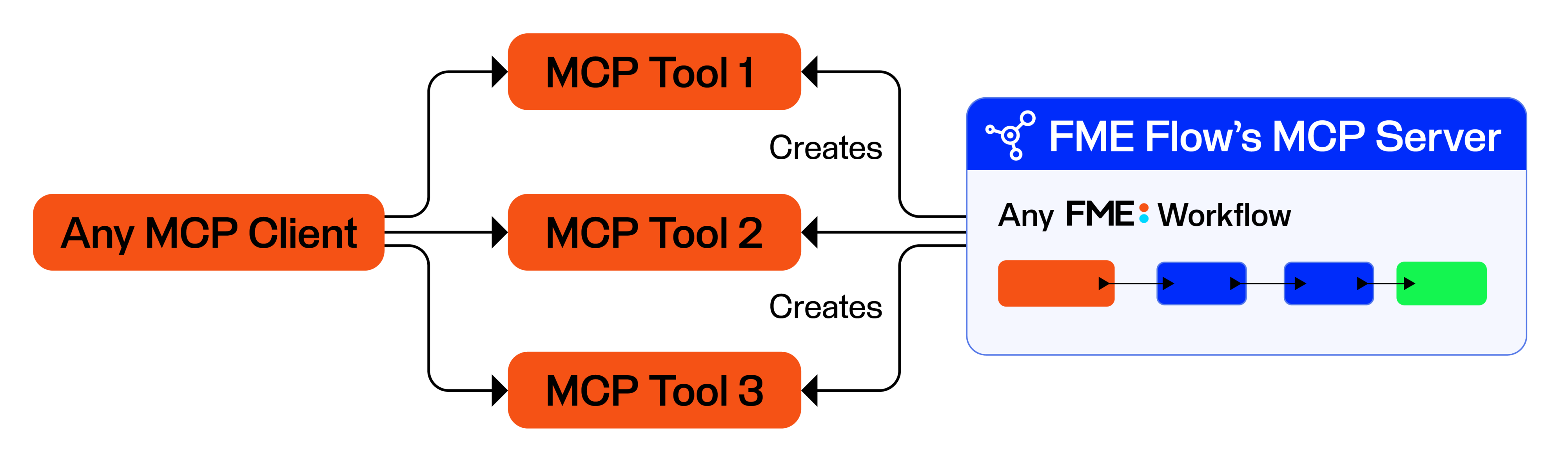
Any existing FME Workspace can become an MCP tool. What the workspace does underneath doesn’t matter—whether it creates, updates, or deletes data, calls external services, or runs transformations and validation logic, it can be invoked as a tool. Exposing a workspace as a tool empowers any MCP-capable client to leverage the full capabilities of FME, including its readers, writers, transformers, and spatial capabilities. In other words, any application that can speak MCP can now do things it never could before via FME, such as complex spatial operations.
Currently, to turn an FME Workspace into an MCP tool, swap or add an MCP writer (which returns results as JSON), publish it to FME Flow, and register it as a tool with its parameters. FME Flow acts as an MCP server, exposing your workspaces as tools and authenticating, governing, and logging every action. For more details on this process, see Turning FME Workspaces into MCP Tools: Connecting ArcGIS to AI.
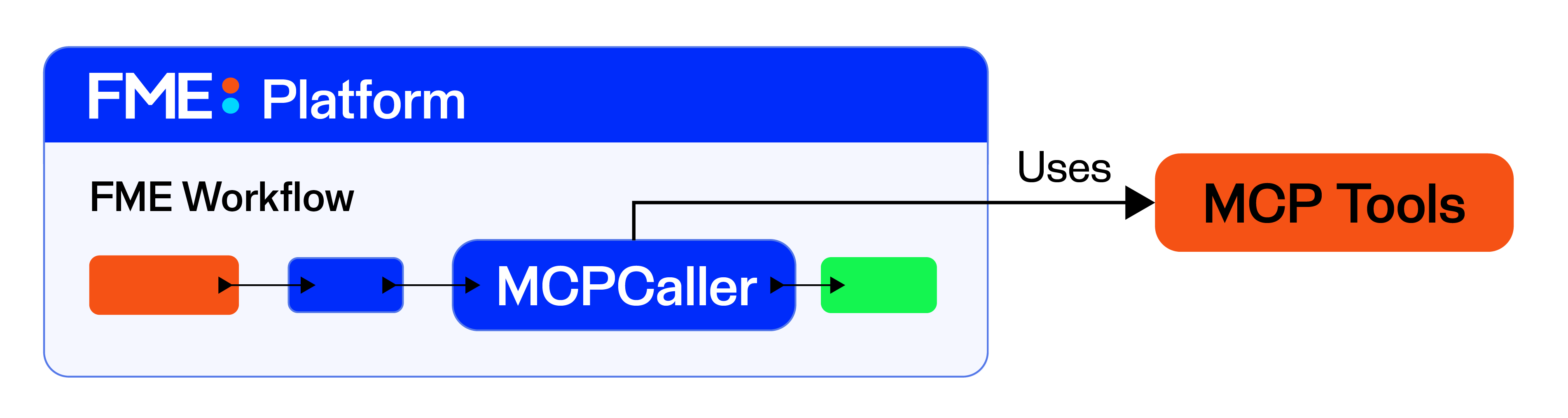
Conversely, the MCPCaller transformer lets an FME workspace consume tools from any MCP server, choosing the tool at authoring time or letting the workspace select tools at runtime. Any system that publishes an MCP interface becomes something FME can reach, which means every MCP-publishing system effectively joins the FME ecosystem.
Keeping everything inside the firewall
The strongest version of this pattern runs entirely on-premises. The AI model, the MCP client, and the MCP server all live inside your network, so no data crosses onto the internet. This is what makes the approach viable for regulated or sensitive data and air-gapped environments: if nothing leaves, compliance is built into the architecture.
A typical local stack pairs an MCP-compatible client such as LM Studio, Goose, or Ollama with an open-weight model you can run yourself, such as Google’s Gemma or Alibaba’s Qwen family, both freely available. The client connects to your FME Flow MCP server using the server’s URL, which FME generates for you when you create the server. Paste that URL into the client’s configuration, and the tools appear, ready to call.
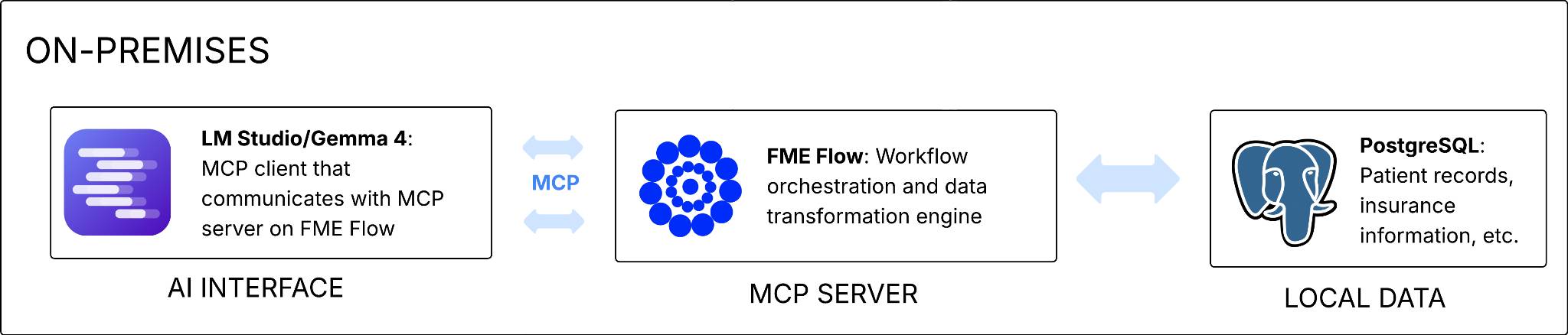
For example, say you want to validate CAD files that sit on a local file share. A natural-language instruction can drive the relevant tool(s) in sequence, with the model breaking the request into steps and calling each workspace in turn. FME runs the validation and returns a structured JSON summary of what passed and failed, which the model can then answer follow-up questions about. The CAD files never leave the network; only the results you chose to return reach the client.
Filtering data at the source (FME as the Data Guardian)
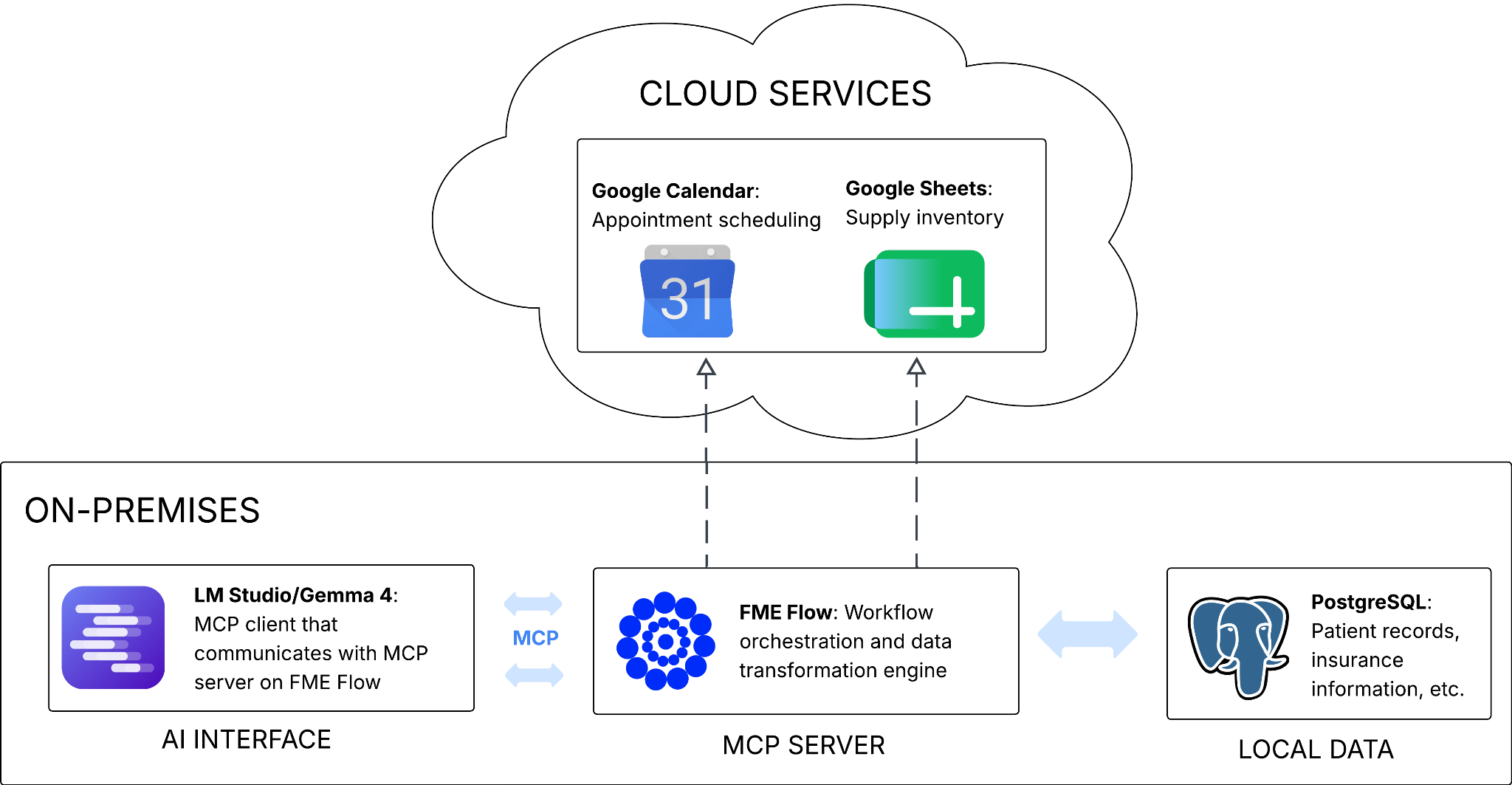
Many real workflows have to connect to the outside world in some way, but the principle still holds: expose only what’s necessary.
For example, consider scheduling appointments at a medical clinic where patient records live in a database mixing sensitive and non-sensitive fields. The workspace can query the database but select only the fields a calendar event needs while leaving sensitive details behind. Or for data that contains precise addresses, you can anonymize the geometry by snapping each point from its precise address to the midpoint of its street block. With FME as the controlled boundary, only specific data and attributes goes out through an API call, and sensitive data never reaches the AI or the cloud service.
- Best-case scenario: never let sensitive data enter the workspace. Use a SQL query that selects only the needed columns, so sensitive fields are eliminated at the point of access. They cannot leak because they were never loaded.
- Next best: remove sensitive attributes mid-workflow. If they have to enter the workspace for processing, strip them (for example, with an attribute-removing transformer) before the results are formatted for the client.
- Last line: expose only chosen attributes at the output. Control what the reader or the MCP Writer sends back, so only the fields you explicitly listed reach the model.
Tips for getting good results in practice
Exposing tools safely is half the job; getting the model to use them well is the other. Here are a few best practices:
- Match the model to the task. Running everything through the most expensive option burns your token budget fast. Frontier models from providers like Anthropic and OpenAI have their place, but capable on-premises models handle many routine tasks well, keeping both cost and data under control.
- Write clear descriptions. The server, tool, and parameter descriptions are what the model reads to decide which tool to call and when. Vague descriptions produce wrong tool calls. Local models in particular cannot lean on the broad reasoning of a large cloud model to infer what you meant. If a model consistently picks the wrong tool, the fix is almost always better documentation, not a different model.
- Craft a system prompt. Leaving it blank means the model works without any sense of the task; tell it what the task is, what inputs to expect, and what outputs you want. If a model still ignores a tool, you can name the tool directly in the prompt, and some clients let you force a specific tool through a command. But the more durable fix is almost always the description: documentation is what lets the model choose correctly on its own.
- Unpublish a tool or stop the server while you are working on it. As long as a tool is published, clients can connect to it, and a half-finished tool is a liability.
- Remember that MCP tools do not replace your existing automation. A tool call can kick off a downstream automation, and automations and workspace apps still have their place. MCP is another way to deploy the workflows you already have, not a reason to throw them away.
Conclusion
AI doesn’t need raw access to your data to be useful with it. By exposing governed tools instead of systems, running the stack on-premises where the data is sensitive, and filtering at the source everywhere else, you keep full control of what any model can see. And because the protocol is open and widely adopted, the integration work you do today keeps working as models change.