
When you run a workspace in FME, what happens between clicking Run and seeing your results has traditionally been a black box. When working with large datasets, chatty APIs, or streams, that wait can become a bottleneck, leaving you staring at a progress indicator and hoping the logic is right, or stopping the run early and starting over from scratch.
Authoring FME Workspaces involves a lot of iteration: build a piece of logic, run it, look at the data, adjust, and run again. That’s how good workspaces are made. Data caching is important for helping you validate that the logic you’ve built actually does what you expect. Previously, those caches were only useful after a translation finished. Now they’re useful while it’s running.
In FME 2026.1, we have improved Data Caching so your data is visible, inspectable, and actionable while the workspace runs.
To see live demos and dive deeper, watch our webinar, Accelerated Authoring: See Data Faster with Improved Data Caching.
3 ways data caching has improved in FME 2026.1
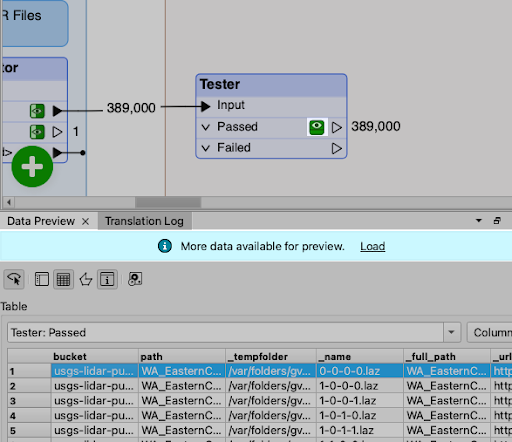
View caches while a workspace is running. Click the cache icon on any output port to open Data Preview against a partially populated cache. Click again to refresh as more features flow through.
Stop without losing progress. Caches built before you stop are now kept. You have two options for how to treat them:
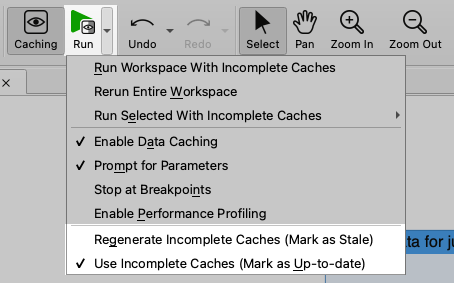
Regenerate Incomplete Caches (the default): refresh the caches on the next run, pulling new or more data.
Use Incomplete Caches: continue authoring downstream against the snapshot you have, without re-running the reader. This enables you to stop deliberately once you’ve read enough, then build and debug against that subset.
Visually, caches turn yellow while they’re being populated and green once committed and stable. Data Caching is enabled by default in 2026.1; if disabled, re-enable it from the Run menu, the toolbar caching icon, or with Ctrl+F5.
Scenario 1: Large datasets
Consider a workspace using an S3 connector to pull LIDAR files from USGS—a source with 12 trillion records, where even narrowing to a single state can take hours. The S3 connector has no feature limits, so you can’t request a sample for development.
With improved data caching, after the first file is listed, you can click the cache icon to see feature attributes in Data Preview. If you stop the translation, the listed files stay in the cache, and you can run downstream transformers as many times as you want against that sample. When you need a bigger sample, mark the cache stale and rerun to extend it.
Scenario 2: APIs and looping
Looping API workflows hide their responses until the translation completes. Consider a workspace that submits a report-generation job to ArcGIS Survey123 and polls the API until the report is ready. The polling sits inside a looping custom transformer that uses an HTTPCaller to repeatedly check the job status.
With improved data caching, you don’t have to add a bunch of Loggers to the workspace and try to glean information from the translation log. Click the cache icon on the HTTPCaller mid-run, and the response body appears directly in Data Preview. Now the translation log can stay focused on what actually belongs in the log.
Scenario 3: Streaming
Streaming workspaces see the biggest improvement. Because a streaming workspace is always running, you previously couldn’t view caches at all.
Consider a workspace reading vehicle position messages from Kafka, with a TimeWindower breaking the stream into 45-second windows and two downstream branches: one that calls a road-conditions API when a vehicle has been idle too long, and one that samples down to a single position per vehicle and writes to Postgres.
What improved Data Caching makes possible mid-stream:
- Inspect the raw stream. Click the cache icon after the connector to see raw JSON messages flowing in from Kafka.
- Verify windowing. Sort the TimeWindower’s cache by window ID, load more data as new windows arrive, and confirm you’re getting a representative cross-section of vehicle types and attributes.
- Catch API issues immediately. Open the HTTPCaller’s rejected port to spot problems like “too many requests” responses from API throttling.
- Verify geometry mid-stream. View features on a base map while the stream runs to confirm the coordinate system is correct.
- Inspect heartbeat features. During a lull, when a heartbeat feature flows through, sort by attribute to see exactly what it looks like. This makes it easy to write a downstream Tester that filters heartbeats out before they reach the database.
Once you have a useful snapshot, you can stop and switch to Use Incomplete Caches and iterate on downstream logic. This creates a real authoring experience for streams, with the same observability batch workflows have always had.
A more efficient authoring experience
Good FME workspaces are built through many small iterations, and anything that lengthens the time between each iteration directly slows the work. By leveraging cached data mid-run, you can see what’s happening before your workspace finishes running. This empowers you to build FME workspaces more efficiently, especially in scenarios such as:
- Large datasets and limit-less connectors: “sample by stopping” instead of building a sampling step just for development.
- Expensive sources (paid APIs, slow databases, cloud reads with egress costs): partial reads during authoring directly reduce costs.
- Looping API workflows: skip the Logger-everywhere pattern; inspect responses via cache instead.
- Streaming: iterative development on a stable snapshot, matching the batch workflow experience.
- New users: see what each transformer is producing as the run happens; faster than reading documentation.
Learn more
FME 2026.1: Updated Data Caching (short video walkthrough)