
Key takeaways:
- The Land Title and Survey Authority of BC processes hundreds of survey plans per month with a small team by automating validation and integration through FME-powered workflows.
- Mandating a standardized digital dataset submission (as DWG files) alongside every survey plan created the foundation for scalable automation.
- Automated topology checks catch geometry errors and auto-correct trivial issues while flagging larger problems back to surveyors.
- The core FME workspaces have run in production for roughly a decade, demonstrating that investing in solid initial design pays off long term.
Manual plan validation doesn’t scale. That’s the reality facing land administration organizations everywhere as digital plan submissions grow in volume, complexity, and variation.
The Land Title and Survey Authority of British Columbia (LTSA) is the regulatory body responsible for land titles, survey systems, and property boundaries across the province. They operate ParcelMap BC, which is the authoritative cadastral fabric for British Columbia. With a small team of GIS analysts, they’ve processed nearly 80,000 survey plans through their digital submission system, hitting monthly peaks of almost 950 plans. Without automation, that volume would be impossible to manage.
Here’s how they did it using automation, and what other organizations facing similar bottlenecks can learn from their approach. For a deep dive into this topic and live demos, watch our webinar.
See also: Digital plan submissions: How to build automated CAD-GIS workflows
Why Manual Review Hits a Ceiling
Traditionally, validating survey plan submissions has meant manual review: checking geometries, confirming attributes, validating naming conventions, and ensuring compliance with submission rules. That works when volumes are low, but as submissions increase and timelines tighten, adding more reviewers just adds cost and complexity.
Before LTSA built ParcelMap BC, individual local governments across the province each maintained their own independent cadastres. Surveyors would submit plans, and someone would manually digitize them, “co-going” line work into a GIS system. Multiple aggregators tried to stitch these independent pockets of cadastral data together into something usable at the provincial level, but the result was fragmented and inconsistent.
LTSA set out to change that with a province-wide, regulated parcel fabric built on quality source data. The key architectural decision: mandate a digital dataset submission from the surveying community alongside every survey plan filed with the Land Title Office.
Enabling Digital Dataset Submission
Every survey plan submitted to LTSA now arrives as two components: a PDF plan filed with the Land Title Office for registration, and a DWG file (the digital dataset submission) delivered to the ParcelMap BC team. That DWG must conform to a precise schema, and a series of automated checks validate it for accuracy, topological consistency, metadata correctness, and more.
This dual-submission model was developed collaboratively with BC’s surveying community. LTSA provided standardized templates so surveyors could work from a consistent structure, and the process was designed to avoid being overly prescriptive. The result has been strong adoption, and surveyors now use the LTSA template as their base across submissions to other government agencies as well.
Because the source data comes directly from surveyors’ own internal CAD files, the quality of incoming data is exceptionally high. LTSA is effectively receiving the surveyor’s authoritative version of their work, which forms a strong foundation for automated processing.
FME as the Automation Backbone
LTSA partnered with Silvacom CS to build the automated pipeline. The solution uses FME as its core engine, with FME Form handling the workflow design and FME Flow managing automation, scheduling, triggers, and API integration in production.
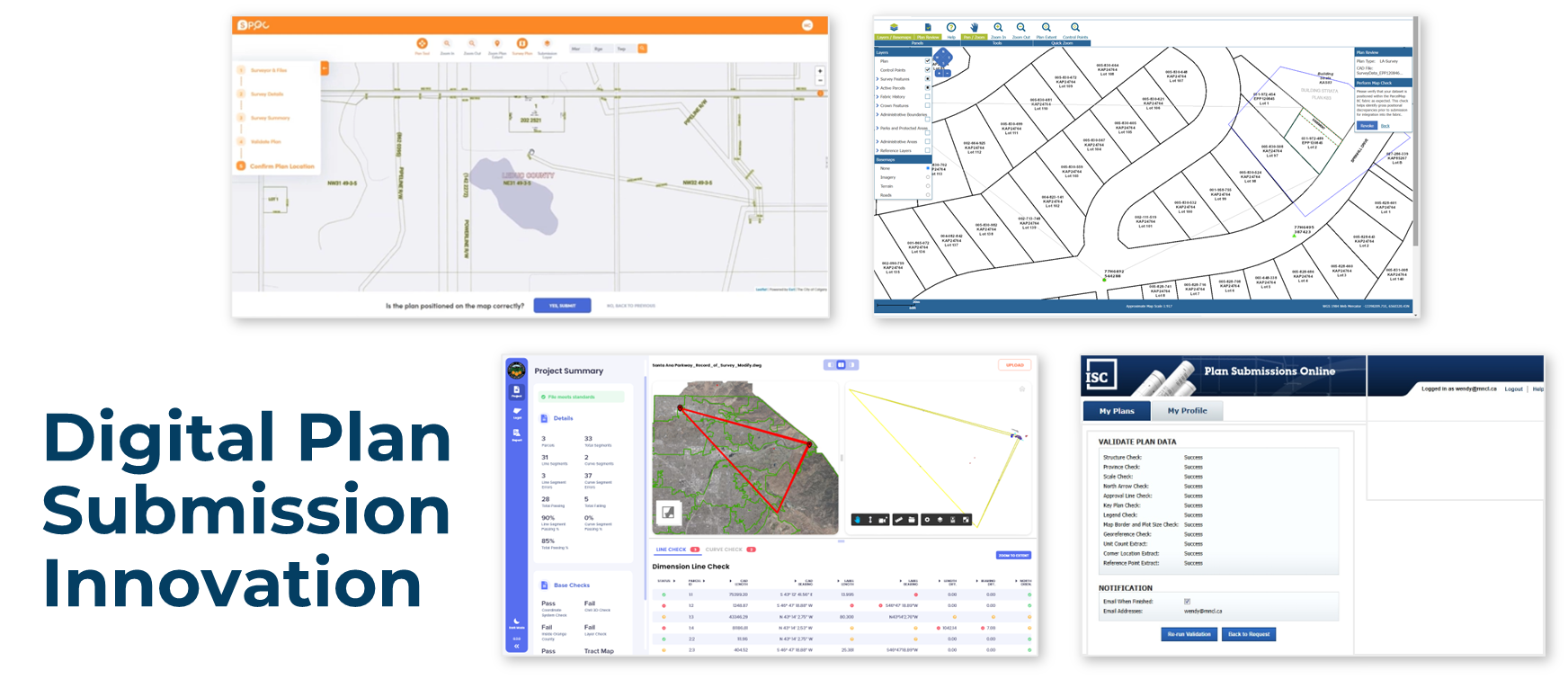
The system works in stages. First, surveyors log into a web portal called Survey Hub, a single interface where they can submit their plan to the Land Title Office along with the accompanying digital dataset. Within that portal, a series of individual FME workspaces run validation checks against the submission: combined scale factor, topological structure, plan number accuracy, and spatial location verification through an integrated map view.
Behind the portal’s clean interface, each of those validation checkboxes represents a distinct FME workspace doing substantive work. Once a submission passes validation, additional FME workspaces stage the dataset into an Esri-native file format, ready for integration into the parcel fabric.
Automated Topology Checks
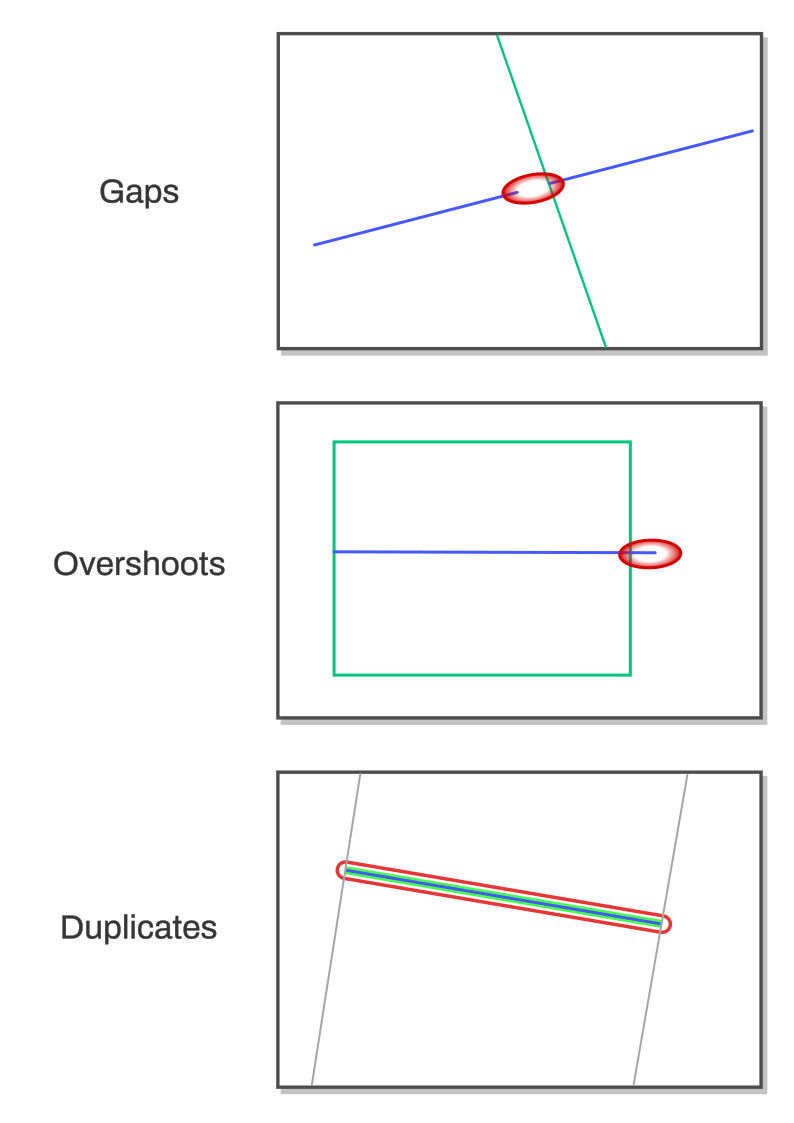
The system’s automated parcel topology check is an FME workspace that ensures submitted CAD files have valid closed polygons, clean line work, and no problematic geometry issues that would cause problems during parcel fabric integration.
The workspace is designed to be flexible across different plan types. It accepts a simple comma-separated text input specifying which CAD layers need validation, since different plan types require different checks. All incoming geometry is first converted to simple lines (e.g. arcs get stroked into line segments, polygons get coerced) so everything can be analyzed consistently. Extremely small lines (less than a hundredth of a centimeter) generated by AutoCAD are filtered out, since they trigger false errors but fall below the spatial resolution of the parcel fabric.
From there, the workspace runs several targeted checks using FME transformers:
- Dangles and gaps: Lines are intersected and split at meeting points, then endpoints within a configurable tolerance are snapped together to auto-correct small drafting errors (like a three-millimeter overshoot from a drafter not having snapping enabled). For remaining issues, the workspace extracts start and end points from each segment and looks for endpoints that don’t overlap with any other — a floating endpoint means an unclosed gap or dangle.
- Unsplit intersecting lines: Lines are broken into individual segments and run through an intersector to find crossing nodes, then checked for whether those nodes correspond to actual endpoints. Where two lines cross without a proper node, the issue gets flagged. The system could fix these automatically, but they represent a structural problem that should go back to the surveyor.
- Duplicate geometry: Center points of line segments are compared across layers, flagging cases where the same geometry appears on multiple layers.
- Self-intersections: FME’s built-in geometry validation detects lines that cross themselves, with error locations extracted and deduplicated before reporting.
All errors flow into an XML output that the front-end portal consumes, displaying error locations on a map so surveyors can visually identify issues before resubmitting. Surveyors can also access the coordinates of error points directly, making it easy to communicate specific problems back to their drafters.
Outcomes: Automation vs. Manual
Automation has enabled LTSA to scale massively: it processed nearly 80,000 plans through this system over roughly ten years. Monthly volumes peak at close to 950 plans, all handled by a team of eight to nine GIS analysts. The turnaround from surveyor submission to registration and map integration currently hovers around a day and a half.
The system has also proven durable. The core FME workspaces built when the system launched have remained largely untouched, just upgraded along the way as needed. That kind of longevity in production code speaks to the quality of the initial design.
LTSA is continuing to push automation further. The current priority is automating what they call “posting plans”, which are surveys that don’t change the on-the-ground location of a parcel boundary but reestablish it with modern survey evidence and XY coordinates. The goal is a fully automated workflow from submission through parcel fabric integration, with no technician intervention required. This project, also being built with Silvacom CS, is expected to go live within the next few months.
Beyond that, LTSA is modernizing their data product delivery pipeline. They currently use FME to package all external content distributed to end users — through the BC data catalog, to local governments, and to surveyors. That packaging system is being rebuilt with updated APIs and delivery mechanisms, again leaning on FME as the processing engine.
Practical Takeaways for Other Organizations
For teams facing similar challenges with plan validation bottlenecks or data submission workflows, several lessons emerge from the LTSA experience.
Design for the problems you have, not every problem you might have. It’s tempting to over-engineer for edge cases and future scenarios, especially when you’re working with an authority that can define standards. Build a system flexible enough to expand when new problems arise, but solve the immediate challenges first. The LTSA system was built to be extensible without requiring a complete rebuild, and that’s exactly what’s happening now as they layer in posting plan automation.
Document your workspaces. FME workspaces can encode complex logic, and future maintainers need to understand what’s happening. Use bookmarks and annotations liberally. Embed ticket numbers from your issue tracking system in workspace annotations. Since FME workspaces are XML-based, source control can pick those references out, making it easier to trace why specific logic was implemented.
Maintain a repository of test data and expected results. Part of what has kept LTSA’s system rock-solid for a decade is the ability to regression-test against known edge cases. Once you solve a problem, preserve the test case so you can verify that future updates don’t reintroduce it.
Minimize the data moving through your workflows. Speed matters in production systems, and the fastest path to performance is reducing what gets processed at each stage. Use attribute removers to clean up data that isn’t needed downstream. Push filtering as close to the data source as possible, and run queries against databases rather than pulling everything into memory. If you’re working with cloud storage, use queryable formats like DuckDB instead of flat CSVs so you can filter at the source rather than incurring the overhead of transferring and parsing entire files.
Invest in change management with your data submitters. LTSA’s success hinged on getting surveyor buy-in. Templates, informational resources explaining the value proposition (faster turnaround times are a compelling incentive), and collaborative standard-setting all contributed to strong adoption. For organizations without regulatory authority to mandate submission standards, consider data mapping interfaces that help submitters align their existing workflows with your requirements. Scan the file on upload, flag discrepancies, and let users map their fields to yours once, with the system remembering their preferences for future submissions.
The Bigger Picture
Data validation is a universal challenge across industries, and manual approaches consistently fail to scale. What LTSA and Silvacom CS demonstrated with ParcelMap BC is that the combination of well-defined standards, automated validation, and a thoughtfully designed submission pipeline can transform a process that would otherwise require an army of reviewers into one that runs reliably with a small team at higher quality and with zero backlog.
The tools to build this kind of system exist today. The harder part is the organizational work: defining standards, partnering with your data submitters, and designing workflows that are robust enough for production but flexible enough to evolve. LTSA’s decade of operational success suggests that getting those foundations right pays dividends for years to come.
See also: City of Henderson automates digital plan submissions with FME