Digital Twin Examples
A digital twin is a virtual representation of a physical system or process that can be synchronized with its physical counterpart through real-time data integration and simulation. With advancements in AI, IoT, and real-time data processing, digital twins are gaining prominence across domains such as manufacturing, urban planning, healthcare, architectural design, product development, and more.
This article explains how digital twins bridge the gap between the digital and physical worlds, provides examples in key domains where they are applicable, and discusses the challenges of implementing them.
Summary of key digital twin concepts
| Concept | Description |
|---|---|
| Digital twins | Digital twins bridge the gap between physical and digital work by creating digital representations of physical processes or systems that can be synchronized with their counterparts. |
| How digital twins work | Digital twins work by creating simulations of the physical world through historical data and integrating data in real time to adjust the state according to the changes in physical equivalents. They also use feedback loops between physical and digital entities. |
| Digital twins in manufacturing | Digital twins can be created for machines, production lines, and entire factory systems using historical data and real-time data captured from IoT sensors. Digital twins in manufacturing help with predictive maintenance, process optimization, quality control, and defect reduction. |
| Digital twins in smart cities and infrastructure | Digital twins can be created for buildings, transportation networks, and entire city systems using real-time data captured from IoT sensors and urban monitoring infrastructure. Digital twins in smart cities help with traffic flow optimization, energy management, water distribution, and urban planning. |
| Digital twins in healthcare | Digital twins can be created for hospital environments, patient physiology, and clinical workflows using real-time data captured from medical sensors and imaging. Digital twins in healthcare help with patient flow optimization, predictive monitoring, surgical planning, and treatment simulation. |
| Digital twins in planning and simulation | Digital twins are frequently used to model products, systems, processes, and physical structures that have yet to be built. They are also used to simulate and optimize functions before building physical counterparts. |
What is a digital twin?
A digital twin is a virtual representation of a physical product, process, or system. Digital twins are generally considered dynamic in nature and have a data feed that connects them to their physical counterparts. This data feed is the communication system used to transmit data between the physical twin and the digital twin, and vice versa. This data is usually collected from sensors of varying types and can include temperature, pressure, light, moisture, motion, and other kinds of information.
It is important to note that digital twins are being increasingly used to model yet-to-be-built systems and products, so an existing physical representation is not always necessary for something to be considered a digital twin. Two-way communication is also not always a factor; sometimes data flows only from a physical entity to the digital twin for review and analysis. There continues to be some contention about the precise definition of a digital twin and how flexible that definition should be.
Components of a digital twin
The components of a digital twin often include:
- A physical entity to model (the “physical twin”)
- Sensors used to monitor the physical twin and transfer data
- A data connection that transmits data between the physical and digital twins
- The digital twin that represents the physical twin
- An interface that allows humans to analyze the digital twin, create predictions, or even transmit data or instructions back to the physical twin
Digital twins come in four general types:
- Component twins, which offer insights into specific parts of a system or process, are granular in scale but are often one part of an asset twin.
- Asset twins represent functional units of two or more components and replicate interactions between these components in real-time.
- System/unit twins are often made up of several asset twins and replicate a larger, integrated system.
- Process twins can be made up of any combination of all of the above or stand alone as a broad view of how systems work together in a supply chain, operational workflow, production facility, or network.
Digital twins are used across multiple industries to improve efficiency, predict outcomes, monitor components, and plan future products and projects.
Differences between models, simulations, digital shadows, and digital twins
While the terms are sometimes used interchangeably, models, simulations, digital shadows, digital reconstructions, and digital twins are distinct. That said, they sometimes have overlapping definitions or can essentially function as one another. For example, some digital twins can run simulations.
Models
Models, both 2D and 3D, are representations of a physical entity. They are static and represent said entity at a specific point in time. Unlike digital twins, models do not change to reflect changes with their physical counterparts and cannot predict or assess outcomes. However, models often make up part of a simulation or even a digital twin. Examples of models include orthophotos or orthomosaics, 3D point clouds, digital elevation models, and CAD models.
Simulations
Simulations are static representations of an entity and do not generally transmit their results to a physical system. Simulations exist in isolation, unconnected to a physical counterpart. Unlike models, simulations can assess and predict outcomes based on user inputs but lack the two-way connection of a digital twin. Digital twins are often used to run simulations.
Digital shadows
A digital shadow is a virtual representation of a physical entity that stays up to date with its current state. It collects data from the physical entity and can be used to monitor and assess it. Digital shadows are also used to restore physical entities to a specific state as a sort of “backup” in case of disruption or data loss.
The shifting definition of “digital twin”
The definition is still evolving as technology advances. There is also a lot of confusion about what a digital twin is, what can be considered a digital twin, and what constitutes a model or simulation. For example, many digital reconstructions (which are not dynamic and therefore don’t actively ingest data from a physical twin) are referred to as digital twins. While data does not always need to flow both ways, it is generally accepted that some form of active data transfer must be occurring for a virtual representation to be considered a digital twin, even if the data is not coming from a physical twin (e.g., for planning).
How digital twins work
Historical data for creating simulations
Existing data can be uploaded to a digital twin to help inform simulations that can assess and model outcomes based on user input. For example, past data on assembly line malfunctions can help a digital twin predict which failures are likely to occur and when, allowing a potential issue to be addressed before it becomes a real one.
Real-time data for real-time view
Digital twins ingest data in real-time from their physical counterparts. This provides users with information about what a system is currently doing and allows preemptive action when something goes wrong or for quick improvements.
Monitoring and state predictions
Digital twins are often used for monitoring their physical twins in real-time, but can also be used to predict how the physical twin will behave in the future. Knowledge of this type allows for future plans and changes to be assessed and analyzed before being implemented.
Feedback loops
Digital twins can be built to communicate with the physical twins they represent, enabling bidirectional data streams that allow a user to send instructions from a digital twin to its physical counterpart to address an issue or make a change
Digital twins across industries
Digital twins are being increasingly used across multiple industries and are expanding into additional industries as well. What began as a NASA project to monitor the Apollo 13 rescue missions in the 1960s has evolved to become commonplace in manufacturing and product development and is becoming more widely used in urban planning, agriculture, telecommunications, and healthcare.
Manufacturing
Digital twins are most prominently used in industrial manufacturing to monitor production lines, improve efficiency by detecting malfunctions early, send instructions to machinery, and plan new facilities. Digital twins are also used for predictive maintenance to help ensure that machinery does not experience gaps in function or productivity. An example of a digital twin in manufacturing is BMW’s iFactory set up in which all production sites have been virtualized using 3D scans and data from more than 100 applications integrated.
Smart cities and infrastructure
Digital twins are increasingly used in urban planning, especially for smart city infrastructure. They are used to plan (and monitor) traffic flow optimization, energy use and management, and water use and management. This is done using numerous sensors placed throughout a city, including drones, mounted cameras, LiDAR, thermal imaging, multispectral, and water flow and level sensors, among others.
This data is used to create real-time representations of a city for assessment and analysis, helping improve safety and efficiency. Digital twins are also used to model city functions before a city is even built, or to simulate adding smart city infrastructure into an existing city.
Virtual Singapore is an example of a digital twin of a country that involves a highly detailed 3D representation of the entire nation. The platform provides accurate real-time data to model scenarios in urban areas and test sustainable development strategies.
Hospitals and healthcare
Healthcare and hospital operations are increasingly using digital twins to improve patient outcomes. While initially used for equipment prognostics, digital twins are now also being used for a more data-driven approach to patient health. A digital twin of a patient can be created from biometric scanning/monitoring and their medical history to create a “virtual patient” to help create a personalized healthcare plan for that patient. Then, this twin can be compared with an aggregated model of other patient data to better understand where that patient falls on health, well-being, and treatment effectiveness. This is culminating in AI-driven patient monitoring systems where predictive diagnostics using multimodal data is the goal.
An example of digital twins in healthcare is the Mater Hospital in Dublin, which created a twin for workflow simulation to optimize clinical operations.
Agriculture
Digital twins can be used in agriculture to help farmers and agronomists understand and manage their land. 3D replicas of farmland, incorporating data from soil sensors, weather stations, satellite imagery, and IoT-connected machinery, can help farmers to simulate conditions and predict outcomes. For example, one can model the impact of a particular irrigation schedule on crop yields across different soil zones. Agricultural digital twins enable a proactive data-driven approach to farming rather than reacting to problems.
Bayer’s field view digital twin and its efforts to model corn plants digitally are a famous example of digital twins in agriculture.
Challenges while implementing digital twins
Systems and processes in the real world are complex, and physical products and infrastructure are affected by many different external factors, so perfect models are difficult, if not impossible, to create.
Modeling and simulation complexity
Digital twins are complex, dynamic models that include spatial data interacting with numerous other types of data. Working with large-scale spatial data to model and simulate physical entities in real time poses challenges. Simulations can’t account for every variable affecting a product, process, or system, so it is important to understand which variables are the most important to simulate and to do so as accurately as possible.
Working with spatial data
One of the most persistent challenges in constructing digital twins is aligning 3D models with the real-world coordinates. Building information models (BIMs) are created in local coordinate systems, while operational data, such as sensor data, uses geographic coordinate systems, such as WGS84. This can cause misalignment and make models appear meters or even hundreds of meters from their actual location in a digital twin.
A digital twin could require several data types, totaling hundreds of gigabytes or even terabytes. The sources of this data can include point clouds and orthomosaics from LiDAR scans or photogrammetry, vector/raster data from GIS sources, CAD drawings, and time series data, all of which can vary in size and file format.
FME excels at addressing such complexities. FME has hundreds of format readers and writers that can address almost any data type needed to build a digital twin. These readers/writers can handle almost any spatial data format and allow data to be transformed, reprojected, restructured, and validated in a single workflow.
Shown below is an example of a data transformation process that was implemented using FME. The use case involves building a digital twin of an asbestos mine. The system ingests data collected from aircraft, drones, and satellites with site information. It also integrates documentation, photos, video inspections, photogrammetric and laser scanner surveys, as well as vector and raster datasets. It uses QField, a professional fieldwork app, to collect spatial data. This data is then integrated using FME and transformed into structural information.
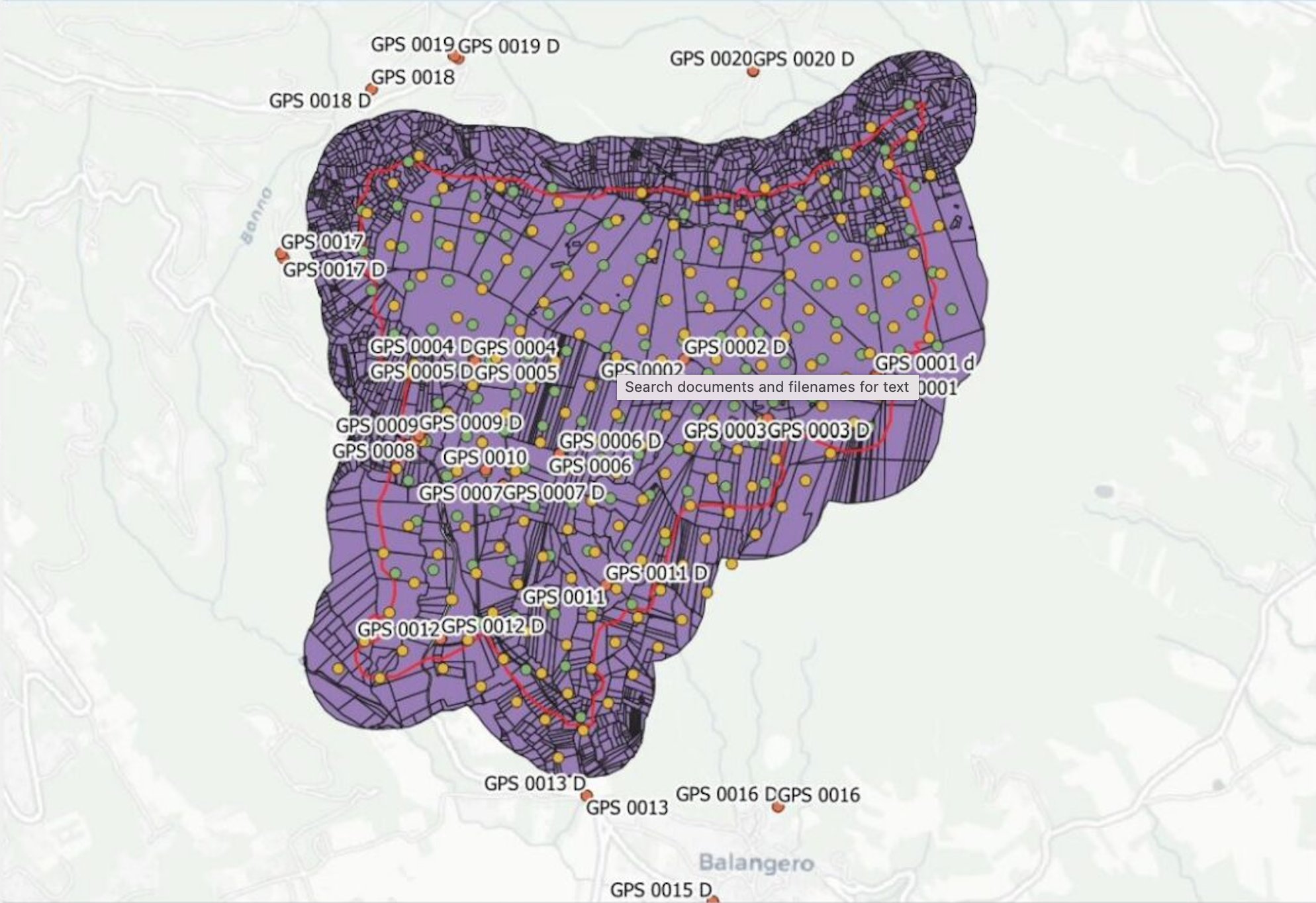
A detailed case study of this can be found here.
Real-time data integration
While receiving and translating a continuous or near-continuous stream of real-time data is important for building a digital twin, so is maintaining data quality, transformation logic, and spatial context at scale.
FME Flow’s automation framework has several real-time data capabilities, including directory watches, webhooks, and scheduled workflows to monitor REST APIs for new sensor readings, trigger workflows when sensor data arrives that detect changes, and maintain data lineage and quality.
Scaling from pilot to production
Building a digital twin can be a massive undertaking, depending on the complexity and scale of the model. Often, it is conducive to build a digital twin pilot, replicating a single asset or system, before attempting to build a fully dynamic virtual version of a process. When it is time to scale to a production model, FME can provide the tools to go from simulating a single part of a process to simulating an entire warehouse of processes. Reliability, scalability, maintainability, governance, and automation are all aspects of infrastructure to keep in mind as digital twins of production-grade systems are being built.
FME Flow provides production-grade architecture that allows job scheduling and orchestration, REST API access, monitoring and notifications, version control integration, and role-based access control.
Digital Twins With FME
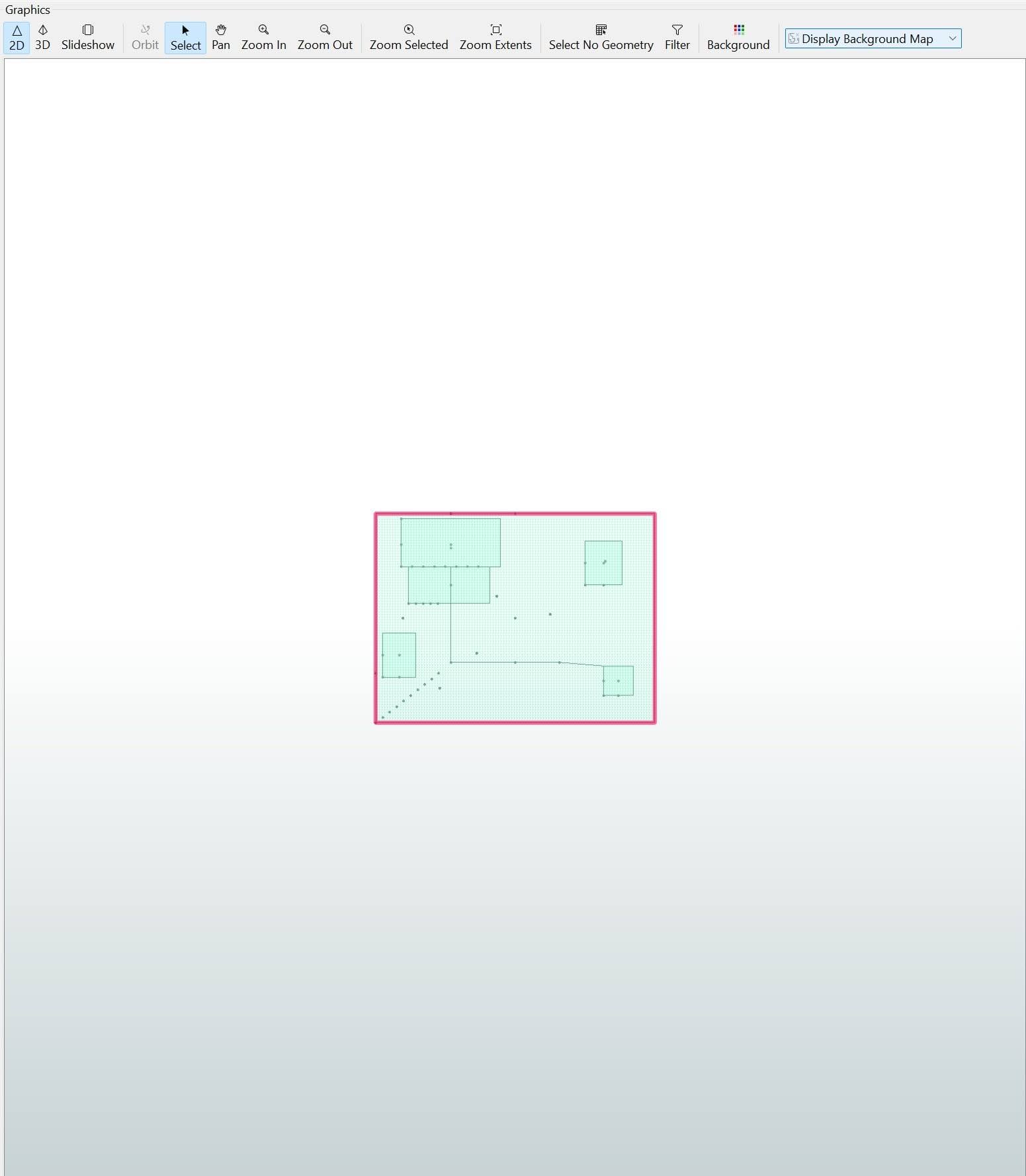
FME has been used as a platform for building digital twins, especially as a bridge between real-time data, existing models and systems, and automation. Below is a sample workflow of a digital twin of a garden that is equipped with IoT sensors, including rain gauges and soil moisture sensors.
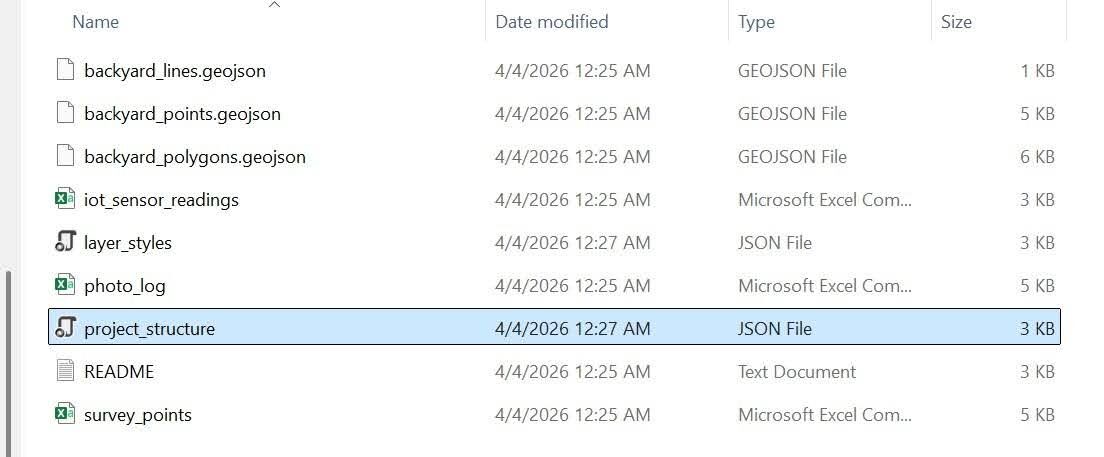
The data collected from the garden includes data from the sensors (“iot_sensor_readings.csv”), the garden’s shape with structures, garden beds, and patios (“backyard_polygons.geojson”), trees and sensors (“backyard_points.geojson”), garden paths (“backyard_lines.geojson”), mini point cloud simulation (“survey_points.csv”), and a multimedia log that includes photo, video, and audio data (“photo_log.csv”).
The “project_structure.json” file outlines the layers present in the project, which would assist with reading the data in a more complex workflow or one connected to QGIS, and the “layer_styles.json” file defines the vector symbology of the digital twin as it would be brought in from another platform, for example, from QGIS.
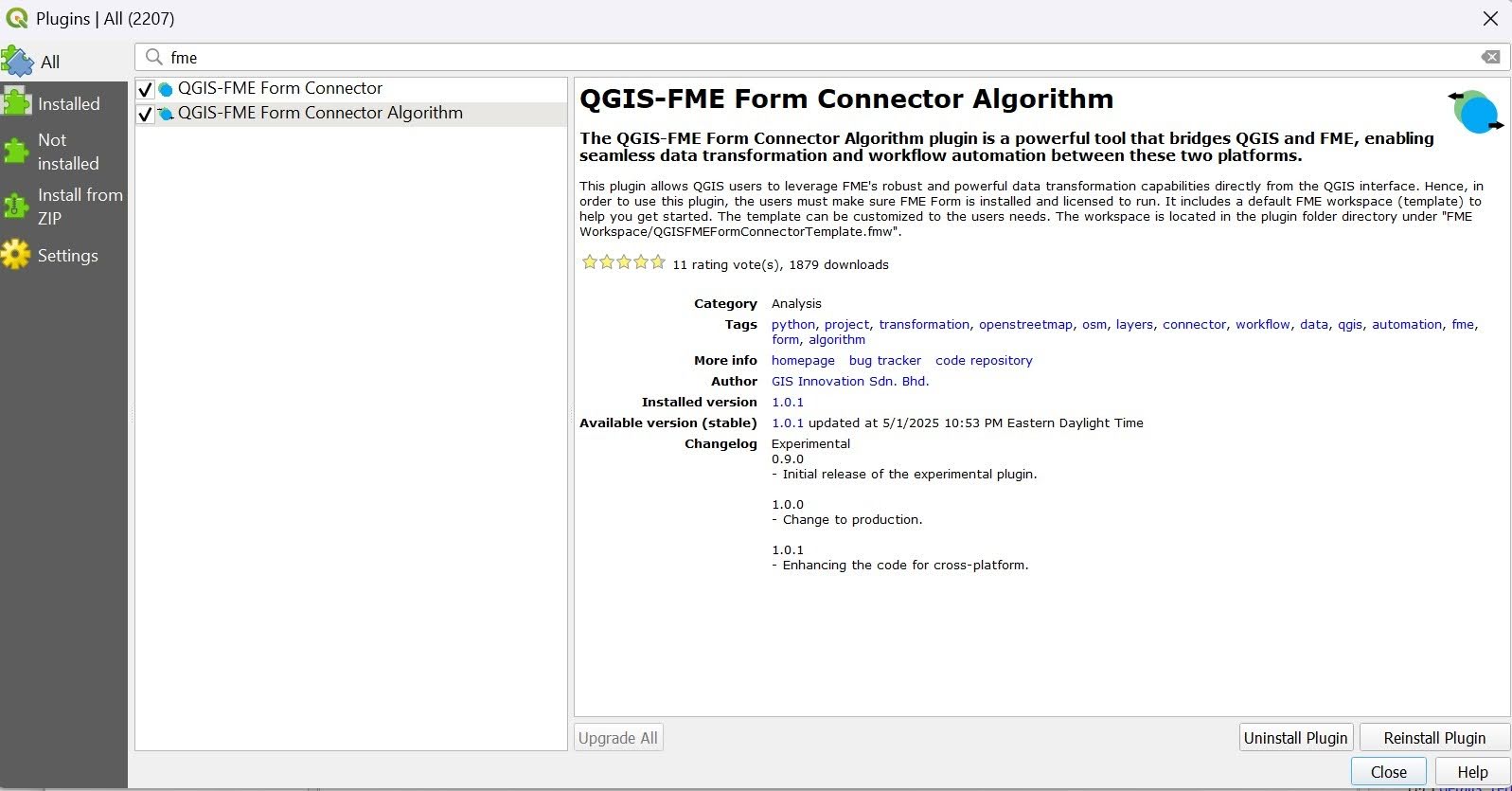
QGIS-FME Plugin for using QGIS file types in FME and automatically creating pipelines
Data can be ingested directly from many different sources, but may need an associated plugin installed to be done correctly. For example, if bringing in data from QGIS, it is imperative to install the QGIS-FME Form Connector or the QGIS-FME Form Connector Algorithm plugin (or both).
Assuming that we have our files ready and will be uploading them directly into FME, the steps to create the garden digital twin are outlined below.
- Use the appropriate reader for each data file you want included in the digital twin. See the far left side of the completed workflow.
- Click Reader on the top toolbar. In the Add Reader dialog, for Format type GeoJSON. Then select a GeoJSON file for the Dataset. For each format, different parameters or a coordinate system can be set. Workflow Options is set to default to Individual Feature Types, so the schema isn’t flattened, and each feature can be mapped individually. Click OK to add the reader.
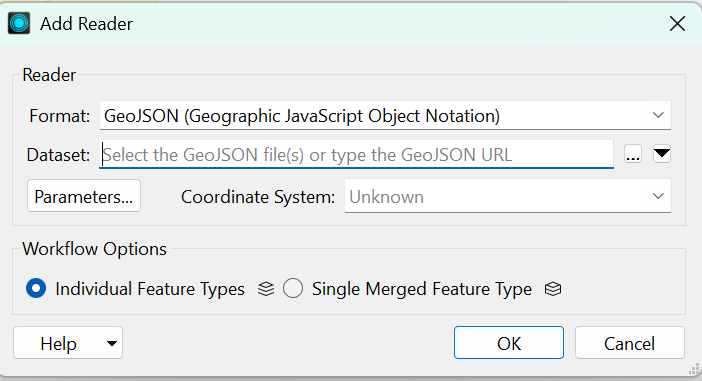
- Repeat for each reader that needs to be added to the workspace. One reader per dataset. The other format needed is a CSV (Comma Separated Value). To view all available formats, click the Format drop-down arrow and click More Formats. A dialog of all the available formats will appear. If a format is greyed out, hover over it to view its requirements.
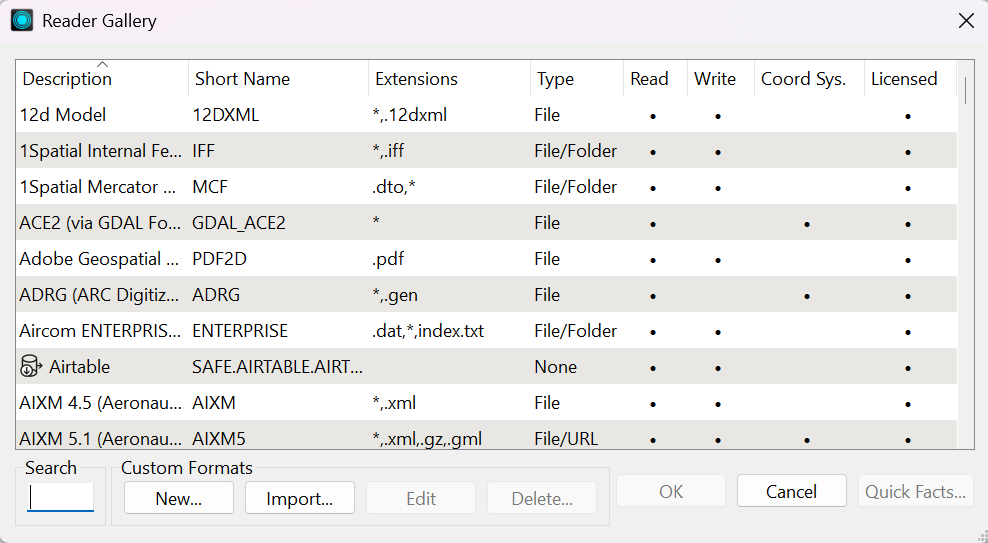
- The above steps are the same to add a writer.
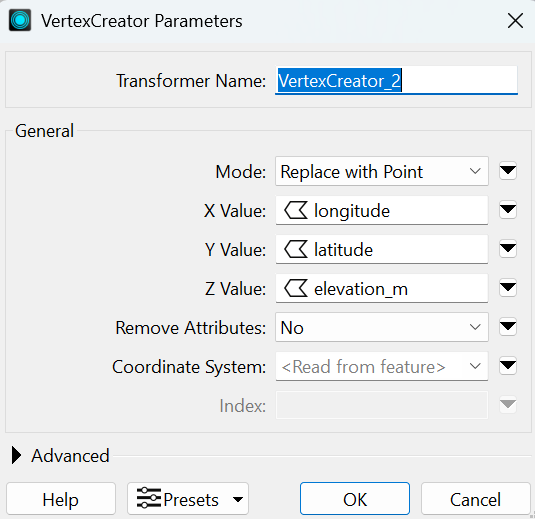
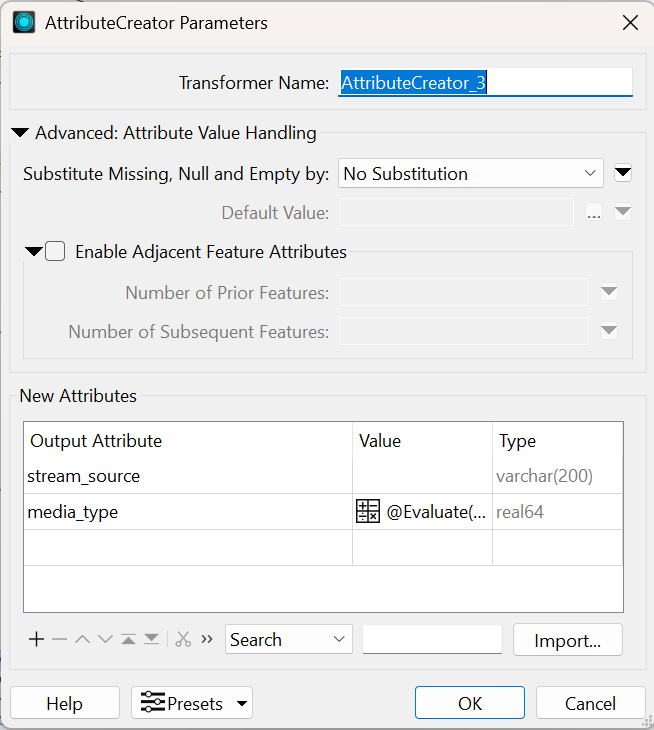
- In this example, to display the points coordinates in the CSV files, they need to be created using a VertexCreator transformer. Then an AttributeCreator transformer will be used to create additional attributes to attach to each point feature.
- To add a transformer, click Transformer in the top menu, or type the transformer’s name directly on the canvas to open the quick add menu.
- Add a VertexCreator for each CSV reader or other readers that have point data needed for the digital twin. Be sure to set the applicable X, Y, and Z values, along with other parameters.
- Add an AttributeCreator to take in the output of each VertexCreator. Add the attribute(s) to be output and their corresponding values.
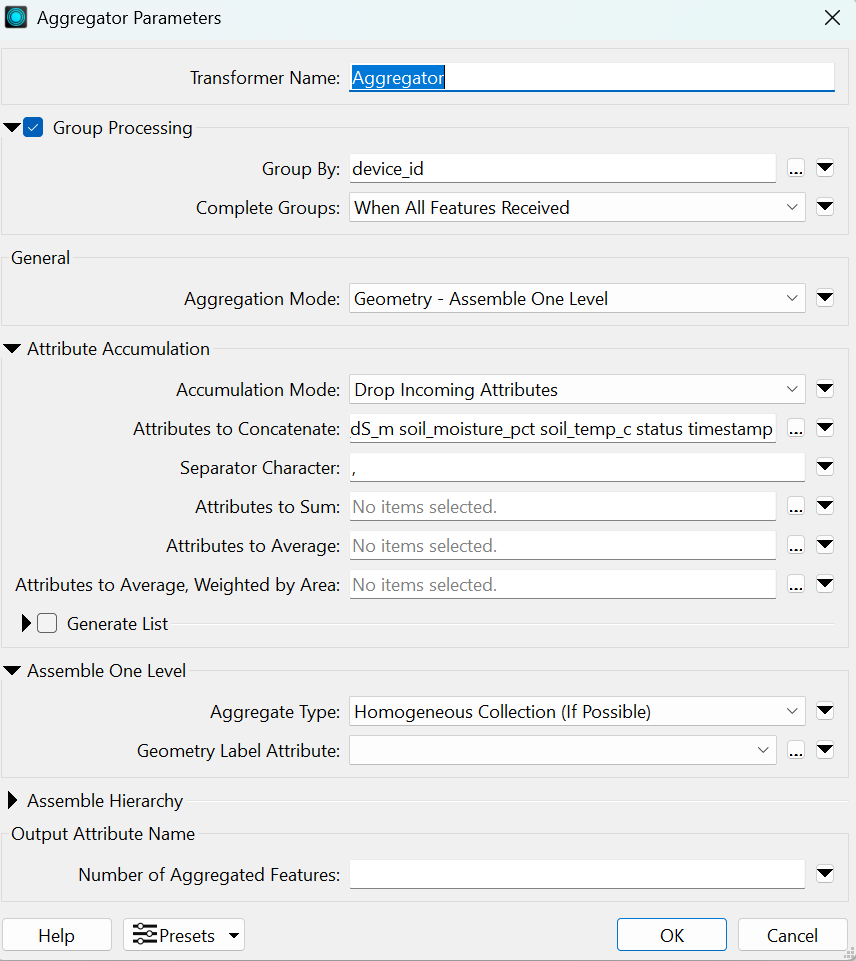
- If needed, as with the iot_sensor_readings CSV reader, add an Aggregator transformer that collapses multiple data rows into fewer, more easily readable features. In this case, 20 total sensor readings from two devices were simplified into two features (one for each device) with timestamped readings.
- The backyard lines, points, and polygons are reprojected from EPSG:4326 to EPSG:32617 using a Reprojector transformer. They are reprojected for the GeometryValidator transformer (which is programmed to ensure the geometries are uniform, make sense, and to handle any missing values), then reprojected back to EPSG:4326 for the GeoJSON Projection.
Creating a Simple Digital Twin in FME
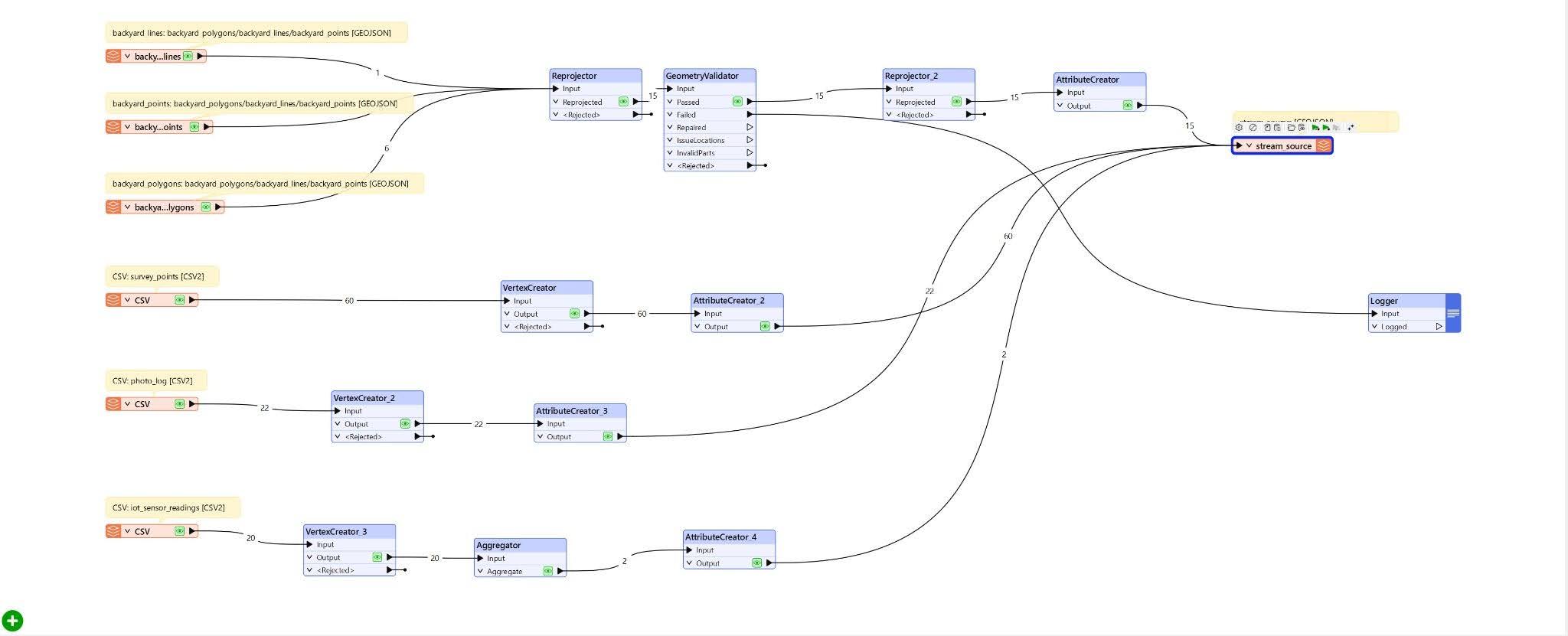
- The last parts of the workflow are a GeoJSON writer and a Logger transformer. The endpoints of each stream flow into the GeoJSON writer, which creates a digital representation of the garden and provides a UI that lets a user view the data associated with the physical garden.
- The Logger can be used to log and read the fail (and pass) states of any of the transformers or just for the end of each stream.
Recommendations
When considering building a digital twin in manufacturing, urban planning, healthcare, or any other field, it is important to keep a few best practices in mind to ensure that the digital twins, and other aspects of the project run smoothly and result in improved efficiency and better planning.
Establish ROI metrics in the beginning
Consider which metrics are important for the project. These metrics can vary greatly across industries as well as between products, systems, processes, and scales. Also consider how many systems are involved, how many digital twins you will need, and which systems need to share information with each other and with the digital twins. Think about how the desired metrics will be measured and streamed to the digital twins.
Design based on streaming, real-time architecture
Keep in mind that digital twins are dynamic and require a continuous stream of data from the entity they represent. As the digital twin architecture is being conceptualized, consider how data will be transferred and by what means; build a “digital thread” between all systems, departments, and devices that must communicate with the digital twin.
Choose the right storage architecture for different kinds of data types
Different data types are often required to make a good, dynamic digital twin. A storage architecture that can handle various kinds of data is essential. FME offers the flexibility and functionality required to ingest, store, and transmit various kinds of data essential to a digital twin.
Design with LLM and agentic integration in mind.
The advent of more advanced LLMs and agentic AI has led to more frequent and easier AI integration with digital twins. While AI integration is not necessary to create a digital twin, it can be very helpful for creating simulations, predictions, and forecasts. Constructing a digital twin with AI in mind from the start can make it easier to integrate UI/UX, automation, and other features down the line. FME provides multiple tools that make it easier to integrate agentic AI, LLMs, and other AI features.
Choose the right frameworks
A real-time data integration framework with spatial computing capabilities is critical. Because many different kinds of data from multiple devices, in different formats, are often required to build a digital model, it is important to choose a framework that can handle all the data involved. The fact that most, if not all, of the data collected is transmitted in real-time and has spatial components must also be kept in mind.
A suitable framework must be used to organize and centralize all the data and platforms that make up a digital twin. FME is one such framework that can not only support multiple data types but also integrate multiple platforms into a single system that supports a digital twin.
Conclusion
Digital twins allow products, systems, and processes to be built, monitored, and assessed virtually. They also aid in planning and prediction, reducing costs and resource waste while improving efficiency. Multiple technologies come together, including AI, GIS, IoT, UI/UX, and others, to help create digital twins that represent entities in real time and pave the way for a more effective, efficient future across multiple industries.
Continue reading this series
Spatial Computing
Learn the basics of spatial computing and its benefits, key applications, and practical examples for processing spatial data using low-code frameworks like FME and traditional GIS software.
KML To GeoJSON
Learn about converting KML to GeoJSON files, including methods, best practices, and key differences between the two spatial file formats.
Geospatial Data Integration: Best Practices
Learn about the importance of seamless integration of diverse geospatial data sources and the challenges, best practices, and workflows involved in achieving accurate mapping and analyses for decision-making.
Shapefile To GeoJSON: Best Practices
Learn three proven methods to convert shapefiles to GeoJSON for modern web mapping applications.
Digital Twin Examples
Learn how digital twin examples are reshaping manufacturing, cities, hospitals, and farms with real-time data.
Augmented Reality Databases
Learn the key database types, data requirements, and best practices for building production-ready augmented reality systems.
MCP Server Geospatial: Tutorial & Implementation
Learn how a geospatial MCP server connects AI agents to spatial tools reliably and at scale.
Spatial Data
Learn how spatial data models, formats, and no-code automation tools simplify complex integration workflows.
What is Geospatial Data
Learn geospatial data fundamentals, real-world use cases, pipeline implementation steps, and best practices using FME.
Digital Twins in Manufacturing
Learn what digital twins are, their manufacturing use cases, and how to tackle data integration challenges while digital twins effectively.
Digital Twins in Urban Planning
Learn how digital twins in urban planning enable real-time monitoring, scenario simulation, and smarter infrastructure decisions.
GeoPandas
Learn how GeoPandas loads, validates, and joins vector data in a complete point-in-polygon workflow.
Geographic Data
Learn what geographic data is, how it works, and best practices for managing spatial data workflows.
Visual Spatial Intelligence
Learn how production systems combine spatial data and geometry to answer real-world measurement questions reliably today.