Model Context Protocol Use Cases
As AI agents move from simple chat interfaces to components of real business workflows, they increasingly need more than reasoning ability. They need reliable access to tools, data sources, and external systems to build and retrieve context, take actions, and complete tasks across an organization’s existing software environment.
Traditionally, giving agents this access has required custom integrations for every API, database, or application. Each new system brings its own connector, authentication flow, error handling, permissions, and schema mapping. For teams building agentic workflows across multiple systems, this creates a growing maintenance burden and slows down deployment.
The Model Context Protocol (MCP) created by Anthropic approaches this issue the same way USB-C approaches device connectivity: one simple standardized interface that works across tools and data sources instead of a different connector for every system. Rather than wiring each integration manually, MCP gives AI applications a unified way to connect agents with the external context and capabilities they need.
Its characteristics make MCP especially useful for agentic AI use cases such as analytics, automation, document workflows, and cross-platform orchestration. This article covers what MCP is, its key use cases, and the best practices to keep in mind when deploying it in a production environment.
Note: While MCP was created by Anthropic for the purpose of enabling AI to interact with tools it is actually a general purpose integration protocol enabling any applications that support the MCP protocol to share both data and functionality via tools.
Summary of key Model Context Protocol concepts
| Concept | Description |
|---|---|
| What is the Model Context Protocol? | MCP is an open-source protocol that standardizes how agentic AI applications connect to external data sources, tools, AI models, applications including development environments using a client-host architecture. |
| Development and data access | MCP can power virtually any integration scenarios. It reduces context friction in development workflows and enables secure RAG-enhanced enterprise data retrieval. |
| Agentic and cross-platform workflows | MCP orchestrates complex, multi-step agentic pipelines across multiple tools, automates cross-platform data workflows using tools like FME (you can learn about it more here), and exposes existing tools and workflows as AI-ready capabilities. |
| Browser automation | MCP supports compliant browser automation with built-in policy enforcement. |
| Security and access | MCP production deployments should enforce path whitelisting and sandboxing, as well as separation of read-only and write(create, update, delete) operations. Teams should validate all tool inputs with strict schema libraries such as Zod or Pydantic, implement egress filtering and network isolation, and adopt OAuth 2.1 with PKCE and progressive least privilege for authentication. |
| Oversight and orchestration | MCP deployments should require human-in-the-loop approval for high-impact actions. Orchestration platforms like FME can further help manage multi-server workflows through centralized governance with minimal custom code. |
What is the Model Context Protocol?
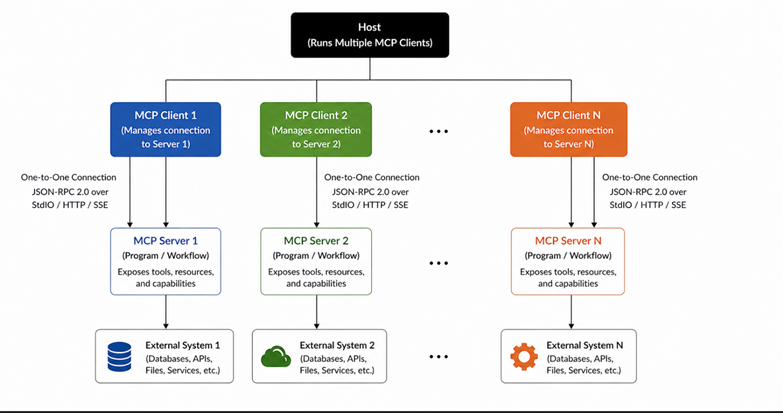
The Model Context Protocol (MCP) is an open-source standard introduced by Anthropic in November 2024 and now is managed under the Linux Foundation. In the context of agentic AI, MCP provides a standardized way for AI agents and agentic applications to connect with external data sources, tools, APIs, and services through a structured client-server architecture built on JSON-RPC 2.0.
MCP is important because AI agents are not limited to generating responses, but are used tocomplete real-world tasks. As such, they often need to retrieve context, inspect files, query databases, call APIs, trigger workflows, and interact with enterprise systems. Without a common interface, every new tool or data source requires a custom integration, which increases complexity and makes agentic systems harder to scale.
MCP was initially developed to help LLM-based systems interact with external environments, but it is not limited to LLMs or AI. It is a model-agnostic protocol that can be adopted by any application or agent framework that needs standardized access to external capabilities or wants to publish standardized access for other applications. This makes it especially useful in domains such as data integration, workflow automation, analytics, and enterprise orchestration, where consistency, interoperability, and governance are critical. Today, LLM’s are becoming a commodity, context is king and context depends on connected data and systems that LLM’s can then leverage.
MCP helps replace fragmented, one-off API integrations with a single reusable interface. This is why it can bedescribed as the “USB-C port for applications.” Instead of building a separate connector for every system, developers can use MCP to standardize how agents discover, access, and interact with tools, data, and workflows. This unlocks a wide range of use cases across industries, particularly for teams building multi-tool and multi-step agentic workflows.
MCP operates on a client-host-server architecture. The client, such as Claude Desktop, Visual Studio Code, or another agentic application, runs multiple client instances, with each client maintaining a dedicated one-to-one connection to one or more MCP servers. Each server exposes specific tools, data, workflows, or external systemsto the agent. Because these servers communicate through the same JSON-RPC 2.0 interface, the host can access different capabilities in a consistent way without requiring service-specific integration logic for every tool.
Model Context Protocol use cases
The flexibility of MCP as a model-agnostic integration protocol enables it to power a wide range of real-world applications across development, enterprise systems, and automation. The table below summarizes some of the most important use cases of MCP, which are explored in more detail in the subsections that follow.
| Use case | Description |
|---|---|
| Local development workflows | MCP filesystem servers give other MCP clients, like LLMs, direct, controlled access to project files for reading, editing, and running tests, replacing manual copy-paste and reducing token usage and time wasted. |
| Enterprise data retrieval and retrieval-augmented generation (RAG) | MCP connectors enable LLM assistants to securely query live enterprise systems (including databases, APIs, CRM systems, ERP etc) |
| Complex agentic workflows | Multiple MCP servers are chained through an orchestrating application to perform multi-step, cross-domain tasks, like translating a Figma design into code files. |
| Cross-platform workflow orchestration and data integration | In spatial computing and GIS workflows, platforms like FME can use MCP to expose governed data integration workflows as AI-ready tools. For example, an FME workflow connected to ArcGIS or other geospatial Data systems could be deployed in FME Flow and exposed through FME Flow’s MCP Server capabilities. This would allow an AI agent to trigger approved geospatial workflows, such as querying, transforming, or updating spatial data, through a controlled interface while keeping the underlying systems secure and governed. |
| Compliant browser automation and web data collection | MCP browser servers (e.g., Playwright or Puppeteer) perform automated, policy-compliant web workflow automation and data collection with domain allowlists, robots.txt enforcement, and session isolation. |
| Exposing existing tools and workflows | Existing data workflows and pipelines can be wrapped and published as governed MCP tools, letting LLM assistants, agents, and other MCP clients discover and call them through a standard interface without rewriting any underlying logic. |
Local development workflows
The problem: The constant problem that developers face while working with LLMs is context friction. To get the AI to understand, developers are left to manually feed the codebase by copying and pasting the file contents, directory trees, and error logs into a chat interface. This process is time-consuming, often error-prone, and disrupts the natural development workflow.
The MCP solution: An MCP filesystem server eliminates this friction by running locally and exposing standardized tools [like read_file(path, write_file(path, content), list_directory(path), and tree(path)] that allow compatible clients, such as IDEs like Visual Studio Code or AI assistants like Claude Desktop, to interact directly with the development environment.
Example config (Claude Desktop, macOS):
from mcp.server.fastmcp import FastMCP
import os
mcp = FastMCP("filesystem")
ALLOWED_PATH = "/Users/yourname/projects/myapp"
@mcp.tool()
def read_file(path: str) -> str:
"""Read the contents of a file within the allowed directory."""
with open(os.path.join(ALLOWED_PATH, path), "r") as f:
return f.read()
@mcp.tool()
def write_file(path: str, content: str) -> str:
"""Write content to a file within the allowed directory."""
with open(os.path.join(ALLOWED_PATH, path), "w") as f:
f.write(content)
return f"Written to {path}"
@mcp.tool()
def list_directory(path: str = "") -> list:
"""List files and folders inside the allowed directory."""
return os.listdir(os.path.join(ALLOWED_PATH, path))
if __name__ == "__main__":
mcp.run(transport="stdio")Instead of sending entire files into a chat, the client makes precise tool calls (e.g., fetching specific lines or listing directories). This targeted approach replaces inefficient copy-paste workflows, significantly reduces token usage, and keeps interactions fast, accurate, and contextually relevant.
Note that the same filesystem MCP server can be consumed by any MCP-compatible tool. A CI/CD system could use it to inspect and build artifacts. A documentation tool could traverse the project structure to generate changelogs. The AI use case is the entry point, but the protocol’s value extends well beyond it.
Enterprise data retrieval and RAG-enhanced querying
The problem: Accessing live enterprise data still remains a big challenge because business analysts and BI engineers spend a major amount of time writing ad hoc SQL queries for questions that could otherwise be answered conversationally. Whether it’s LLMs or traditional apps, unsecured database access risks SQL injection, unauthorized changes, credential exposure, and PII leaks.
The MCP solution: An MCP database server acts as a secure middleware layer between the application and the database. However, MCP doesn’t inherently secure database access on its own; it requires a well-engineered server to guarantee the security. The server can then be explicitly designed to expose only allowlisted, read-only query tools, to validate inputs against strict schemas, and to use parameterized queries to prevent injection.
The application never accesses the database directly, instead calling a named tool that runs only the logic the engineer chose to expose. Additionally, it can enforce policies like row-level security and PII redaction before the data leaves the database layer. Since the MCP tool calls follow a discrete request-response pattern, the large datasets should be handled consciously. In practice, engineers can implement pagination, cursor-based fetching, or result summarization within the tool logic to avoid bloated payloads. This approach also enables RAG workflows, where only relevant data is retrieved on demand, keeping context windows lean and responses grounded in live, secure data.
The example below shows a safer way to expose database access through an MCP server. Instead of allowing the AI agent to generate and execute raw SQL, the server only exposes a small set of pre-approved query names, such as `monthly_revenue`, `customer_orders`, and `product_inventory`.
When the agent calls the `execute_query` tool, it does not send SQL directly. It sends a registered query name and the required parameters. The server then validates the query name using Pydantic, checks that the result limit is within an allowed range, retrieves the matching SQL template from the approved registry, and passes the parameters to the database driver using named parameter binding.
This design reduces the risk of SQL injection and prevents the agent from running arbitrary database commands. The agent can still retrieve useful business data but only through controlled, predefined queries that the development team has reviewed and approved. The `schema://warehouse` resource separately exposes schema metadata so the agent can understand what data is available without needing direct access to the database itself.
from mcp.server.fastmcp import FastMCP
from pydantic import BaseModel, field_validator
import db  # your database client

mcp = FastMCP("database")

# Pre-approved query registry: the LLM can only invoke named queries,
# never supply raw SQL. Each entry maps a tool-facing name to a
# parameterized SQL template safe for direct driver execution.
QUERY_REGISTRY = {
    "monthly_revenue": (
        "SELECT region, SUM(amount) AS revenue "
        "FROM orders WHERE order_month = :month "
        "GROUP BY region"
    ),
    "customer_orders": (
        "SELECT order_id, status, created_at "
        "FROM orders WHERE customer_id = :customer_id "
        "ORDER BY created_at DESC"
    ),
    "product_inventory": (
        "SELECT product_id, sku, stock_level "
        "FROM inventory WHERE warehouse_id = :warehouse_id"
    ),
}


class QueryInput(BaseModel):
    query_name: str
    parameters: dict
    limit: int = 100

    @field_validator("query_name")
    def must_be_registered(cls, v):
        if v not in QUERY_REGISTRY:
            raise ValueError(
                f"Query '{v}' is not in the approved registry. "
                f"Allowed: {list(QUERY_REGISTRY.keys())}"
            )
        return v

    @field_validator("limit")
    def max_limit(cls, v):
        if v > 1000:
            raise ValueError("Limit cannot exceed 1000")
        return v


@mcp.tool()
def execute_query(query_name: str, parameters: dict, limit: int = 100) -> list:
    """
    Execute a pre-approved, parameterized query against the data warehouse.
    Raw SQL is never accepted. Supply a registered query name and its
    required named parameters -- the database driver handles binding,
    preventing injection at the structural level.
    """
    validated = QueryInput(query_name=query_name, parameters=parameters, limit=limit)

    # Retrieve the pre-approved SQL template -- no user-supplied string
    # ever reaches the execution engine directly
    sql_template = QUERY_REGISTRY[validated.query_name]

    # Append limit as a named parameter so it is also driver-bound,
    # never interpolated via an f-string
    sql_with_limit = f"{sql_template} LIMIT :limit"
    bound_params = {**validated.parameters, "limit": validated.limit}

    # db.execute must use named parameter binding (:param style),
    # never string formatting -- the driver substitutes values safely
    return db.execute(sql_with_limit, bound_params)


@mcp.resource("schema://warehouse")
def get_schema() -> str:
    """Returns the data warehouse schema metadata."""
    return db.fetch_schema_metadata()


if __name__ == "__main__":
mcp.run(transport="stdio")Complex multi-step agentic workflows across multiple tools
The problem: Real-world agentic tasks often involve multiple steps across different tools and domains, for example, fetching a task from a project management tool, getting a design from a design tool, and committing code to a repository. A single, monolithic server that combines all of these capabilities is difficult to maintain, test, secure, and scale.
The MCP solution: MCP enables the application to connect to multiple single-purpose servers, one for each external system (e.g., Figma, GitHub, and Slack). Each server is isolated, stateless, and focused, eliminating the need for monolithic integrations. The orchestration logic is handled by the LLM or an external workflow/state engine operating through the MCP client layer that breaks down tasks and dynamically decides which tool to invoke at each step based on prior results. Importantly, no server needs to know about any other, as all orchestration logic lives in the host, making each server independently testable, auditable, and replaceable.
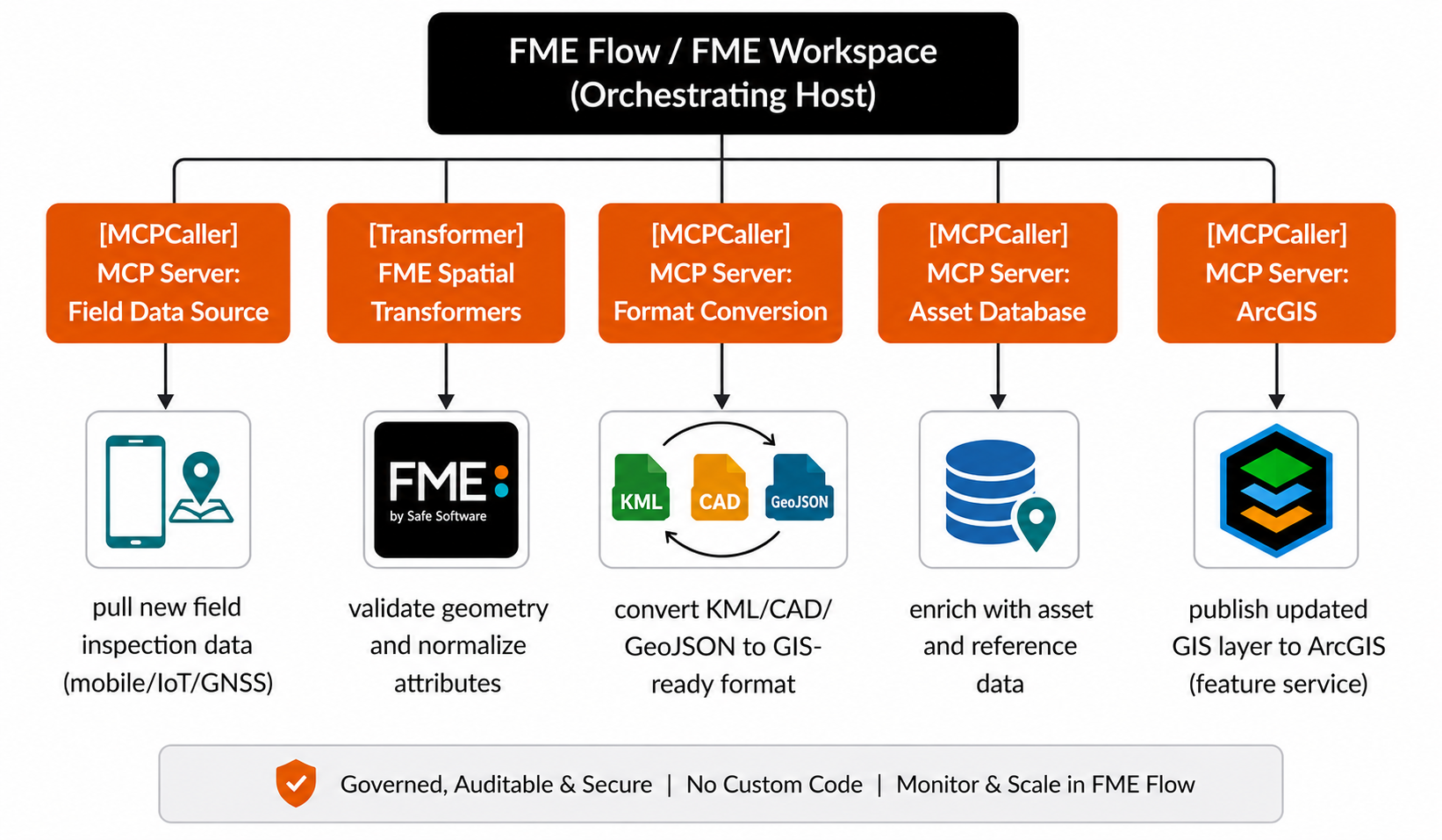
Domains that involve complex workflows often have orchestrating platforms for the quick setup of MCP servers. For example, in spatial computing, FME is a no-code platform that includes support for building MCP services to expose spatial and other computing, data and workflows. Tools like the Feature Manipulation Engine (FME) act as orchestrating hosts, chaining MCP servers to automate cross-system workflows and data pipelines without relying on custom API integrations.
Cross-platform workflow orchestration and data integration
The problem: Spatial computing, CAD, BIM, 3D, and GIS workflows often involve data spread across multiple systems, such as ArcGIS, CAD files, field survey data, asset databases, and cloud storage. Managing these workflows through custom scripts can become difficult, especially when teams need to transform formats, validate spatial data, update maps, and keep non-technical stakeholders informed.
The MCP solution: MCP helps by exposing governed data workflows (including Spatial) as AI-ready tools. Instead of allowing an AI agent to directly access every GIS system or database, a platform like FME can act as the controlled orchestration layer. Teams can build workflows that use any kind of data or system in FME, deploy them through FME Flow, and expose approved workflows as MCP tools for agents or other MCP applications to trigger.
For example, an AI agent could request an FME workflow that pulls new field inspection data, validates geometry, converts KML or CAD data into a GIS-ready format, enriches it with asset metadata, and publishes the cleaned output to ArcGIS. The agent does not need direct access to any underlying system. It simply invokes the approved MCP tool while FME handles the data transformation, workflow execution, monitoring, and governance. Through this, MCP leverages FME’s strengths: spatial and other data processing, GIS integration, workflow automation, and governed access to complex data pipelines.
Compliant browser automation and web data collection
The problem: Browser automation tools such as Playwright or Puppeteer are used to programmatically interact with a web browser. However, without setting strict boundaries, these tools can access restricted domains, violate robots.txt directives, and reuse session data across runs, potentially causing legal and operational risks.
The MCP solution: MCP introduces browser servers with built-in compliance mechanisms, powered by Playwright or Puppeteer. The servers enforce constraints at the execution layer itself. This includes mechanisms such as domain allowlists to restrict navigation, automated enforcement of robots.txt before data access, and strict session isolation to ensure that each interaction starts with a clean state.
The following code creates an MCP server that gives an AI agent-controlled browser automation capabilities using Playwright. Instead of allowing the agent to browse the open web freely, the server limits navigation to approved domains, checks robots.txt before fetching page content, and resets cookies between sessions to reduce tracking and data leakage risks.
When the server starts, it launches a headless browser and creates a browser context. The navigate tool lets the agent open pages only from domains listed in the allowlist. The fetch_page tool adds another layer of policy enforcement by checking whether the site’s robots.txt permits access before returning page content. The reset_session tool clears cookies so each browser run is isolated.
The snippet demonstrates how browser automation can be exposed through MCP in a safer, policy-controlled way, rather than giving an agent unrestricted browsing access.
from mcp.server.fastmcp import FastMCP
from playwright.async_api import async_playwright, BrowserContext
from urllib.robotparser import RobotFileParser
from urllib.parse import urlparse
import httpx

mcp = FastMCP("browser")

ALLOWED_DOMAINS = ["docs.example.com", "api.example.com"]

# Module-level references, populated during startup
playwright_instance = None
browser = None
browser_context: BrowserContext | None = None


@mcp.on_startup()
async def startup():
    """Launch Playwright and create a persistent browser context on server start."""
    global playwright_instance, browser, browser_context
    playwright_instance = await async_playwright().start()
    browser = await playwright_instance.chromium.launch(headless=True)
    browser_context = await browser.new_context(
        java_script_enabled=True,
        accept_downloads=False,
    )


@mcp.on_shutdown()
async def shutdown():
    """Cleanly wind down the browser and Playwright process on server exit."""
    global playwright_instance, browser, browser_context
    if browser_context:
        await browser_context.close()
    if browser:
        await browser.close()
    if playwright_instance:
        await playwright_instance.stop()


# Domain allowlist enforcement
@mcp.tool()
async def navigate(url: str) -> str:
    """Navigate to a URL within the allowed domain list."""
    hostname = urlparse(url).hostname
    if not any(hostname.endswith(domain) for domain in ALLOWED_DOMAINS):
        raise ValueError(f"Domain not in allowlist: {url}")
    page = await browser_context.new_page()
    try:
        await page.goto(url)
        return await page.content()
    finally:
        await page.close()


# robots.txt enforcement
@mcp.tool()
async def fetch_page(url: str) -> str:
    """Fetch page content after checking robots.txt compliance."""
    parsed = urlparse(url)
    robots_url = f"{parsed.scheme}://{parsed.netloc}/robots.txt"
    rp = RobotFileParser()
    async with httpx.AsyncClient() as client:
        resp = await client.get(robots_url)
        rp.parse(resp.text.splitlines())
    if not rp.can_fetch("*", url):
        raise ValueError(f"Access disallowed by robots.txt: {url}")
    page = await browser_context.new_page()
    try:
        await page.goto(url)
        return await page.content()
    finally:
        await page.close()


# Session isolation between runs
@mcp.tool()
async def reset_session() -> str:
    """Clear cookies and storage to isolate each run."""
    await browser_context.clear_cookies()
    await browser_context.storage_state()
    return "Session cleared"


if __name__ == "__main__":
mcp.run(transport="stdio")Exposing existing tools and workflows to LLMs
The problem: Organizations typically have years of invested data workflows, which typically include ETL pipelines, data quality checks, automation tasks, spatial and other data transformations, and report generation processes. When teams want these workflows accessible to LLM assistants, automation systems, or new applications, they face a choice: Rewrite the existing logic in a format the new system understands, or build a custom API wrapper for each workflow. Both approaches take significant time and introduce new maintenance overhead.
The MCP solution: MCP lets teams expose existing tools and workflows as callable MCP tools without rewriting the underlying logic. With FME Flow’s MCP Server capability, any existing FME workspace can be published as a governed MCP tool. External clients (whether LLM assistants, CI/CD pipelines, or other applications) can then discover and call these workflows through the standard MCP interface, with OAuth 2.0 authentication and centralized access control built in. An existing FME workspace that normalizes address data, validates geospatial records, or generates reports becomes an MCP tool callable from Claude, a custom agent, or any MCP-compatible client, with no rewrite required.
This code shows how an MCP client can connect to an existing MCP server and call a workflow that has already been exposed as an MCP tool. In this example, the client connects to a remote MCP endpoint over Streamable HTTP, passes an OAuth bearer token for authentication, initializes the MCP session, discovers the tools available on the server, and then calls a workflow named `normalize_address_data`.
The important point is that the client is not building or defining the workflow itself. The workflow already exists on the server side. The client simply discovers it and invokes it with the required input arguments, such as an input file location and country code. This pattern is useful when teams want AI agents or applications to trigger approved workflows through MCP without giving them direct access to the underlying systems or implementation logic.
from mcp import ClientSession
from mcp.client.streamable_http import streamablehttp_client
import asyncio

async def call_existing_workflow():
    async with streamablehttp_client(
        "https://your-mcp-server.example.com/mcp",
        headers={"Authorization": "Bearer <oauth_token>"}
    ) as (read, write, _):
        async with ClientSession(read, write) as session:

            # Required: negotiates protocol version and capabilities
            # with the server before any tools can be listed or called
            await session.initialize()

            # Discover tools exposed by the server
            tools = await session.list_tools()
            print("Available tools:", [t.name for t in tools.tools])

            # Call an existing workflow exposed as an MCP tool
            result = await session.call_tool(
                "normalize_address_data",
                arguments={
                    "input_file": "s3://bucket/raw_addresses.csv",
                    "country_code": "US"
                }
            )
            print("Result:", result.content[0].text)

asyncio.run(call_existing_workflow())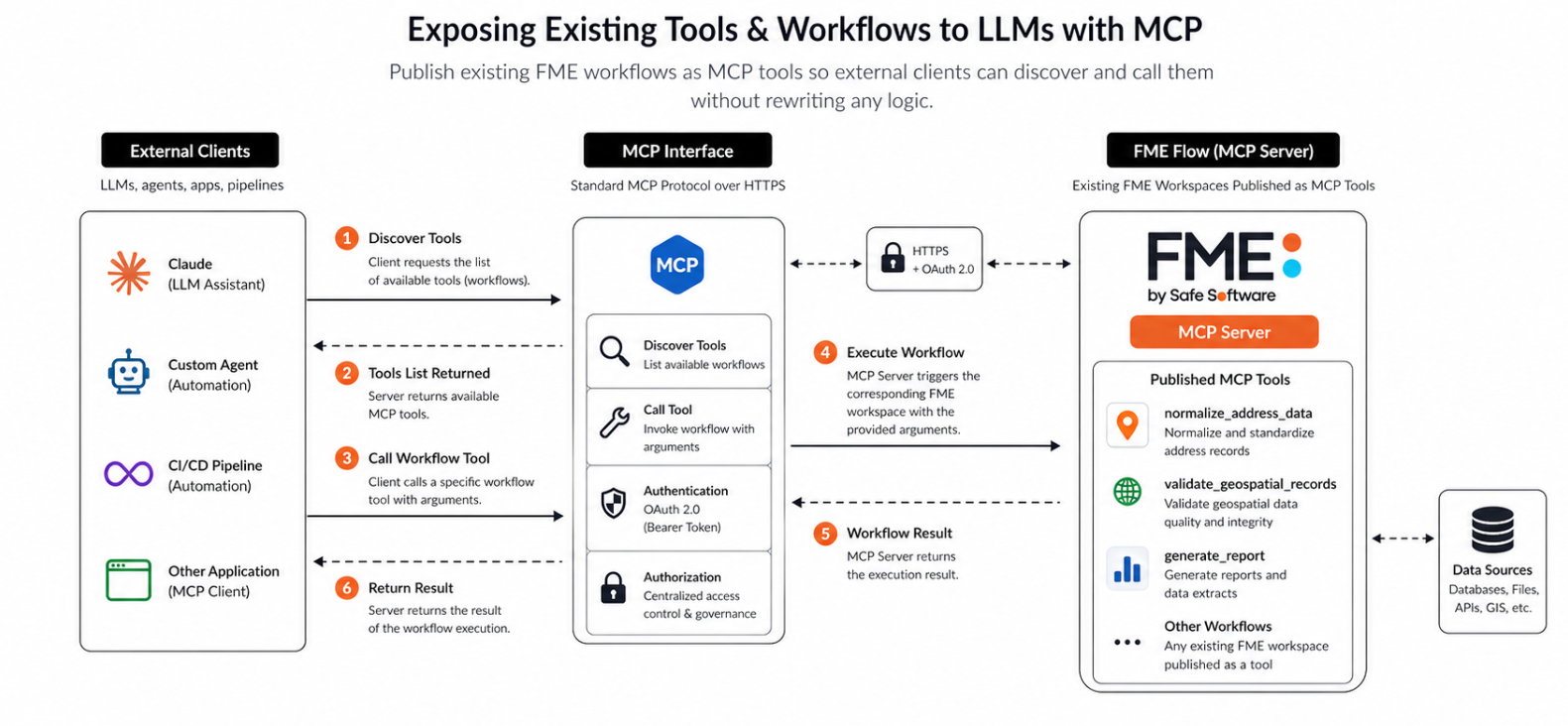
Best practices for integrating MCP servers into your production environments
Here are the six major best practices for adopting MCP in your workflow.
Scope access with path whitelisting and sandboxing
Once MCP servers are set between the applications and external systems, the scope of risk increases, as now the MCP servers have access across all the filesystems, databases, and networks. This makes setting clear restrictions as to what each server can access important.
Here are two techniques to use:
- Path whitelisting: For filesystem servers, strictly define the project directories to avoid blanket access to the entire environment. The database servers should be connected with read-only credentials, ensuring that data retrieval is separated from state-changing operations.
- Sandboxing: Run MCP servers within isolated environments, such as Linux namespaces to restrict what the process can see, cgroups to bound resource consumption, and hardened container runtimes like Docker with dropped capabilities or gVisor for kernel-level isolation. These isolated environments provide more robust containment by isolating filesystem access, processes, networking, and resource visibility at the operating system level.
This snippet runs a filesystem MCP server inside a Docker container with restricted file access. It mounts the local project directory into the container as `/workspace` in read-only mode and sets `MCP_ALLOWED_PATHS` so the server can only access that approved path. This demonstrates how container isolation, path whitelisting, and read-only mounts can reduce risk when exposing filesystem access to an AI agent through MCP.
# Example: Run filesystem MCP server with Docker isolation
import docker
client = docker.from_env()
container = client.containers.run(
image="mcp/filesystem-server",
volumes={
"/projects/myapp": {
"bind": "/workspace",
"mode": "ro"  # Read-only mount
}
},
environment={
"MCP_ALLOWED_PATHS": "/workspace"
},
remove=True  # Equivalent to --rm
)Separate read and write capabilities with explicit control
MCP servers expose both data-retrieval tools and state-changing write tools. While read-only operations are generally low-risk, the same isn’t true for write operations. This means that implementing human-in-the-loop (HITL) approval for critical actions is crucial. The following are the key factors one should consider with respect to read and write actions while working with MCP.
- Read-only: For read-only operations, the servers primarily work for accessing information for common use cases such as context retrieval and RAG.
- Human approval for writes: For write operations (Create, Update, Delete) , the server should have restricted access or even human intervention for action approval for high-impact actions such as updating records, deleting files, or making configuration changes.
Enforce strict input validation with schemas
When MCP servers expose tools to interact with external systems, the reliability of those interactions heavily depends on the inputs provided. And many a time, the inputs generated by applications are inconsistent, loosely structured, or contextually ambiguous. To avoid errors, the MCP tools should enforce strict input schemas to validate each input. This can be done by integrating libraries such as Zod (for TypeScript) and Pydantic (for Python) directly into the tool’s execution pipeline. The following script demonstrates how this can be done with Pydantic.
# Python example using Pydantic
from pydantic import BaseModel, field_validator
class QueryInput(BaseModel):
query: str
limit: int = 100
@field_validator("query")
@classmethod
def must_be_select(cls, v: str) -> str:
if not v.strip().upper().startswith("SELECT"):
raise ValueError("Only SELECT queries are permitted")
return vEnforce outbound network controls with egress filtering
When MCP servers interact with external systems, uncontrolled outbound traffic can reach arbitrary destinations, increasing the risk of unintended data flow or misuse of internal access. Tools such as Smokescreen or Envoy can be used to implement strict egress filtering and network isolation. The following section explains the key actions one must take to enforce network control.
- Routing traffic through a proxy: All outbound traffic should pass through a policy-enforcing proxy or firewall that acts as a gatekeeper.
- Implementing an allowlist: To prevent servers from connecting to unauthorized external services, the servers are restricted to a predefined set of approved domains and IPs.
- Block internal network access: To avoid any unwanted interaction between the server and the internal private system, access to internal IP ranges (RFC 1918) is blocked or highly controlled.
Adopt OAuth 2.1 with progressive least privilege
When MCP servers integrate with external services, using static, long-lived API tokens is risky because they are hard to rotate and difficult to revoke if leaked. OAuth 2.1 solves this through short-lived, scoped tokens. Sessions start with minimal permissions (such as read-only) and request elevated scopes only when a specific privileged action is needed.
For public clients where a client secret cannot be safely stored, use the Authorization Code flow with Proof Key for Code Exchange (PKCE). PKCE prevents authorization code interception attacks by binding the code exchange to the original requester. Separately, never hardcode credentials in server configuration files; store all secrets in a key management service.
Use orchestration platforms for multi-server workflows
For a complex workflow with multiple MCP servers and data sources, managing the connection lifecycle, authentications, data transformation, and retry logic through custom code becomes hard to debug, especially when new integrations are being added. As a solution, leveraging an agentic domain-specific no-code data integration platform like FME in spatial computing is an absolute game-changer. FME has built-in MCP connectors, making it act as a center hub by connecting to various MCP servers (e.g., GitHub, Slack, Google Workspace) and orchestrating complex, end-to-end business processes.
Platforms like FME provide a centralized, visual, and often low-code/no-code approach to building and managing these intricate workflows. You get simplified management, enhanced visibility, and reduced development effort all-in-one platform.
Last thoughts
MCP has truly been a game-changer in how applications connect to data, tools, and external systems. Although MCP was initially designed for AI-specific use cases, the protocol itself is fundamentally model-agnostic in design, i.e., it carries no AI-specific logic. Any application, be it a data integration platform, a CI/CD pipeline, or any analytics tool, can adopt MCP as its integration layer. However, the ease of use that the protocol comes with has its own set of security concerns, making the best practices foundational requirements for operating MCP at scale.
For data integration teams, MCP represents a shift from custom connectors to standardized, orchestrated workflows. Platforms like FME are well-integrated to act as the coordination layer across multiple MCP servers, enabling organizations to build workflows that are not only scalable but also secure.
Continue reading this series
AI Agent Architecture: Tutorial & Examples
Learn the key components and architectural concepts behind AI agents, including LLMs, memory, functions, and routing, as well as best practices for implementation.
AI Agentic Workflows: Tutorial & Best Practices
Learn about the key design patterns for building AI agents and agentic workflows, and the best practices for building them using code-based frameworks and no-code platforms.
AI Agent Routing: Tutorial & Examples
Learn about the crucial role of AI agent routing in designing a scalable, extensible, and cost-effective AI system using various design patterns and best practices.
AI Agent Development: Tutorial & Best Practices
Learn about the development and significance of AI agents, using large language models to steer autonomous systems towards specific goals.
AI Agent Platform: Tutorial & Must-Have Features
Learn how AI agents, powered by LLMs, can perform tasks independently and how to choose the right platform for your needs.
AI Agent Use Cases
Learn the basics of implementing AI agents with agentic frameworks and how they revolutionize industries through autonomous decision-making and intelligent systems.
AI Agent Tools: Tutorial & Example
Learn about the capabilities and best practices for implementing tool-calling AI agents, including a Python-based LangGraph example and leveraging FME by Safe for no-code solutions.
AI Agent Examples
Learn about the core architecture and functionality of AI agents, including their key components and real-world examples, to understand how they can complete tasks autonomously.
No Code AI Agent Builder
Learn the benefits and limitations of no-code AI agent builders and how they democratize AI adoption for businesses, as well as the key components and features of these platforms.
Multi-Agent Systems: Implementation Best Practices
Learn about multi-agent systems and how they improve upon single-agent workflows in handling complex tasks with specialised roles, communication, coordination, and orchestration.
Langgraph Alternatives: The Top 6 Choices
Learn about LangGraph, a powerful yet complex orchestration framework for building intelligent systems, and its limitations, alternatives, and selection criteria.
Agentic AI vs Generative AI
Learn the differences between generative AI and agentic AI and how to choose the right AI paradigm for your needs.
Model Context Protocol Use Cases
Learn how Model Context Protocol standardizes AI agent connections to tools, data, and enterprise systems efficiently.