
This work was done in collaboration with Safe Software partner Veremes
Laser remote sensing technology known as LiDAR (Light Detection and Ranging) has been used for decades to capture highly accurate three-dimensional representations of the world. Originally applied to scientific and measurement-focused use cases, LiDAR has become widely adopted over the past fifteen years as a powerful complement to traditional photogrammetry techniques.
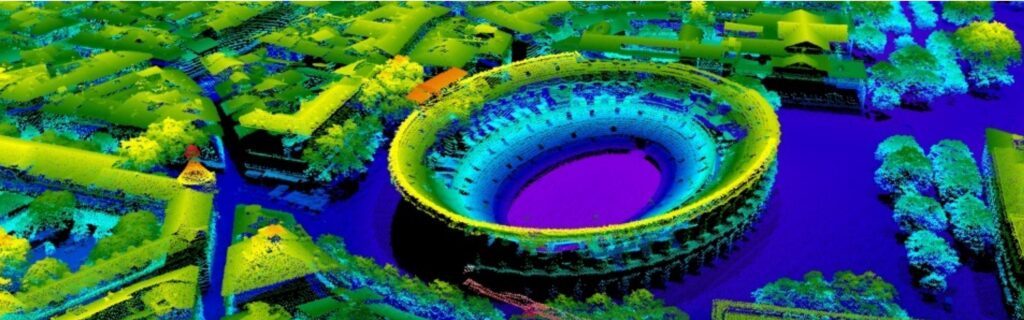
Advances in sensor technology now allow LiDAR to be deployed across a wide range of platforms, including airborne systems such as airplanes, helicopters, and drones, as well as terrestrial platforms like trains and vehicles. The datasets generated by these sensors are commonly referred to as point clouds.
This article explores how FME supports point cloud workflows and where it delivers the most value. FME excels at organizing, managing, and preparing point cloud data, helping teams move from raw LiDAR data to analysis-ready datasets efficiently and reliably.
Specificities and use cases
As LiDAR adoption has grown, so has the scale and complexity of the datasets it produces. A defining characteristic of point clouds is the very large volume of data they contain, with a single file commonly including tens of millions of points.
This volume must be considered at every stage of data management. Without appropriate tooling, memory limitations and performance constraints can quickly become a challenge when working with realistic datasets.
Beyond their scale, point clouds are valued for their high spatial accuracy and their ability to capture semi-transparent environments, such as vegetation canopies in forested areas or shallow water in coastal and marine environments. As a result, LiDAR data is widely used in fields such as archaeology, where it helps reveal features hidden by vegetation, and oceanography, where it supports the study of shallow coastal zones.
While point cloud datasets were previously available at a local level, broader adoption in France accelerated with the release of national datasets produced by the IGN (Institut National de l’Information Géographique et Forestière) as part of the Lidar HD program, and by SHOM (Service Hydrographique et Océanographique de la Marine) through the Litto3D project.

Nature of the data
A point cloud consists of a collection of points, each carrying its own set of information. Depending on the sensor, configuration settings, and intermediate processing steps, the available information may vary. Most datasets include:
-
X, Y, Z position
-
Return intensity
-
Timestamp corresponding to the laser pulse emission
-
Return number and total number of returns for a given pulse
Additional information commonly found in point clouds includes:
-
A classification index (typically computed after acquisition using specialized tools)
-
The angle of the sensor relative to vertical at the time of acquisition
-
A pass index corresponding to a flight line
-
RGB color components (red, green, blue)
Managing point clouds with FME
History and Overview
Building on this foundation, FME has supported the PointCloud geometry type since 2011, enabling teams to work with large point cloud datasets as part of automated, scalable workflows.
Unlike other geometry types handled by FME, the FME Python API does not currently provide dedicated classes or functions for direct point cloud manipulation. Instead, point cloud processing in FME is handled through its core workspace capabilities and specialized transformers.
Component Concept
In FME, information associated with each point is modelled using components. Components are most often numeric (signed or unsigned integers on 8, 16, or 32 bits, or floating-point values on 32 or 64 bits) and are only rarely string-based. List-type components are not supported.
At a conceptual level, components can be compared to attributes attached to each individual point.
Visualization
Two visualization modes are available:
-
2D: a top-down view with relatively large point symbols, allowing distance measurements in the X,Y plane.
-
3D: an oblique view that enables users to select individual points and inspect their component values.
Performance considerations apply, particularly during view initialization, as spatial indexes must be calculated in advance.
Transformers specific to Component Structures
FME provides a dedicated set of transformers for managing component structures, using an approach similar to attribute handling. These transformers make it easy to add, remove, retain, copy, or rename components as needed within a workflow.
Numerical calculations on Component Values
Numerical calculations used to create or update components are performed using PointCloudExpressionEvaluator.
This transformer operates in a similar way to ExpressionEvaluator and RasterExpressionEvaluator, with access limited to the component values of the current point, feature attributes, and user-defined parameters.
Classification
Point cloud classification involves assigning each point to a land-cover class, such as ground, buildings, or vegetation. For efficiency, this information is stored as a classification component value, using a predefined class code that is typically represented as an unsigned 8-bit integer.
The classification table proposed by ASPRS (American Society for Photogrammetry and Remote Sensing), as defined in the LAS format specification, is widely adopted across the industry.
While FME does not perform classification algorithms directly, it integrates well with external tools designed for this purpose. Custom transformers available on the FME Hub make it possible to connect with the LASTools library, which is licensed separately and installed independently of FME
Filtering, Splitting, and Combining
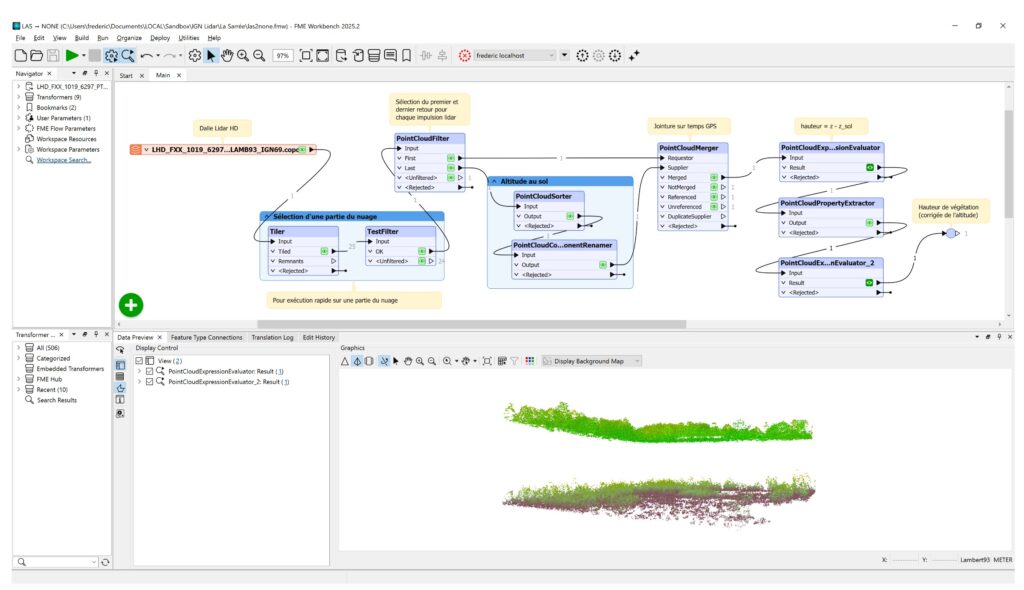
Point clouds can be filtered to retain only points whose component values meet specific criteria (such as value ranges, data types, or formulas) using PointCloudFilter. As with TestFilter, multiple output ports can be configured to represent different conditions.
PointCloudSplitter allows a point cloud to be divided into multiple point clouds based on distinct values or value ranges.
Conversely, PointCloudCombiner enables multiple point clouds to be combined into a single cloud, or into multiple clouds when grouping by attribute value is applied. This transformer can also assemble features of other geometry types (points, lines, polygons, rasters) into a point cloud.
Merging Components Based on Common Values
PointCloudMerger plays a central role in point cloud workflows. It enables components from a Supplier point cloud to be added to points in a Requestor point cloud based on matching component values.
When duplicate matches exist in the Supplier cloud, only the first matching point is used. As a result, point order in the Supplier cloud is important and may require sorting beforehand using PointCloudSorter.
Reducing the Number of Points
When a point cloud contains more points than can be efficiently processed, point density can be reduced using different approaches.
PointCloudSimplifier removes points that contribute least to the overall shape of the cloud, such as points in flat areas. This approach requires computing an underlying surface to preserve the general form of the dataset and can be resource-intensive.
PointCloudThinner retains a subset of points based on their order in the cloud (for example, the first N points, the last N points, one point every N, or N evenly distributed points). This method is fast and simple but may significantly alter the overall structure of the cloud.
Conversion To and From Other Geometry Types
Point clouds can be converted into simple point geometries using PointCloudToPointCoercer. This approach should be used with caution, as FME is not intended to manage millions of individual point features.
In most cases, it is preferable to derive a Digital Elevation Model (DEM) from the point cloud (for example using SurfaceModeller) or, when the point cloud has a grid structure, to convert it into a raster using NumericRasterizer, where each point becomes a pixel.
Conversely, various geometry types can be converted into point clouds. A common example is converting a raster using PointCloudCombiner, creating a structured point cloud with one point per original pixel.

FME: An effective companion for point cloud workflows
As with image data, FME is designed to streamline point cloud data preparation and transformation, helping teams get their data ready for use in specialized tools, including advanced processing and analysis.
By enabling scalable, repeatable, and reliable workflows, FME works alongside dedicated point cloud processing software to support efficient and well-orchestrated data pipelines.
If you’re curious to learn more about LiDAR and how FME works with point cloud data, check out our page.