Langgraph Alternatives: The Top 6 Choices
LLMs have transformed how developers build intelligent systems. However, as these systems scale and become more complex, managing them effectively requires frameworks that go beyond basic linear workflows. This is where LangGraph comes into play, a framework built on top of the LangChain ecosystem.
Developers use LangGraph to create multi-step reasoning agents, conversational research assistants, and planning and execution pipelines. However, the framework can feel more complex for simple retrieval-augmented generation (RAG) tasks, creates a steeper learning curve, and remains tightly coupled with the LangChain ecosystem.
Because of these challenges, many developers look for LangGraph alternatives. This article reviews the top competitors and guides on selecting the appropriate framework for a given project.
Summary of key LangGraph alternative concepts
As teams evaluate LangGraph alternatives, there are several key concepts they should be familiar with. The table below summarizes three high-level concepts that this article will explore in detail.
| Concept | Description |
|---|---|
| LangGraph limitations | Langgraph is an orchestration framework for building, managing, and deploying stateful agents. While it is suitable for building applications such as multi-step agentic workflows, RAG pipelines with conditional logic, and stateful conversational AI systems, it does suffer from limitations, including complexity overhead, ecosystem lock-in, scalability limits, and steep learning curves. |
| The best LangGraph alternatives | A review of six key alternatives, including CrewAI, AutoGen, PydanticAI, LlamaIndex, FME, and OpenAI Agents SDK, each serving different needs |
| How to choose the right tool as your LangGraph alternative | Help agents decide which agent handles which task and how work is passed along. Examples One must compare alternatives based on developer experience (DX), deployment complexity, community support, and specialized features (e.g., parallel execution, function calling) to decide on the best alternative. Match framework selection to workflow type, data complexity, team expertise, and production requirements to get the best results |
LangGraph limitations
LangGraph is useful for organizing complex, stateful agents and retrieval-augmented generation (RAG) workflows, but it is not easy to use. Its structure adds significant overhead, slowing development. Debugging and making changes are challenging because developers must manage complex graph settings, state persistence, and message routing.
For teams new to agent orchestration, this steep learning curve can be a significant obstacle that slows adoption.
Adding a new agent intent or updating workflow logic during a project often requires restructuring the entire state schema. This process increases the risk of errors and adds significant time to the modification process.
For example, adding a sentiment analysis feature to an existing customer support bot sounds simple, but usually requires updating the schema across six to eight graph nodes, revising ten to twelve conditional edges, and restructuring checkpoint logic, hence turning what should be a few hours of work into a multi-day refactoring effort. Even minor updates can propagate through the system, requiring changes to multiple graph nodes and edge conditions.
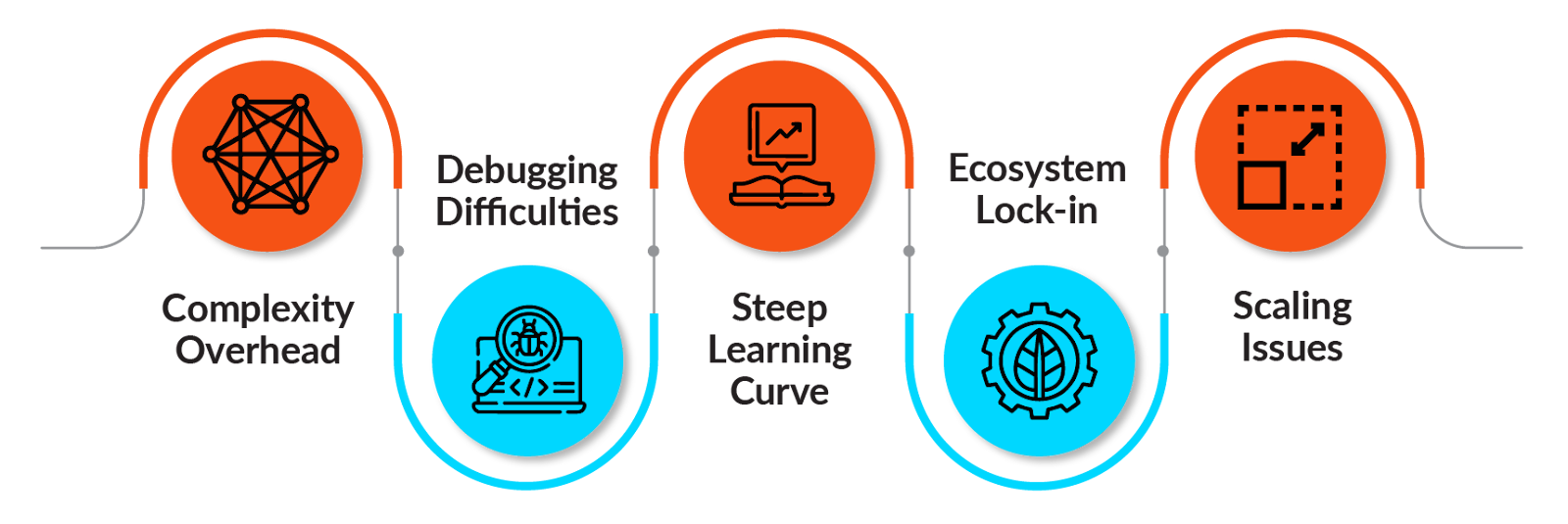
Developers also encounter challenges with ecosystem lock-in and scaling. Because LangGraph is tightly integrated with LangChain, it is less flexible in production environments. It is difficult to swap out components or combine with other frameworks, since it is not modular.
To run concurrent workflows, teams often need to set up a separate LangGraph Server. This requirement adds setup and maintenance overhead, complicating production deployments.
As applications scale, maintaining performance becomes more challenging. Teams may spend significant time on manual optimizations to ensure smooth operation.
With these challenges in mind, it is important to consider how other frameworks manage orchestration more efficiently.
The best LangGraph alternatives
In this section, we will discuss the most relevant alternatives available today. When evaluating frameworks, do not depend solely on features or marketing claims. Instead, use explicit decision criteria that align with technical and operational requirements.
| Criteria | Explanation | Example Questions |
|---|---|---|
| Scalability | How well the framework handles increased load | Can it process 10,000+ requests/day? Does it support horizontal scaling? |
| Schema Safety | Type checking and validation capabilities | Are inputs/outputs validated? Can errors be caught at compile time? |
| Integration | Compatibility with existing tools and services | Does it work with FastAPI? Can it connect to your databases? |
| Developer experience | Ease of learning and development speed | How long to build the first agent? Is debugging straightforward? |
| Production features | Enterprise-ready capabilities | Does it have monitoring? Error recovery? Deployment tools? |
| Community | Support and ecosystem maturity | Are there examples? Active forums? Regular updates? |
| Control vs. abstraction | Balance between simplicity and flexibility | Can you customize deeply? Is it too opinionated? |
CrewAI
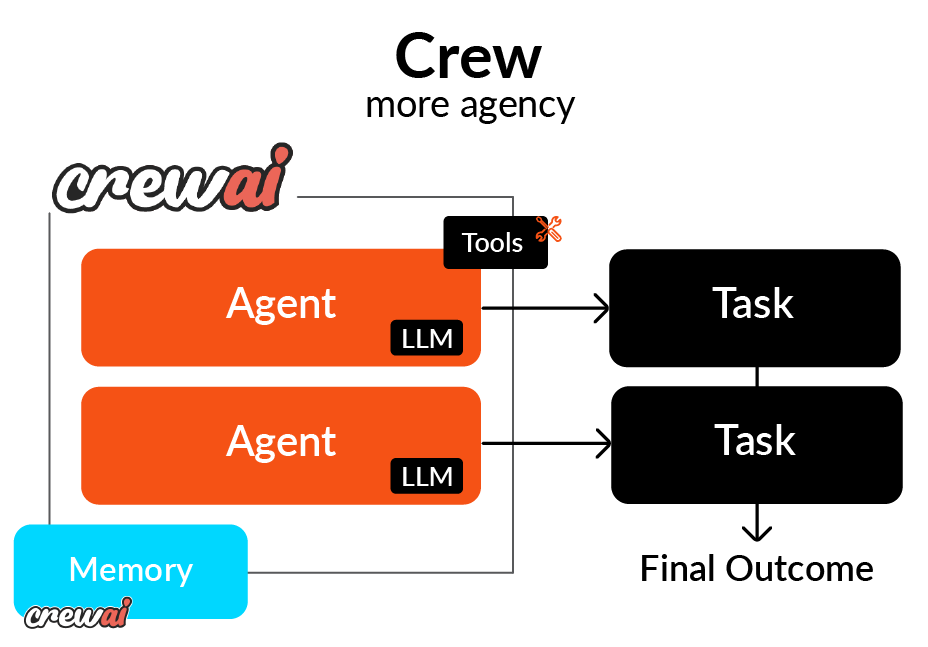
CrewAI is built around the idea of teams of agents working together in a clear structure. Each agent gets a role, a goal, and a backstory, which guide how it behaves and collaborates.
Key Strengths
CrewAI stands out for its developer-friendly YAML configuration. This approach allows for clear, declarative definitions of agents and their relationships, making workflows easier to understand. Pydantic-based validation helps catch schema errors early, and built-in replay features make debugging and iteration easier.
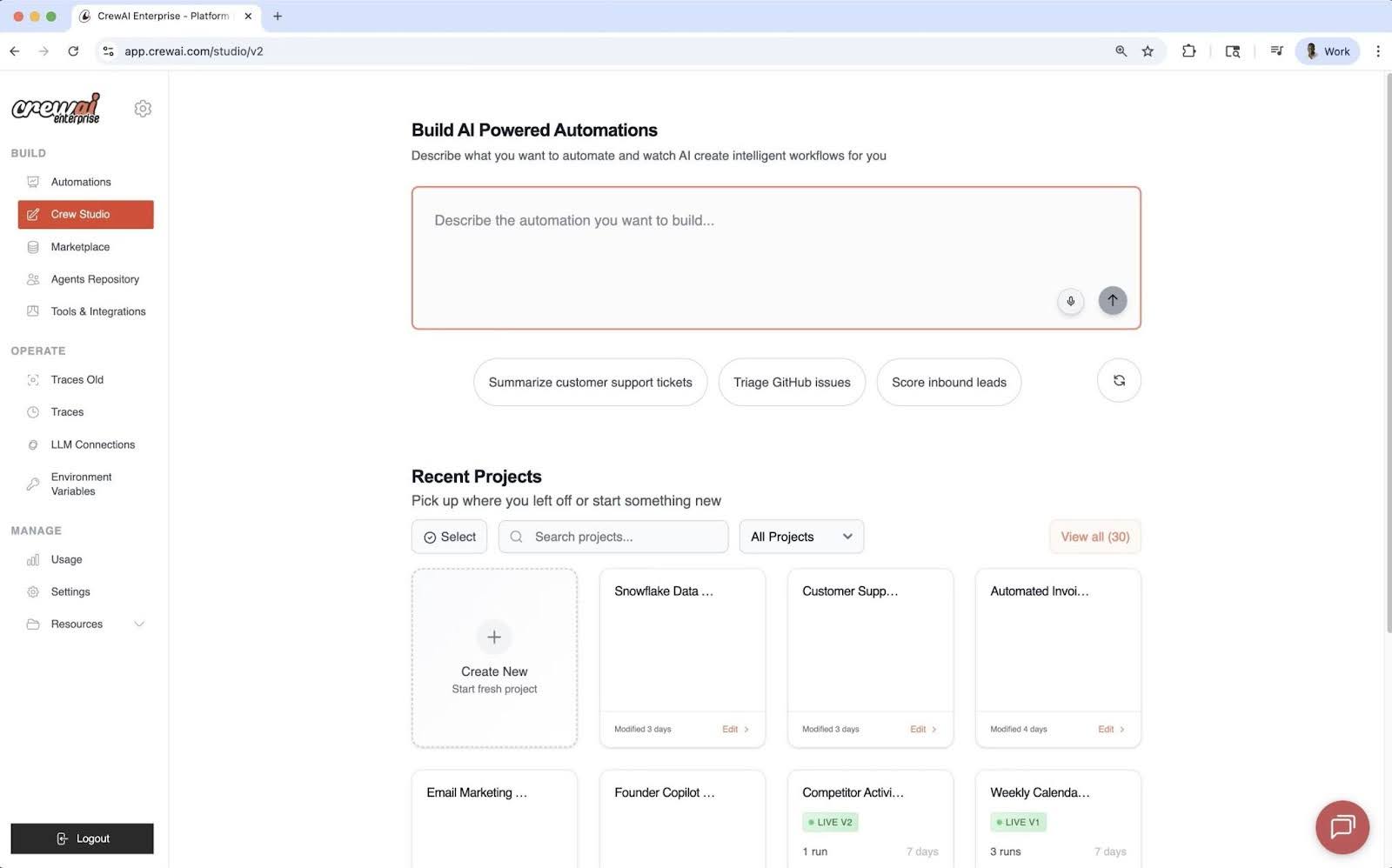
Its visual layout allows straightforward management of agent teams and task hierarchies.
Limitations
CrewAI is highly structured, which can limit workflows that require dynamic branching or concurrency. It works best for predictable, hierarchical processes, rather than for adaptive or real-time tasks.
When To Choose
CrewAI is suitable for content generation pipelines, structured research, or process automation that follows an organizational hierarchy, where tasks move in sequence or are managed by a coordinating agent.
While CrewAI focuses on structure and predictability, the following framework, AutoGen, takes a different approach by emphasizing flexibility and dialogue-based collaboration.
Microsoft AutoGen
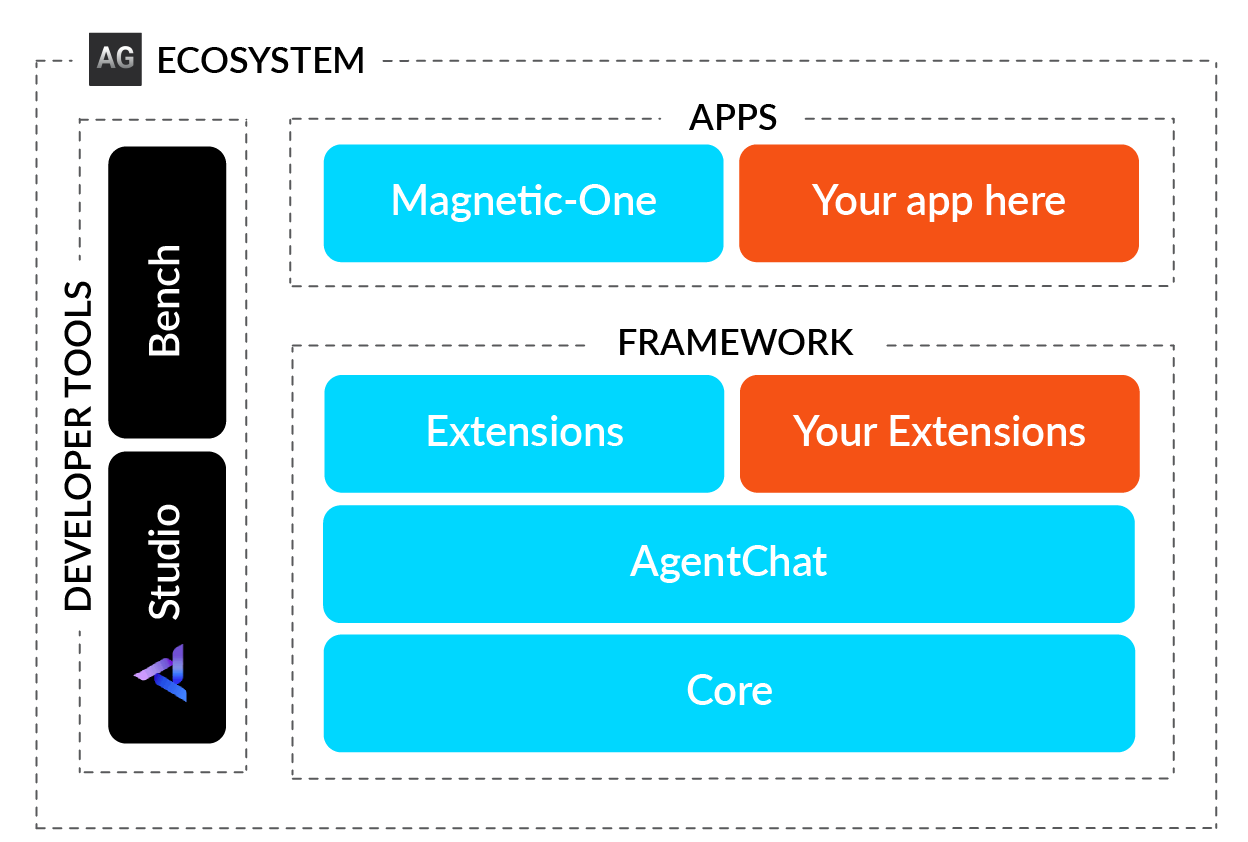
AutoGen is an open-source orchestration framework from Microsoft that enables multi-agent communication through conversation. It uses an event-driven design, so agents exchange messages asynchronously and act based on the dialogue’s context.
Key Strengths
AutoGen’s main strength is its flexibility. It supports dynamic collaboration and allows human intervention during processes. Its built-in code execution makes it suitable for autonomous code generation, testing, and debugging.
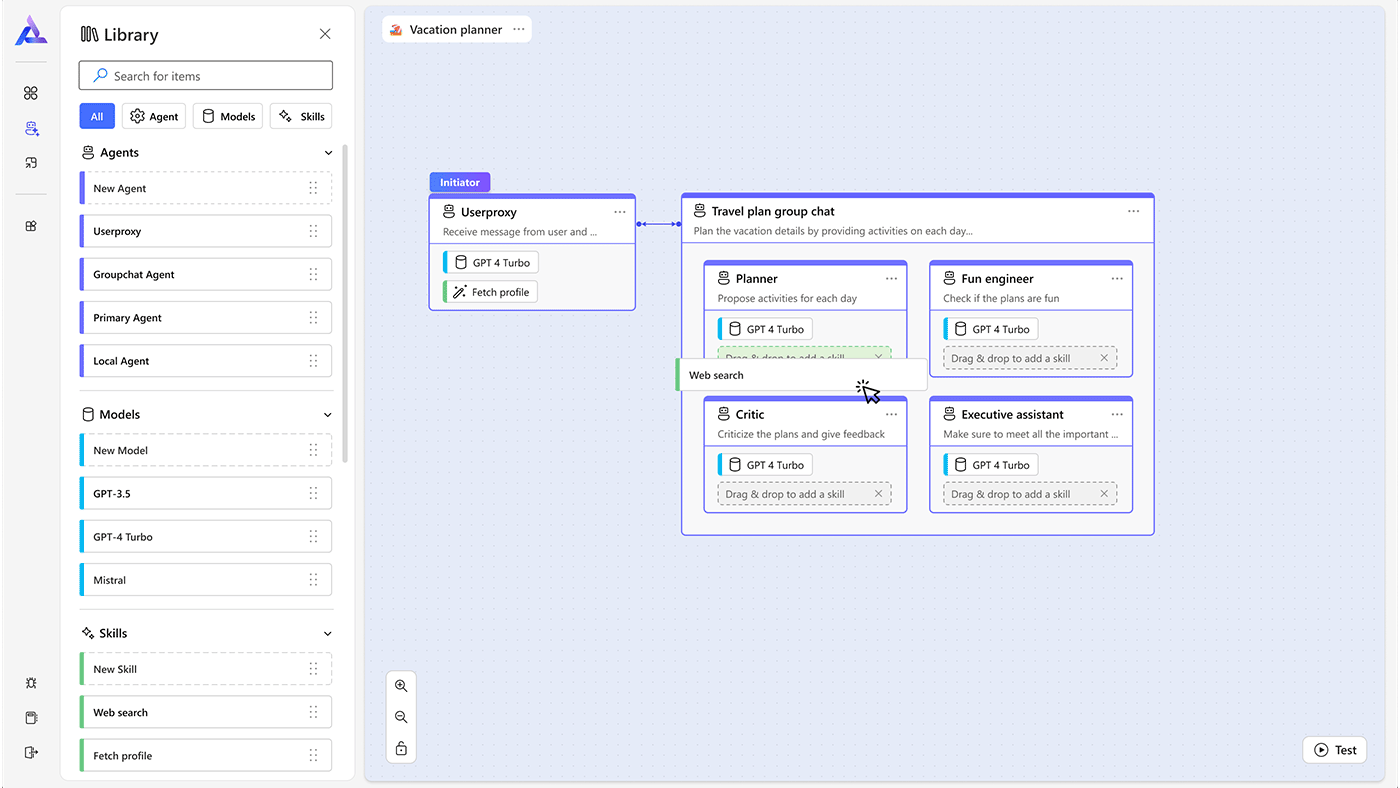
Developers can set up agent conversations and workflows visually and interactively
Limitations
This flexibility can sometimes cause unpredictable behavior. Without a strict structure, maintaining control requires extensive prompt engineering, which reduces efficiency for simple, linear tasks.
When To Choose
AutoGen is best suited for research, experimentation, or any setting that requires adaptive multi-agent dialogue, especially in autonomous coding or decision-support applications.
PydanticAI
PydanticAI uses strict type enforcement to make AI workflows predictable and safe. The system checks every input and output against a schema, removing uncertainty during execution.
Key Strengths
Type safety and validation help prevent runtime errors. Consistent interfaces across models make it reliable, which is ideal for enterprise environments where predictability is essential.
# Example: AI triage agent with schema validation

from dataclasses import dataclass
from pydantic import BaseModel, Field
from pydantic_ai import Agent, RunContext

@dataclass
class TriageDependencies:
    ticket_id: str

class TriageOutput(BaseModel):
    triage_summary: str = Field(description="Summary for escalation team")
    requires_escalation: bool
    priority: int = Field(ge=1, le=5)

triage_agent = Agent(
    "openai:gpt-4o",
    deps_type=TriageDependencies,
    output_type=TriageOutput,
instructions="You are an L1 IT support agent. Triage incoming tickets.")PydanticAI example showing strict schema validation with type-safe input/output definitions. (Source)
In the above example, the TriageOutput class acts as a strict blueprint for AI’s response. The agent is forced to return structured data, which in this case includes a summary, a boolean flag for escalation, and a priority number between 1 and 5, instead of receiving a vague paragraph or text. When triage_agent runs, PydanticAI validates the output against the schema in real-time. If the LLM forgets the summary or assigns a priority of “10,” the system catches the error, ensuring that the downstream system (such as a ticketing dashboard) receives the data in the format it expects.
Limitations
Because of its strict schemas, PydanticAI is less suitable for exploratory or dynamic tasks. The setup process can also require more effort for small or rapidly changing projects.
When To Choose
PydanticAI is the preferred choice for any field requiring consistent, validated, and auditable outputs. It is especially important for industries such as financial services and healthcare, where data integrity is critical.
For lighter, quick-prototype setups, the OpenAI Agents SDK provides a streamlined, production-ready approach to orchestration.
OpenAI Agents SDK / Swarm
The OpenAI Agents SDK is a production-ready framework for building multi-agent workflows, released by OpenAI in March 2025. It replaces the experimental Swarm framework and adds enterprise features, including tracing, guardrails, and session-based conversation history management.
Key Strengths
This SDK provides simple building blocks for agent orchestration, including agents, handoffs (transferring control between agents), guardrails (input/output validation), and sessions (automatic conversation history). Built-in tracing allows developers to visualize and debug workflows easily. The framework works with OpenAI and more than 100 other large language models, and includes enterprise features such as Temporal integration for long-running workflows.
# Example: Simple OpenAI Agent with Handoffs
from agents import Agent, Runner

# Define a support agent
support_agent = Agent(
    name="SupportAgent",
    instructions="You are a helpful customer support agent. "
                 "Answer questions about products and services.",
)

# Define a sales agent
sales_agent = Agent(
    name="SalesAgent",
    instructions="You are a sales specialist. "
                 "Help customers with purchases and pricing.",
)

# Run the agent
result = Runner.run_sync(
    support_agent,
    "What products do you offer?"
)
print(result.final_output)OpenAI Agents SDK example showing simple agent creation and execution. (Source)
In the snippet above, two distinct personas, a SupportAgent and aSalesAgent, are defined and assigned a name and a natural language instruction set. The Runner.run_sync command initiates the workflow with the support_agent.
If a user asks about pricing, the support agent is configured to transfer the conversation to the sales agent. This abstraction allows developers to focus solely on defining who the agents are and what they should know, thereby hiding the complex orchestration logic for how they pass messages back and forth.
Limitations
Because it is a newer framework (released in March 2025), its community and ecosystem are still developing compared to more established options. While it is highly flexible, developers must build more orchestration logic than with opinionated frameworks such as CrewAI.
Another factor is the vendor lock-in. Although the SDK supports more than 100 LLM providers, its advanced capabilities, such as tracing, guardrails, and session, are tightly coupled to OpenAI’s platform. As a result, teams that rely heavily on these features may find it more difficult to migrate away in the future.
When To Choose
Select the OpenAI Agents SDK for production-ready agent orchestration with strong observability. This framework is ideal for teams that require provider-agnostic flexibility and enterprise features, such as tracing and guardrails, especially when coordinating multiple agents or integrating human involvement into the workflow.
While the OpenAI Agents SDK focuses on streamlined multi-agent coordination, LlamaIndex adds powerful data integration and retrieval features to the orchestration.
LlamaIndex
LlamaIndex is an agent orchestration framework that uses event-driven workflows and focuses on RAG. Unlike general-purpose orchestrators, it’s especially good at connecting agents to external knowledge, so their responses are based on real, verifiable data.
Key Strengths
LlamaIndex integrates smoothly with data sources and vector databases. The development team introduced its Workflows module in mid-2024 and expanded it in 2025 to support controlled multi-agent processes. The AgentWorkflow class lets agents work together and hand off tasks within event-driven workflows.
# Example: LlamaIndex Workflow with RAG
from llama_index.core.workflow import (
    StartEvent,
    StopEvent,
    Workflow,
    step,
)
from llama_index.llms.openai import OpenAI

class SimpleRAGWorkflow(Workflow):
    @step
    async def query_documents(self, ev: StartEvent) -> StopEvent:
        """Query vector database and generate response"""
        llm = OpenAI(model="gpt-4")
        # Retrieve relevant documents
        # Generate response using context
        response = await llm.acomplete(ev.query)
        return StopEvent(result=str(response))

# Run the workflow
workflow = SimpleRAGWorkflow(timeout=60, verbose=True)
result = await workflow.run(query="What is LlamaIndex?")LlamaIndex workflow example showing event-driven RAG implementation (Source)
This example illustrates LlamaIndex’s event-driven architecture. In this, the workflow is defined as a class SimpleRAGWorkflow, and the query_documents function listens for a StartEvent, performs the retrieval and generation (RAG) using OpenAI, and wraps the result in a StopEvent.
This structure decouples the logic, making it powerful because it easily adds intermediate steps, such as a “verify citation” or “reformulate query” step, by simply adding new functions that listen for specific events. This combination of structure and capabilities makes the pipeline highly modular and easier to debug.
Limitations
The complex event-driven design can make debugging hard. Sometimes, documentation updates are slow to catch up with new releases. Its architecture is still more data-focused than general-purpose.
When To Choose
LlamaIndex is well-suited for building document analysis tools, knowledge bases, or RAG-focused applications that already use its pipelines.
FME by Safe Software
FME (Feature Manipulation Engine) is a no-code platform for building AI agent workflows with a visual, drag-and-drop interface. Instead of writing code, you can connect components called ‘transformers.’ This enables business analysts and non-developers to build advanced AI agents that handle complex data processing and AI tasks by simply connecting visual blocks.
Key Strengths
FME stands out for its visual, no-code development. The platform provides a canvas where users can drag and drop components and connect them, with no coding required. Each component, or ‘transformer,’ handles a specific task such as reading data, calling a LLM, or routing a decision.
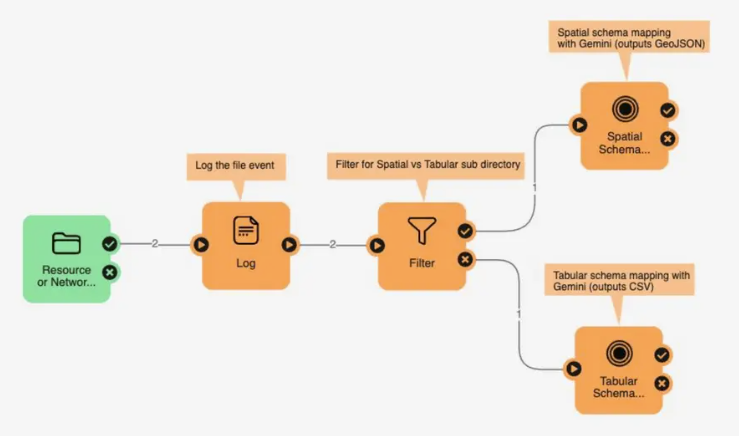
FME is flexible and connects to any AI model (OpenAI, Azure, Gemini, or local) and hundreds of data sources. This makes it ideal for real-world enterprise scenarios where agents need to work with many different systems, such as files, databases, APIs, and cloud services.
Beyond traditional databases, FME excels at handling:
- Vector data: Shapefiles, KML, GeoJSON, CAD formats
- Raster data: GeoTIFF, satellite imagery, aerial photography
- Spatial/GIS data: Coordinate transformations, spatial analysis, map generation
- IoT data: Real-time sensor feeds and telemetry
- 450+ format support: Including specialized enterprise and geospatial formats
Safe Software originally developed FME as an Extract, Transform, Load (ETL) tool, then combined its powerful data transformation capabilities with AI operations. The platform can preprocess data, apply AI logic, and send results to multiple destinations, all within a single visual pipeline.
Practical example: How to create a no-code email classification agent
In this example, we will develop a workflow that automates the handling of customer emails. Then the agent reads an incoming message, processes it to determine whether it is about “Billing” or “Tech support,” and drafts the correct response, all without writing a single line of code.
FME’s visual canvas lets you map this logic using five components:
- reator (Email Reader): Triggers on incoming emails and extracts the subject and body text. FME can not natively listen to mail boxes, so we will assume there is another automation that triggers the reader whenever a new email comes in.
- OpenAIConnector (Classifier): Analyze the texts and classify the emails into which category they belong
- TestFilter (Router): Directs the workflow down the correct path based on decisions made
- OpenAIConnector(Generator): Routes the workflow based on the classification result.
- HTML Writer(Formatter): Structures the draft into a properly formatted email.
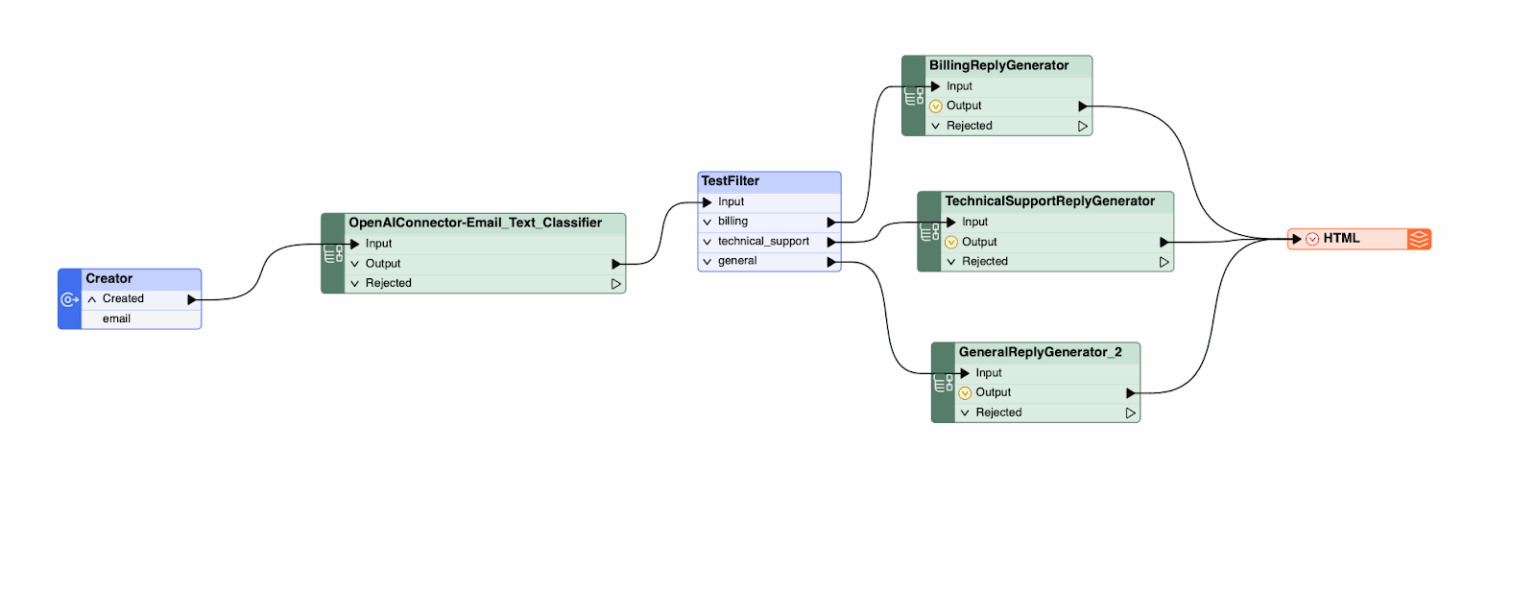
Now, let’s walk through the process teams can use to implement the agent with FME by Safe Software.
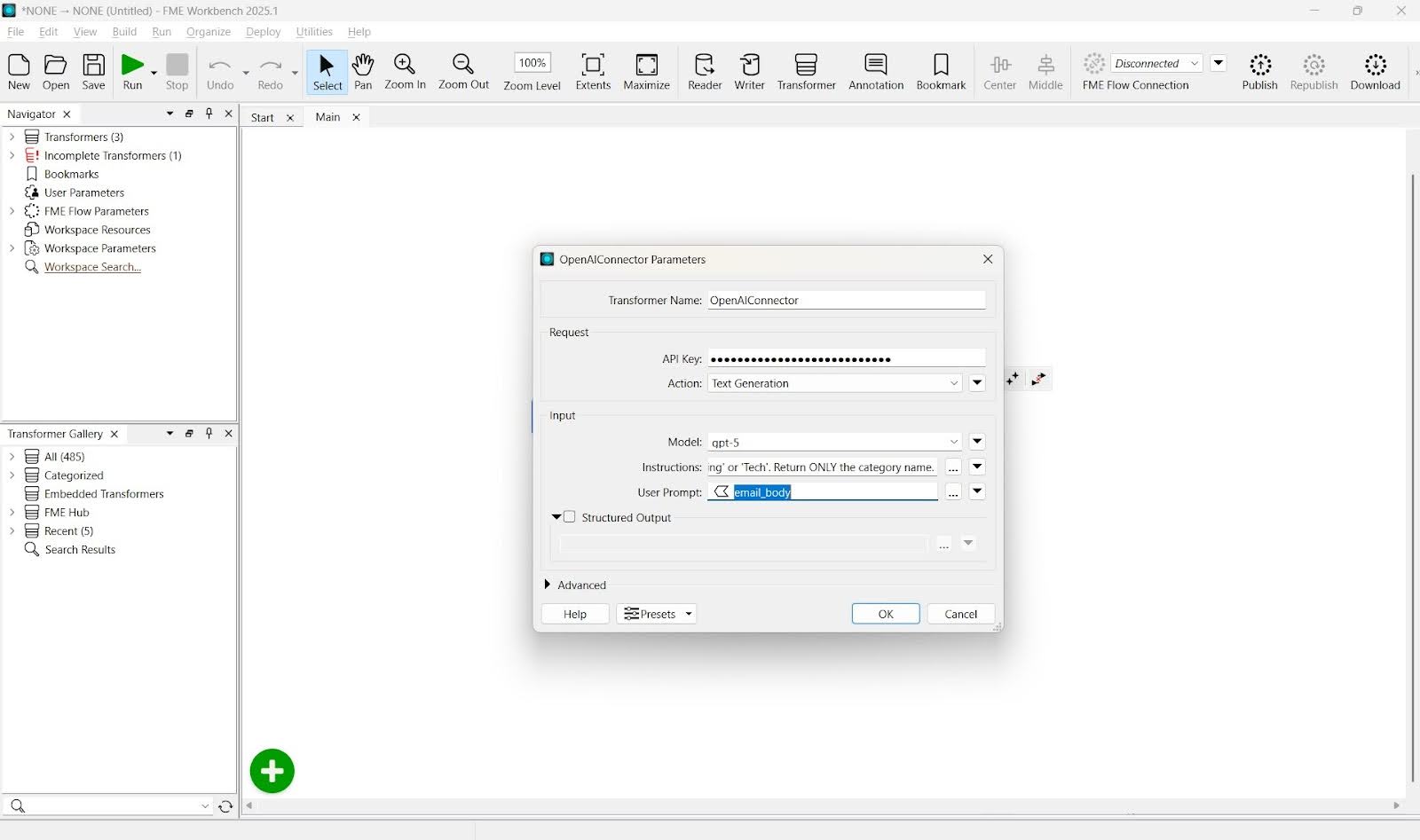
- Configure the Open AI connector: First, configure the OpenAI connector to make decisions. Give it a strict “System Prompt” that tells it to act solely as a classifier and return only the category name (like “Billing” or “Tech Support”).
- Implement routing logic: Next comes the routing logic. This will handle the branching logic using a TestFilter. Instead of writing complex if/else code, define simple rules in a table: if the AI output is “Billing,” the data moves to the Billing port; if it is “Technical Support,” it moves to the Tech port.
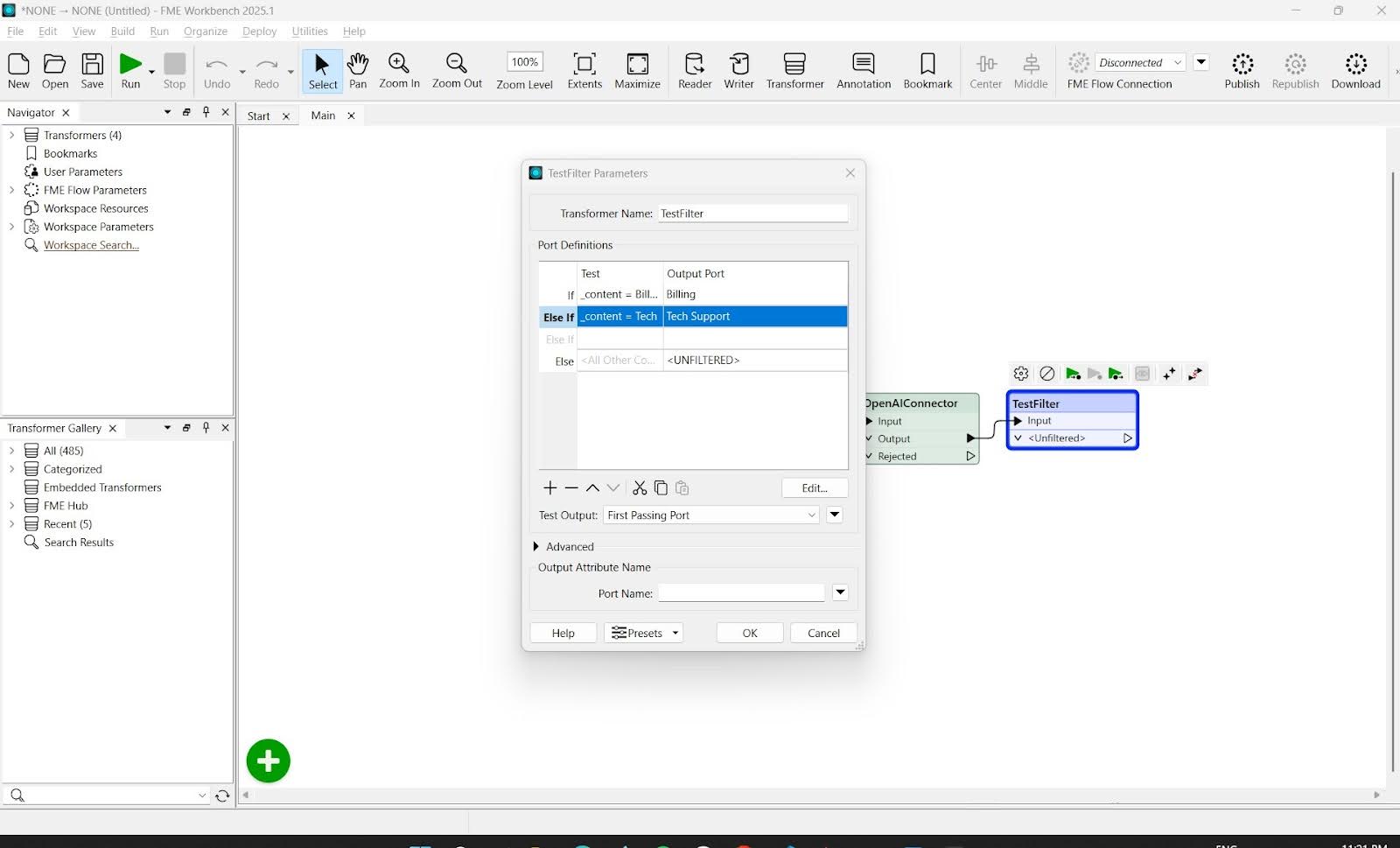
- Complete the agent orchestration: Once the data passes through the correct drafting agent, it reaches the HTML Writer. This component formats the raw text into a polished email with headers and metadata, ready for review. This workflow demonstrates how complex agent orchestration can be built and audited entirely through a visual interface.
FME Flow manages the production side and delivers automation capabilities enabling scheduled triggers, monitoring, and scalable processing.
Limitations
FME’s no-code approach limits its flexibility for advanced reasoning or non-linear control flows. The platform is effective for structured, data-heavy automation, but not for complex agent logic.
When To Choose
FME is most appropriate for organizations in the following scenarios:
- Non-developers who need to build and maintain AI workflows.
- When the primary challenge is complex data integration (connecting multiple enterprise systems).
- Geospatial, vector, or raster data processing is a core requirement.
- Enterprise data pipelines already exist in FME.
- Rapid prototyping without coding infrastructure is a priority.
FME is particularly effective in industries such as smart cities, utilities, logistics, and telecommunications, anywhere spatial data integration and connecting multiple systems are key requirements. The platform is most suitable when the main challenge is data transformation and routing, rather than complex agent reasoning.
How to choose the right tool as your LangGraph alternative
The best framework for you depends on your workflow type, technical depth, and operational needs.
The following flow shows how choosing a framework matches your project goals and level of complexity.
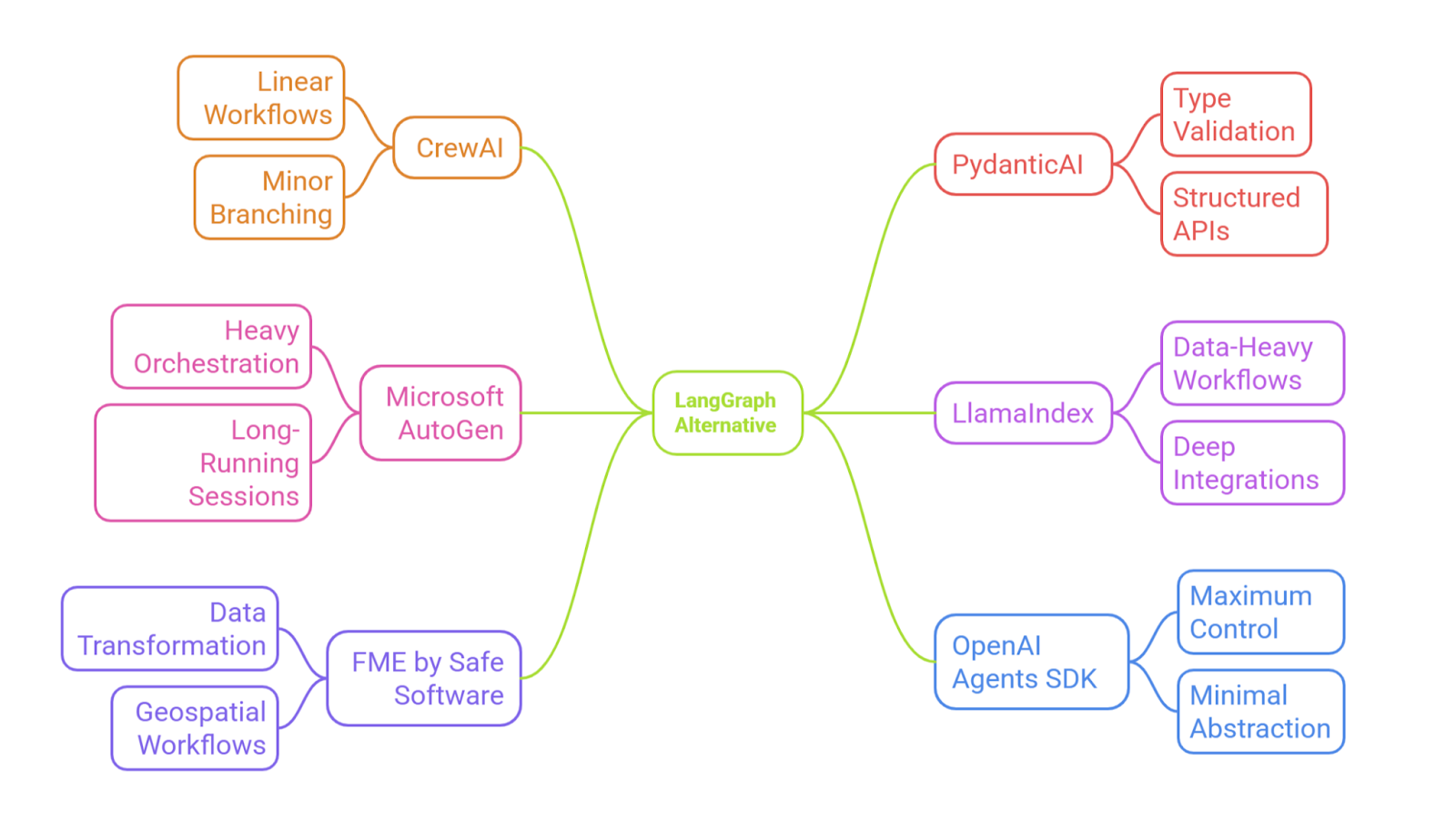
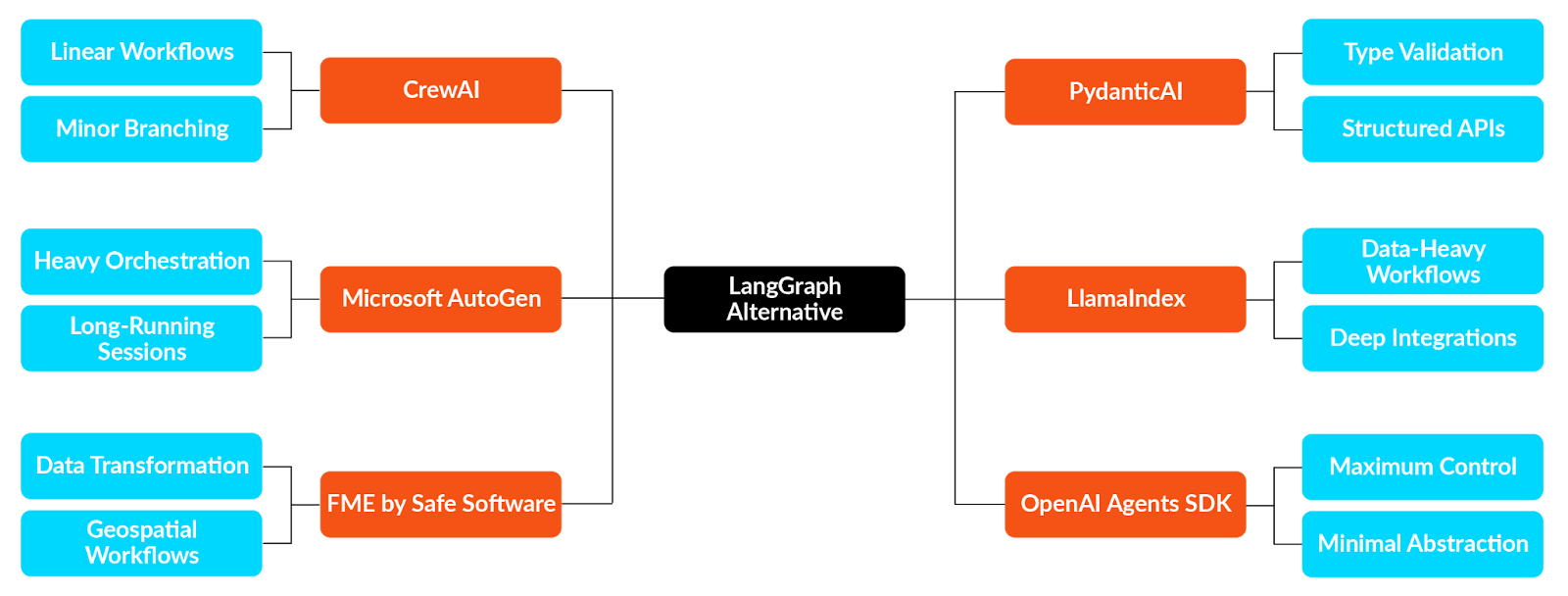
Choosing a LangGraph alternative based on use case
The optimal framework depends on specific use cases, team skills, and production requirements. The comparison below is the decision criteria and technical details to assist in selecting the appropriate framework for a project.
For example, a marketing agency building a content pipeline might use CrewAI, since its role-based structure matches their workflow, with researchers, writers, and editors working in sequence. In contrast, a pharmaceutical research team might use AutoGen, in which agents work dynamically on drug discovery; one searches the literature while another analyzes compounds, and human researchers step in at key points.
A banking app with strict compliance needs would likely choose PydanticAI for its schema validation. Meanwhile, a law firm analyzing thousands of contracts might use LlamaIndex’s RAG features for document-based responses.
The main thing is to match your workflow’s complexity, data needs, and team skills to the strengths of each framework.
| Criteria | Best For | Complexity | Learning Curve | Key Strength | Workflow Type | Example Use Case |
|---|---|---|---|---|---|---|
| CrewAI | Sequential multi-agent workflows | Medium | Gentle to moderate (clear Task/Agent patterns, minimal boilerplate) | Role-based team structure with declarative setup | Hierarchical, predictable flows | Content generation pipeline where research, writing, and editing agents collaborate sequentially |
| AutoGen | Conversational multi-agent systems | Medium-High | Moderate to steep (conversation orchestration and event-driven logic) | Event-driven design with code execution | Non-linear, exploratory processes | Drug discovery with dynamic agent collaboration and human-in-the-loop decision points |
| PydanticAI | Type-safe enterprise applications | Medium | Moderate (schema modeling and validation patterns) | Strong schema validation and type safety | Structured, deterministic APIs | Banking API with strict compliance validation and type-safe data handling |
| LlamaIndex | RAG-heavy applications | Medium | Moderate (requires understanding of data connectors and indexing flows) | Superior data integration and vector store support | Query-driven, knowledge-intensive | Legal contract analysis system processing 50,000+ documents with citation tracking |
| OpenAI Agents SDK | Production multi-agent coordination | Medium | Low–Medium (intuitive abstractions and tracing support) | Built-in tracing, guardrails, and provider-agnostic design | Flexible, scalable orchestration | Multi-tenant SaaS chatbot with observability, tracing, and client-specific guardrails |
| FME | No-code enterprise workflows | Low | Very low (drag-and-drop, visual editor) | Visual development with 450+ format support | Visual pipelines, data transformations | Smart city platform integrating traffic data, GIS maps, IoT sensors, and weather feeds |
Framework Comparison by Use Case and Technical Specifications
Conclusion
LangGraph is no doubt a powerful tool for building complex, stateful, agentic systems powered by cyclical graphs. It performs very well in scenarios where planning, tool use, and human-in-the-loop checkpoints are essential. However, as with any technology, it is not a universal solution. Other alternatives may be a better fit depending on the complexity of your project, scalability, and ecosystem requirements.
Ultimately, to build applications that are not just functional but also scalable and maintainable, the right frameworks have to be used based on your project’s goals, tech stack, and the level of complexity you can handle.
Continue reading this series
AI Agent Architecture: Tutorial & Examples
Learn the key components and architectural concepts behind AI agents, including LLMs, memory, functions, and routing, as well as best practices for implementation.
AI Agentic Workflows: Tutorial & Best Practices
Learn about the key design patterns for building AI agents and agentic workflows, and the best practices for building them using code-based frameworks and no-code platforms.
AI Agent Routing: Tutorial & Examples
Learn about the crucial role of AI agent routing in designing a scalable, extensible, and cost-effective AI system using various design patterns and best practices.
AI Agent Development: Tutorial & Best Practices
Learn about the development and significance of AI agents, using large language models to steer autonomous systems towards specific goals.
AI Agent Platform: Tutorial & Must-Have Features
Learn how AI agents, powered by LLMs, can perform tasks independently and how to choose the right platform for your needs.
AI Agent Use Cases
Learn the basics of implementing AI agents with agentic frameworks and how they revolutionize industries through autonomous decision-making and intelligent systems.
AI Agent Tools: Tutorial & Example
Learn about the capabilities and best practices for implementing tool-calling AI agents, including a Python-based LangGraph example and leveraging FME by Safe for no-code solutions.
AI Agent Examples
Learn about the core architecture and functionality of AI agents, including their key components and real-world examples, to understand how they can complete tasks autonomously.
No Code AI Agent Builder
Learn the benefits and limitations of no-code AI agent builders and how they democratize AI adoption for businesses, as well as the key components and features of these platforms.
Multi-Agent Systems: Implementation Best Practices
Learn about multi-agent systems and how they improve upon single-agent workflows in handling complex tasks with specialised roles, communication, coordination, and orchestration.
Langgraph Alternatives: The Top 6 Choices
Learn about LangGraph, a powerful yet complex orchestration framework for building intelligent systems, and its limitations, alternatives, and selection criteria.
Agentic AI vs Generative AI
Learn the differences between generative AI and agentic AI and how to choose the right AI paradigm for your needs.
Model Context Protocol Use Cases
Learn how Model Context Protocol standardizes AI agent connections to tools, data, and enterprise systems efficiently.