AI Agent Examples
An AI agent is a software abstraction that utilizes language model calls and function calls to complete a task autonomously. Unlike raw language model prompts, agents have defined goals and structured, replicable workflows to act step by step toward those goals. They can utilize tools, and they have access to long-term and short-term memory to accomplish the tasks given to them.
Agentic frameworks—whether code-based, such as CrewAI and Langgraph, or no-code and low-code, such as Safe Software FME—provide the orchestration scaffolding needed to manage context, subtasks, and tools. Without such structure, even the most intelligent language models may struggle to decompose subtasks intelligently or maintain coherent workflows.
In this article, we explore the core architecture behind AI agents and walk through real-world examples. We also demonstrate the implementation of an AI agent using a code-based framework as well as a low-code and no-code framework.
Summary of key AI agent concepts
| Concept | Description |
|---|---|
| AI agents | AI agents are goal-oriented systems that can achieve an objective based on a high-level workflow by perceiving user input and environmental factors and then planning autonomously based on these inputs. |
| AI agent examples | AI agents primarily belong to three categories: customer-facing agents, employee-facing agents, and agentic workflows. Customer-facing agents include e-commerce support agents and information-dispensing agents. Decisioning agents, HR chat agents, etc, are examples of employee-facing agents. Agentic workflows have several applications, including content generation, document parsing, and automating multi-step web workflows. |
| Architecture | AI agent architecture includes five key components: the input parser, the decisioning logic (powered by an LLM), memory systems, the tool executor, and the output generator. |
| Memory systems | Agents require memory to execute long tasks. Memory encompasses both short-term memory (conversational context) and long-term memory (knowledge bases and context-specific data). |
| Reasoning engine | A software module that equips the agent with processing capabilities for planning, decision-making, and problem-solving. |
| Input parser | Input parsing includes the logic to transform raw user or external environment input into a form understood by the LLMs. |
| Tools | API and function calls are designed to allow the agent to connect with the external world. |
| Safety and governance | A layer that filters and constrains how an AI agent behaves and usually includes human-in-the-loop and business-specific policy enforcement. |
A deeper dive into AI agents
At their core, AI agents are goal-oriented systems with a high-level workflow that can think through problems step by step, taking action when needed using the right information at the right time. The combination of these components enables agents to complete a task without human intervention. The agents’ architecture is complemented with hallucination checks and guardrails to ensure that they follow tasks predictably.
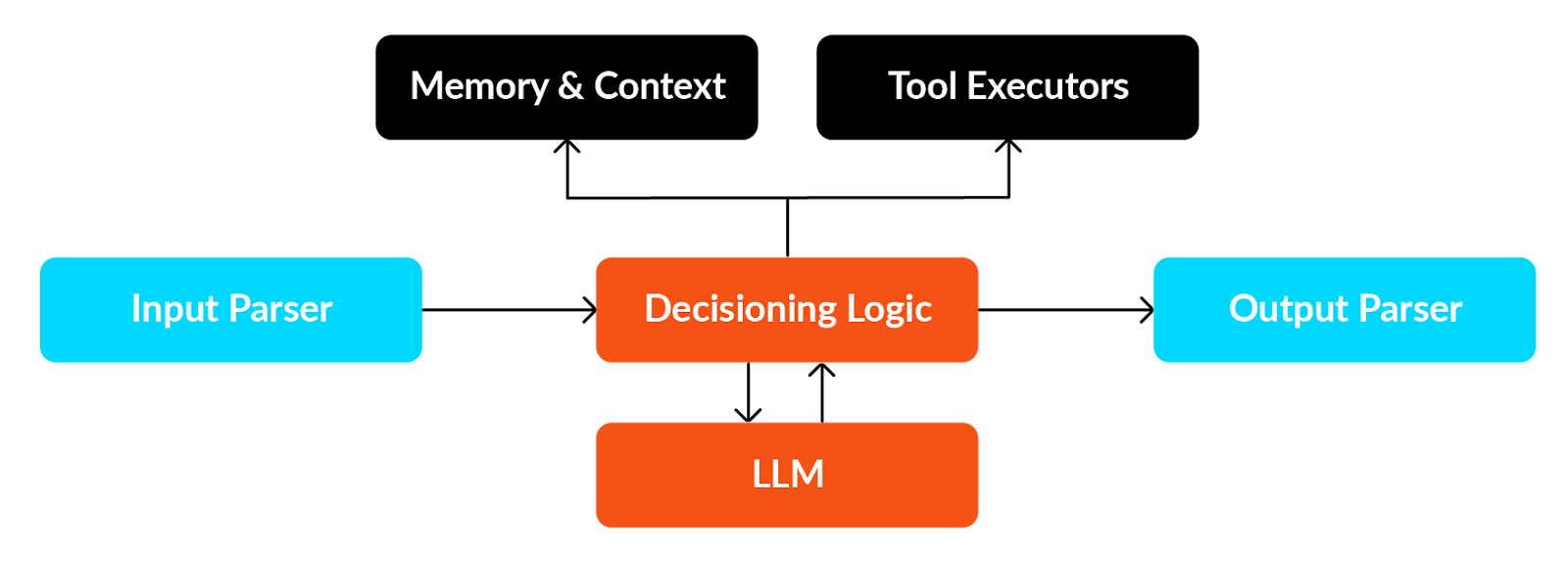
At a high level, an AI agent comprises modules for input parsing, decision-making logic, output parsing, memory management, and the LLM, which is the core of the decision-making process.
Input parser
The input parser is a translation layer between the raw input and the internal structures that an AI agent can reason with. It receives and standardizes user input, which is required for various reasons. For example, if the input is structured, the parser needs logic that can translate the structured output to a format the agent understands. If the input is unstructured, such as a PDF, then the agent may need the LLM’s help to parse it and make sense of it. Systematic input parsing is required for the following reasons:
- Reliability: It is essential to enforce consistency in a way that is compliant with the system’s guardrails.
- Composability: Standardization of input allows agents to plug into each other and communicate using a well-defined protocol for user input.
- Validation: Standardization can help the system validate user input before passing it into the execution layers.
- Debuggability: With a standardized parser, the system can log raw inputs vs. parsed input, allowing developers to catch issues quickly.
Decision logic
Think of the decision logic layer as the “if-then-else” logic running on top of reasoning. The decision logic layer is responsible for the next action that the agent will take. This layer considers the current state of context and memory, user input, and agents’ capabilities, such as tools and API responses. It also considers business logic constraints when taking the next action. The following actions typically involve an LLM call, memory update, tool call, or delegation to another agent.
Tool executor
The tool execution layer is the part of an AI agent responsible for executing actions in the external world. The reasoning engine and decision logic layer decide what the next step should be, and the tool executor is the component that translates the decisions into execution. For example, if the reasoning engine determines that it should look up the weather in London, the tool executor will call the weather API, retrieve the JSON response, possibly standardize the response depending on the system, and return it to the agent.
The tool executor also lets you connect to the external world. For example, if a system uses a language model that can’t look up live weather in London, by defining a function that calls the weather API, the agent can now use it. Additionally, when creating a large-scale system with moderately advanced business logic, it’s often necessary to use the system to make API calls to banks and external databases to fulfill the current user request.
Memory and state management
The memory and state layer is a subsystem that tracks, stores, and retrieves information throughout the agent’s lifecycle. Raw LLM calls are “stateless” if you use an API to call within your system, unless you manually keep track of the previous conversation and pass it in for context. The memory layer addresses this continuity problem by remembering what has been said, done, or decided upon previously.
State management maintains short-term context within a conversation or session and long-term context across multiple interactions. The memory layer can be expanded to include retrieval augmented generation (RAG) for persistent memory. It can keep previous conversations, system-specific data, or business-specific data in a vector database.
Output generator
The output generator is the component of an AI agent that takes the agent’s internal result, which can be raw LLM text, tool output (such as JSON), or database responses. It converts this input into a structured, standardized, user-facing response. This layer ensures that what comes out of the system is usable, coherent, and consistent. The reasoning behind having the layer is similar to that of the input processing layer: to create a reliable, composable, and guarded system.
Real-world examples of AI agents
When the task is repeatable and has minimal ambiguity, AI agents are highly effective at augmenting human workflows. Typical AI agent use cases belong to one of the three categories:
- Customer-facing agents
- Employee-facing agents
- Agentic workflows
Let’s break down each of these categories and look at an example to illustrate them.
Customer-facing agents
These are agents that are deployed on websites or mobile apps to directly respond to customer queries. In some cases, a customer-facing agent can be the product itself without a primary mobile app or website. For example, there are agents that act as counseling partners or that perform psychological evaluations. In such cases, the agent itself is the product.
Another example is the support chatbots that one can find on e-commerce websites. A customer support chatbot can be implemented to answer customer queries instantly, help with issue resolution, reduce wait times, and improve satisfaction. Instead of waiting dozens of minutes or sometimes even an hour on the phone or dealing with a delayed email from a human agent, users can interact with a chatbot 24/7. Users can ask frequently asked questions like “where is my order?” or “how can I reset my password?” and get step-by-step troubleshooting help for commonly known problems. Depending on the functionality provided to the chatbot, users can perform simple account-related actions, such as checking order status and updating contact information.
Employee-facing agents
Employee-facing agents are decision-making assistants that help employees make day-to-day decisions with the aid of AI. A simple version of one is an HR assistant chatbot designed to support employees by instantly answering their questions about company policies, personal HR data, HR FAQs, and everyday administrative tasks, reducing the need to contact the HR team directly. The chatbot acts as a virtual team member who helps employees self-serve, answer, and take action.
More complex versions of employee-facing agents have access to the organization’s data warehouse, document repositories, historical sales performance data, and all the data assets used by senior management to inform their decisions. For example, an AI agent that helps the buying team in a supermarket chain can help them answer questions like “which categories sold the most last year this season?” or “what is the optimal assortment in the cereal category for pin code 07008?” Such agents have access to very granular data points and can contribute to strategic decision-making.
Agentic workflows
Agentic workflows help automate repetitive tasks; the LLM layer provides the decision logic based on a goal that is to be achieved. Agentic workflows typically operate within a defined environment and are capable of handling changes that can happen with that environment and still achieve the goal. Typical examples of agentic workflows include content creation agents and report generation agents.
Content generation agents
A content creator agent becomes a company’s new creative force: a virtual partner embedded in the marketing team that helps generate engaging, on-brand content at scale. The agent accesses internal company data and is powered by an LLM. It assists with ideation, creation, and scheduling posts across platforms like LinkedIn, Instagram, and blogs. It can also be taught to adopt a tailor-made company-specific tone, plan weekly/monthly themes, and make suggestions.
Report builder agent
A report builder is an agent that collates data from various sources—including databases, web APIs, and web pages—to generate a report. This agent can have access to internal company data as well as external APIs and web pages. An approval workflow can be made for employees to review before sending the final report.
Implementing an AI agent
As an example, let’s build a simple version of a content creation agent in LangGraph – A popular agentic framework.
- Install the required libraries.
pip install -U langgraph
pip install openai- Define a state structure: the blueprint describing what pieces of information the agents keep track of as they run.
from typing import List, Dict,TypedDict
class ContentAgentState(TypedDict):
    topic: str
    brand_tone: str
    weekly_themes: List[Dict]
    generated_post: str
scheduled_posts: List[Dict]- Import the necessary libraries and initialize the OpenAI client. To do this, first make sure you have your OpenAI API key in your environment.
from langgraph.graph import StateGraph, END
from openai import OpenAI
from langgraph.graph import START
import json, datetime

client = OpenAI()- Create a JSON file in the same folder as your code named brand_guide.json. This JSON file will provide the agent with instructions on the correct tone to use, preferred platforms, hashtags, etc.
{
  "tone": "Friendly, witty, approachable but still professional.",
  "brand_values": ["Innovation", "Transparency", "Customer-first approach"],
  "preferred_platforms": ["LinkedIn", "Instagram", "Company Blog"],
  "hashtags": ["#GenAI", "#FutureOfWork", "#Innovation"]
}- Define the key methods that will be the nodes of your graph.
The load_brand_guide method simply reads the JSON file and updates the state, keeping the information about what tone it should use.
def load_brand_guide(state: ContentAgentState):
    with open("brand_guide.json") as f:
        brand = json.load(f)
    state["brand_tone"] = brand["tone"]
return state- The generate_themes function makes a function call to OpenAI to get the weekly themes and updates the state.
def generate_themes(state: ContentAgentState):
    prompt = f"""
    You are a content strategist with tone: {state['brand_tone']}.
    Generate 3 weekly content themes about {state['topic']}.
    Respond as JSON with keys: week, theme, post_ideas.
    Keep it short and professional!
    """
    result = client.chat.completions.create(
        model="gpt-4.1",
        messages=[{"role": "user", "content": prompt}],
    )
    state["weekly_themes"] = json.loads(result.choices[0].message.content
return state- The following three functions emulate creating and scheduling posts, and the last function simply formats and prints the output.
def create_post(state: ContentAgentState):
    first_idea = state["weekly_themes"][0]["post_ideas"][0]
    prompt = f"Write a LinkedIn post for: {first_idea}. Tone: {state['brand_tone']}"
    result = client.chat.completions.create(
        model="gpt-4.1",
        messages=[{"role": "user", "content": prompt}],
    )
    state["generated_post"] = result.choices[0].message.content
    return state

def schedule_post(state: ContentAgentState):
    state["scheduled_posts"] = [{
        "platform": "LinkedIn",
        "content": state["generated_post"],
        "scheduled_for": (datetime.datetime.now() + datetime.timedelta(days=1)).strftime("%Y-%m-%d %H:%M")
    }]
    return state

def final_output(state: ContentAgentState):
    print("\nWeekly Themes")
    print(json.dumps(state["weekly_themes"], indent=2))
    print("\nGenerated Post")
    print(state["generated_post"])
    print("\nScheduled Posts")
    print(json.dumps(state["scheduled_posts"], indent=2)
return state- Finally, let’s initialize the graph and give it a go!
workflow = StateGraph(ContentAgentState)
workflow.add_node("load_brand_guide", load_brand_guide)
workflow.add_node("generate_themes", generate_themes)
workflow.add_node("create_post", create_post)
workflow.add_node("schedule_post", schedule_post)
workflow.add_node("final_output", final_output)

workflow.add_edge(START, "load_brand_guide")
workflow.add_edge("load_brand_guide", "generate_themes")
workflow.add_edge("generate_themes", "create_post")
workflow.add_edge("create_post", "schedule_post")
workflow.add_edge("schedule_post", "final_output")
workflow.add_edge("final_output", END)

graph = workflow.compile()


initial_state: ContentAgentState = {
    "topic": "AI in Healthcare",
    "brand_tone": "",
    "weekly_themes": [],
    "generated_post": "",
    "scheduled_posts": []
}

graph.invoke(initial_state)
The code will produce the following output. Reading the output, we can see that the agent has generated a weekly content plan, including three weeks of themes with multiple post ideas for each week and a fully written social media post with a friendly, witty tone. It has also emulated scheduling a post: It has formatted the same post for LinkedIn, along with the exact scheduled date and time. The agent not only came up with ideas but also wrote a polished post and prepared it for publication, all while maintaining brand tone and staying on topic and on schedule.
Weekly Themes
[
  {
    "week": 1,
    "theme": "Demystifying AI in Healthcare",
    "post_ideas": [
      "What exactly is AI in healthcare? (Spoiler: It's not just robots with stethoscopes)",
      "Top 3 myths about AI in medicine\u2014debunked!",
      "A beginner\u2019s guide: How AI is transforming patient care today"
    ]
  },
  {
    "week": 2,
    "theme": "AI Success Stories in Healthcare",
    "post_ideas": [
      "AI vs. Disease: Real-world examples of early diagnosis wins",
      "Behind the scenes: How hospitals use AI for smoother operations",
      "Meet the doctors partnering with AI\u2014stories from the frontlines"
    ]
  },
  {
    "week": 3,
    "theme": "The Future & Ethics of AI in Healthcare",
    "post_ideas": [
      "Crystal ball time: What\u2019s next for AI in medicine?",
      "Can AI be ethical in healthcare? Let\u2019s talk boundaries and best practices",
      "The patient perspective: How does AI impact your healthcare experience?"
    ]
  }
]

Generated Post
🤖💡 What exactly is AI in healthcare? (Spoiler: It's not just robots with stethoscopes.)

When people hear "AI in healthcare," they often imagine a futuristic clinic run by android doctors. But the reality is even more exciting--and a lot more practical!

AI in healthcare is about **smart algorithms**, not just sparkling gadgets. It's the engine behind faster diagnoses, personalized treatment suggestions, epidemic predictions, and even automating those never-ending admin tasks. Think:
AI-powered imaging tools spotting anomalies a human eye might miss
Algorithms helping tailor treatments based on your unique genetics
Predictive models identifying patients at risk--before symptoms hit

No, it doesn't replace the human touch. (Let's keep our doctors and nurses, please!) But it *does* empower healthcare professionals to focus their expertise where it matters most.

So, next time you hear "AI in healthcare"--imagine less "sci-fi movie," and more "better care, fewer headaches, healthier outcomes."

Curious how AI is transforming your corner of healthcare? Let's chat below! 👇 #AI #HealthTech #DigitalHealth

Scheduled Posts
[
  {
    "platform": "LinkedIn",
    "content": "\ud83e\udd16\ud83d\udca1 What exactly is AI in healthcare? (Spoiler: It\u2019s not just robots with stethoscopes.)\n\nWhen people hear \u201cAI in healthcare,\u201d they often imagine a futuristic clinic run by android doctors. But the reality is even more exciting\u2014and a lot more practical!\n\nAI in healthcare is about **smart algorithms**, not just sparkling gadgets. It\u2019s the engine behind faster diagnoses, personalized treatment suggestions, epidemic predictions, and even automating those never-ending admin tasks. Think:  \n\ud83d\udd2c AI-powered imaging tools spotting anomalies a human eye might miss  \n\ud83e\uddec Algorithms helping tailor treatments based on your unique genetics  \n\ud83d\udcc9 Predictive models identifying patients at risk\u2014before symptoms hit\n\nNo, it doesn\u2019t replace the human touch. (Let\u2019s keep our doctors and nurses, please!) But it *does* empower healthcare professionals to focus their expertise where it matters most.\n\nSo, next time you hear \u201cAI in healthcare\u201d\u2014imagine less \u201csci-fi movie,\u201d and more \u201cbetter care, fewer headaches, healthier outcomes.\u201d\n\nCurious how AI is transforming your corner of healthcare? Let\u2019s chat below! \ud83d\udc47 #AI #HealthTech #DigitalHealth",
    "scheduled_for": "2025-09-19 03:42"
  }
]

{'topic': 'AI in Healthcare',
 'brand_tone': 'Friendly, witty, approachable but still professional.',
 'weekly_themes': [{'week': 1,
   'theme': 'Demystifying AI in Healthcare',
   'post_ideas': ["What exactly is AI in healthcare? (Spoiler: It's not just robots with stethoscopes)",
    'Top 3 myths about AI in medicine--debunked!',
    'A beginner's guide: How AI is transforming patient care today']},
  {'week': 2,
   'theme': 'AI Success Stories in Healthcare',
   'post_ideas': ['AI vs. Disease: Real-world examples of early diagnosis wins',
    'Behind the scenes: How hospitals use AI for smoother operations',
    'Meet the doctors partnering with AI--stories from the frontlines']},
  {'week': 3,
   'theme': 'The Future & Ethics of AI in Healthcare',
   'post_ideas': ['Crystal ball time: What's next for AI in medicine?',
    'Can AI be ethical in healthcare? Let's talk boundaries and best practices',
    'The patient perspective: How does AI impact your healthcare experience?']}],
 'generated_post': ' What exactly is AI in healthcare? (Spoiler: It's not just robots with stethoscopes.)\n\nWhen people hear "AI in healthcare," they often imagine a futuristic clinic run by android doctors. But the reality is even more exciting--and a lot more practical!\n\nAI in healthcare is about **smart algorithms**, not just sparkling gadgets. It's the engine behind faster diagnoses, personalized treatment suggestions, epidemic predictions, and even automating those never-ending admin tasks. Think:  \n AI-powered imaging tools spotting anomalies a human eye might miss  \n Algorithms helping tailor treatments based on your unique genetics  \n Predictive models identifying patients at risk--before symptoms hit\n\nNo, it doesn't replace the human touch. (Let's keep our doctors and nurses, please!) But it *does* empower healthcare professionals to focus their expertise where it matters most.\n\nSo, next time you hear "AI in healthcare"--imagine less "sci-fi movie," and more "better care, fewer headaches, healthier outcomes."\n\nCurious how AI is transforming your corner of healthcare? Let's chat below!  #AI #HealthTech #DigitalHealth',
 'scheduled_posts': [{'platform': 'LinkedIn',
   'content': ' What exactly is AI in healthcare? (Spoiler: It's not just robots with stethoscopes.)\n\nWhen people hear "AI in healthcare," they often imagine a futuristic clinic run by android doctors. But the reality is even more exciting--and a lot more practical!\n\nAI in healthcare is about **smart algorithms**, not just sparkling gadgets. It's the engine behind faster diagnoses, personalized treatment suggestions, epidemic predictions, and even automating those never-ending admin tasks. Think:  \n🔬 AI-powered imaging tools spotting anomalies a human eye might miss  \n Algorithms helping tailor treatments based on your unique genetics  \n Predictive models identifying patients at risk--before symptoms hit\n\nNo, it doesn't replace the human touch. (Let's keep our doctors and nurses, please!) But it *does* empower healthcare professionals to focus their expertise where it matters most.\n\nSo, next time you hear "AI in healthcare"--imagine less "sci-fi movie," and more "better care, fewer headaches, healthier outcomes."\n\nCurious how AI is transforming your corner of healthcare? Let's chat below!  #AI #HealthTech #DigitalHealth',
'scheduled_for': '2025-09-19 03:42'}]}This simulation of a content-creator agent is pretty impressive, isn’t it? Now imagine a fully production-ready agent with robust functionality: the kind of system that can consistently generate, schedule, and manage content at scale. That would be an incredible asset for any company.
Implementation using FME
Now let’s see a more straightforward implementation of the content creator agent in FME by Safe Software, which is a low-code/no-code platform that enables everyone to create agents. FME is simple because it has only three main concepts to master: readers, writers, and transformers.
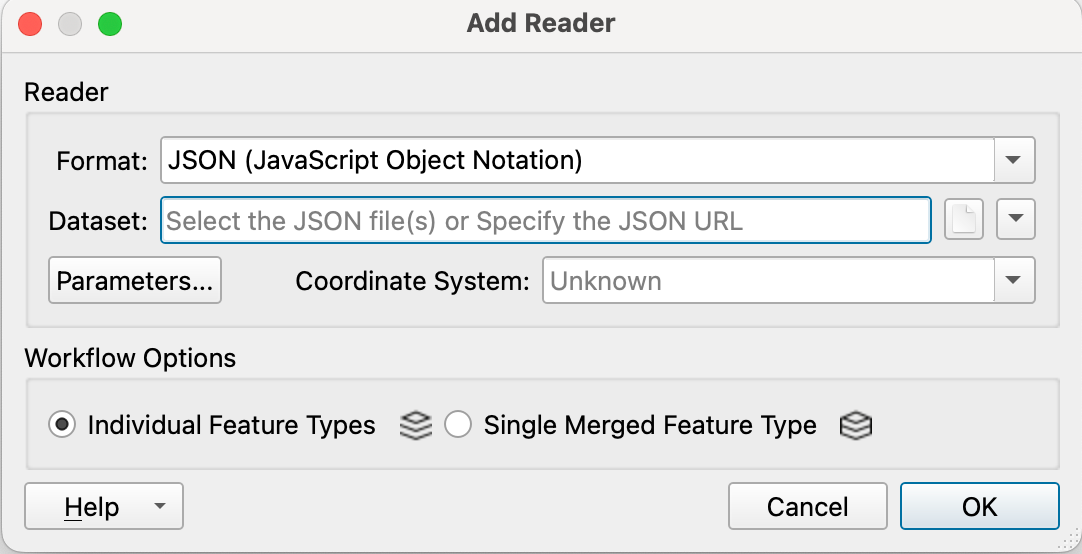
- Once you have the FME workbench ready, start by adding a reader to read brand_guide.json. In the right upper corner, you will find the button for Readers. Select the brand_guide.json file.
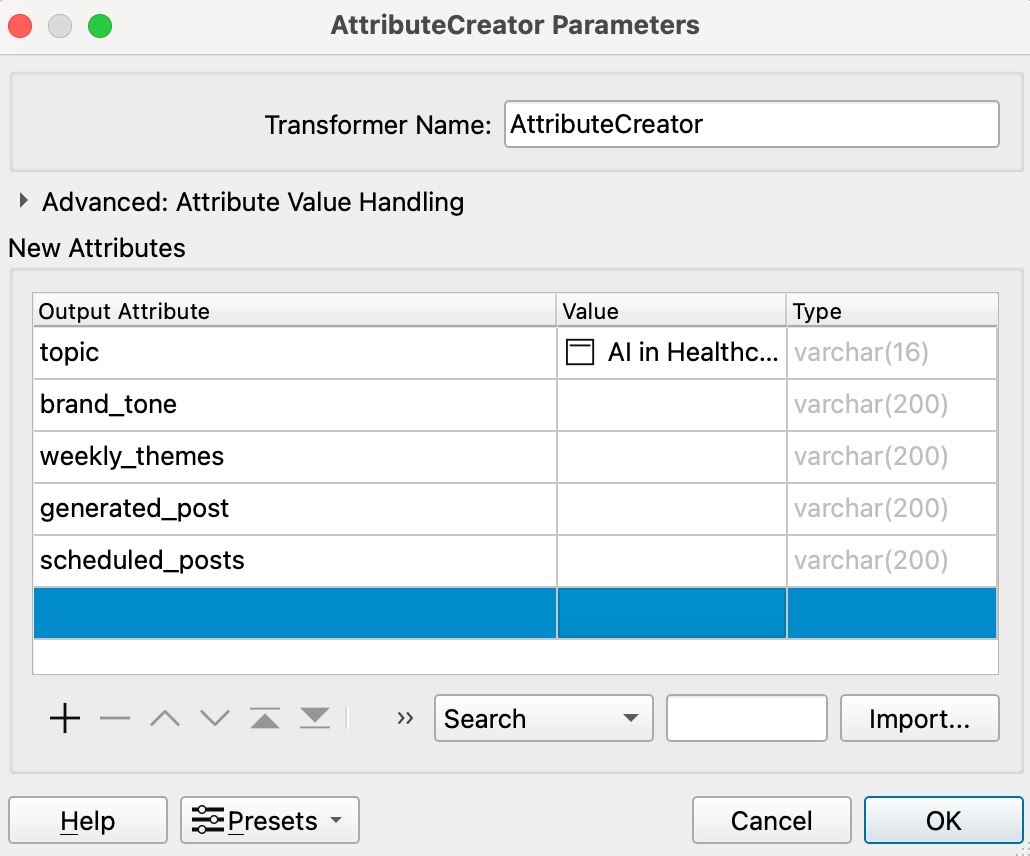
- Add an attribute creator and fill in the field for the topic with AI in healthcare. You can leave the remaining fields blank. Connect the output of JSONFeature to the input of AttributeCreator.
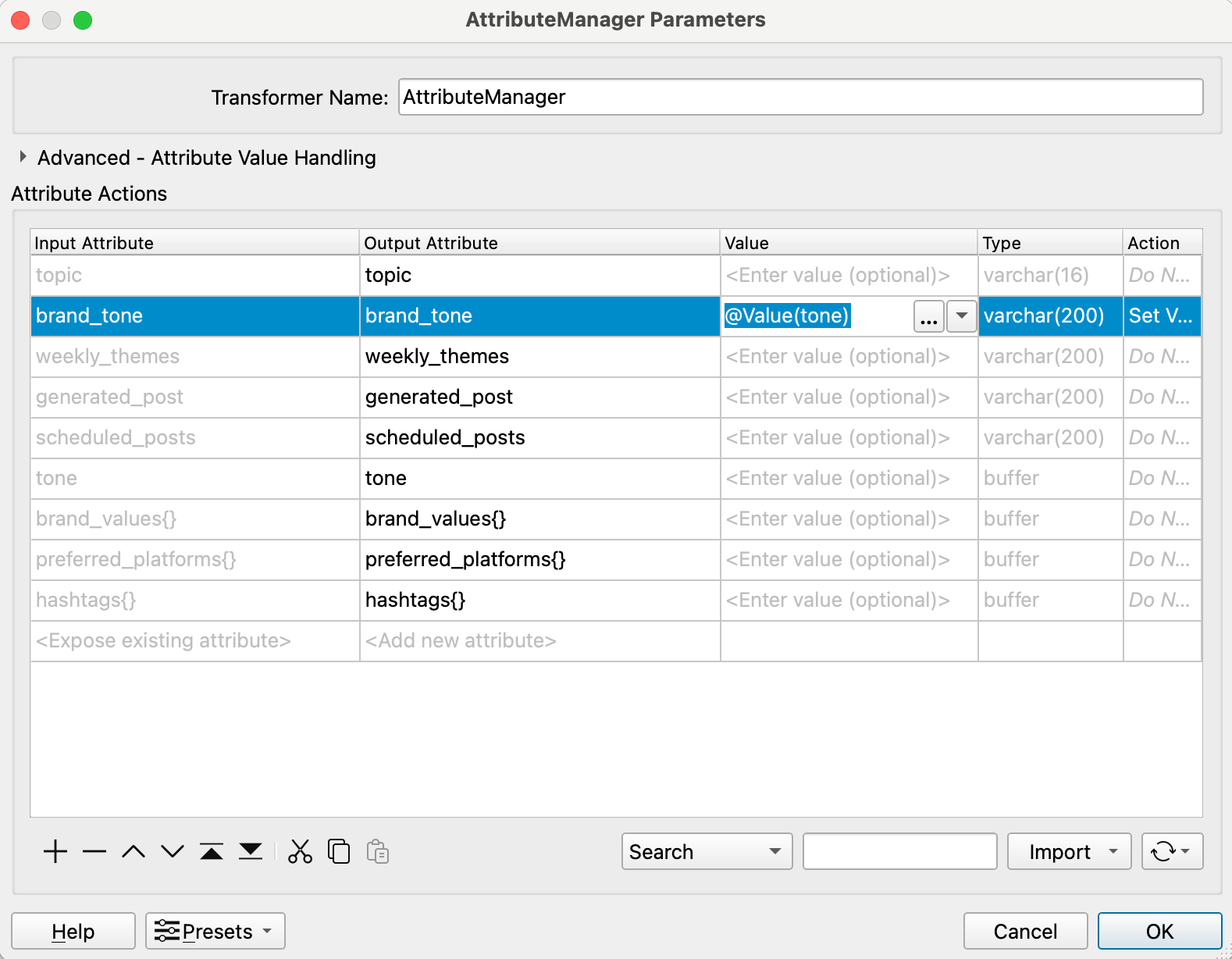
- Add an AttributeManager to allow you to alter attributes (add, rename, delete, etc). We will set the value of brand_tone to @Value(tone). Connect the output of AttributeCreator to the input of AttributeManager.
- Next, we will add OpenAIChatGPTConnector. Provide your OpenAI API key and add the following entries:
- System prompt: “You are a content strategist. Generate content themes using the provided brand tone and topic.”
- User prompt: “Generate three weekly content themes about @Value(topic) with tone: @Value(brand_tone). Respond as a JSON array with keys: week, theme, post_ideas. Each post_ideas should be an array of 3 ideas.”
Connect the output of AttributeManager to the input of OpenAIChatGPTConnector.
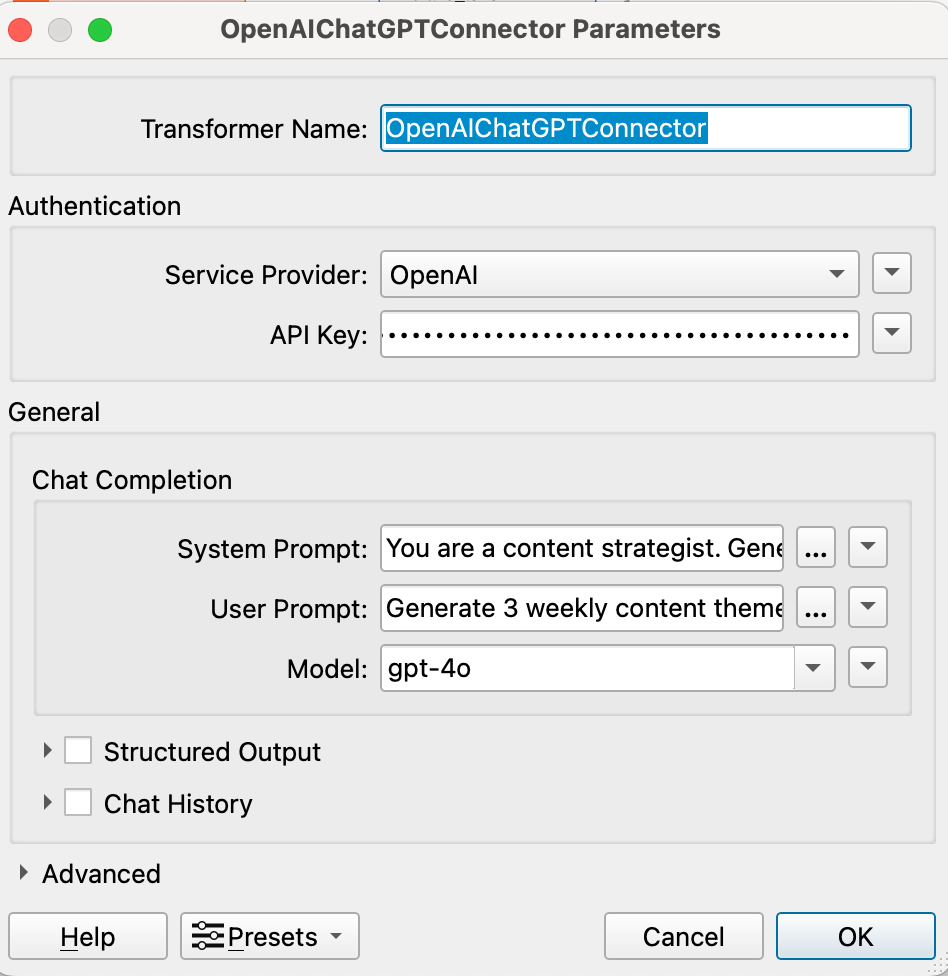
- Add another AttributeManager and set the attribute value of weekly_themes to @Value(Response). After connecting the inputs and outputs, add a JSONExtractor. Then connect the output of JSONExtractor to the logger and run it.
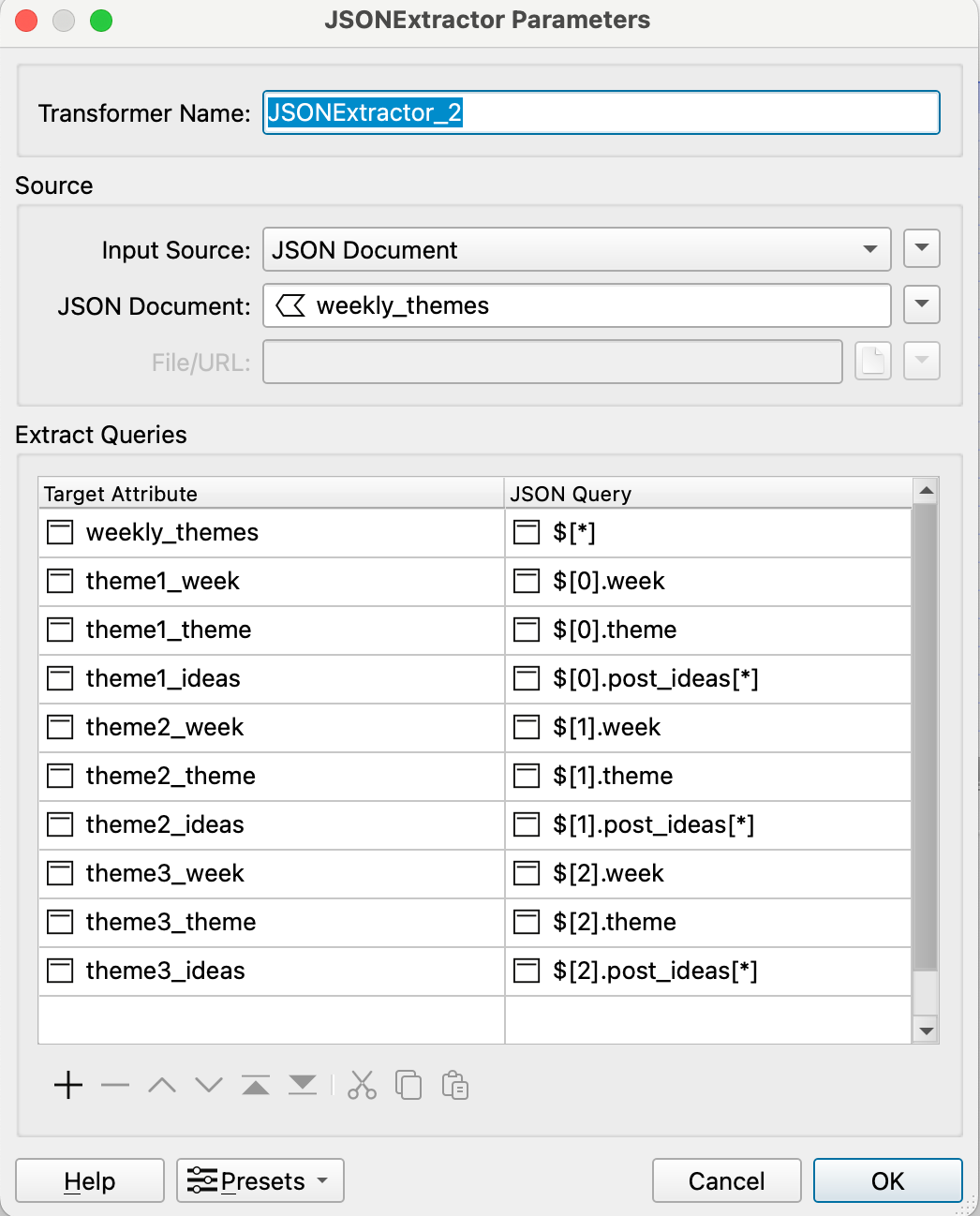
In the visual preview, you should see a row of values and columns that indicate the attributes. Double-click on response and you should see the following output.
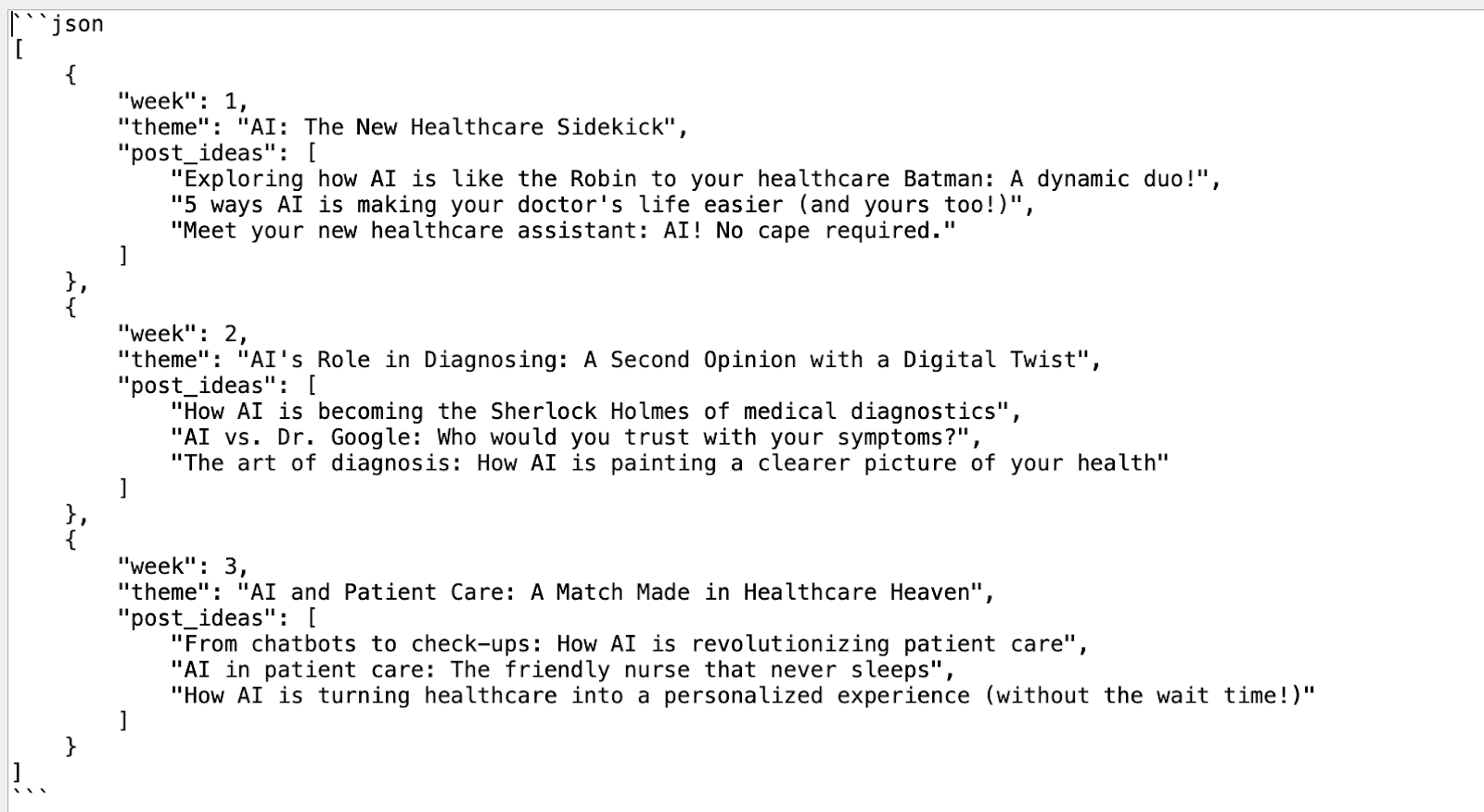
Congratulations! You have made a simplified version of the content creator agent in FME Workbench.
Best practices when implementing AI agents
Building a simple AI agent today is straightforward, thanks to the rise of low-code and no-code platforms. For a personal project or a one-off application, putting one together isn’t much of a challenge, but when the goal is to integrate agents into a larger system and run them reliably at scale, it becomes essential to follow established best practices.
Define clear task boundaries
When building AI agents, one of the biggest mistakes is assigning them overlapping tasks and vague requirements. Each agent or tool needs its own clear purpose —it might handle planning, retrieval, or user interaction—but not all of it at the same time. When responsibilities blur, the overall system becomes less maintainable, harder to debug, and more challenging to scale.
Let’s take a customer service system, for example. You might have one agent managing the conversations with customers and a completely separate agent handling shipping status through API calls to external systems. This clear definition and separation of responsibility and functionality make the entire system much easier to understand and maintain.
Use modular agent design
Modularity is a key consideration while designing AI agents. Break AI agents into separate components, such as reasoning, memory management, and tool execution, and treat each one as its own standalone module. This will make the code and logic reusable and easy to integrate with new workflows.
For example, imagine that you are building a memory management module for a customer support agent. On your next project, when you work on a report generator agent, you can reuse the same module without needing to rebuild it from scratch. If you are switching the LLM that powers the agent or switching the vector database, you would only need to make a single tweak instead of rewriting an entire part of the system.
Start with rule-based or intent-based routing
When working with multiple AI agents or complicated workflows, it’s best to keep things simple at first. Start with basic rule-based routing using keywords, intents, or straightforward if/else logic to decide which agent handles what. This approach will start you off with something solid and easy to work with.
Once the overall strategy is going well, you can add some intelligence to the system. For example, you can add a planner agent that actually takes into account which sub-agent to call based on the question. The idea here is that rules come first, reasoning second. Designing in this way not only makes the system comprehensible and debuggable early on, but it also leaves you with an anchor to extend it as intelligent and autonomous in the future.
Establish a fallback path
No AI system is bulletproof; the system needs a plan for when things go wrong, it faces unexpected inputs, or API calls fail. A default fallback path can be as simple as a default response like “I’m not sure about that; a human agent will contact you soon,” a retry loop, or just logging the problem so a person can take a look at it later.
The point is graceful degradation. You need to identify where the system is failing, but users shouldn’t have to deal with it. In enterprise environments, this is critical: Fallbacks keep the customers from losing trust, especially when dealing with regulated industries or high-stakes interactions.
Prioritize observability and continuous improvement
Having the ability to observe the agents involved in the sequence of decision-making is very important when debugging issues. An ideal observability system for agents logs the inputs it receives, the prompts it uses, and the autonomous decisions it makes, as well as the outputs it filters out and the user’s feedback. It also must log latency and memory usage at every stage of the agent’s work.
Last thoughts
It is no longer necessary to have a degree in computer science to create an AI agent. However, designing an agent that is stable, scalable, and maintainable requires intent and an educated mind. Developers can rapidly prototype on low-code/no-code platforms like FME and maintain code-level control for production pipelines. Business requirements, time, and availability of resources should drive the choice of the framework. FME by Safe Software is a suitable alternative for a no-code, production-grade data integration system, offering built-in capabilities for implementing agile workflows.
The objective is not merely to get agents “working.” The real challenge is building systems that stakeholders trust, that can change without disrupting existing behavior, and that evolve as the business expands. That’s what differentiates proof-of-concept demos from systems that deliver long-term value.
Continue reading this series
AI Agent Architecture: Tutorial & Examples
Learn the key components and architectural concepts behind AI agents, including LLMs, memory, functions, and routing, as well as best practices for implementation.
AI Agentic Workflows: Tutorial & Best Practices
Learn about the key design patterns for building AI agents and agentic workflows, and the best practices for building them using code-based frameworks and no-code platforms.
AI Agent Routing: Tutorial & Examples
Learn about the crucial role of AI agent routing in designing a scalable, extensible, and cost-effective AI system using various design patterns and best practices.
AI Agent Development: Tutorial & Best Practices
Learn about the development and significance of AI agents, using large language models to steer autonomous systems towards specific goals.
AI Agent Platform: Tutorial & Must-Have Features
Learn how AI agents, powered by LLMs, can perform tasks independently and how to choose the right platform for your needs.
AI Agent Use Cases
Learn the basics of implementing AI agents with agentic frameworks and how they revolutionize industries through autonomous decision-making and intelligent systems.
AI Agent Tools: Tutorial & Example
Learn about the capabilities and best practices for implementing tool-calling AI agents, including a Python-based LangGraph example and leveraging FME by Safe for no-code solutions.
AI Agent Examples
Learn about the core architecture and functionality of AI agents, including their key components and real-world examples, to understand how they can complete tasks autonomously.
No Code AI Agent Builder
Learn the benefits and limitations of no-code AI agent builders and how they democratize AI adoption for businesses, as well as the key components and features of these platforms.
Multi-Agent Systems: Implementation Best Practices
Learn about multi-agent systems and how they improve upon single-agent workflows in handling complex tasks with specialised roles, communication, coordination, and orchestration.
Langgraph Alternatives: The Top 6 Choices
Learn about LangGraph, a powerful yet complex orchestration framework for building intelligent systems, and its limitations, alternatives, and selection criteria.
Agentic AI vs Generative AI
Learn the differences between generative AI and agentic AI and how to choose the right AI paradigm for your needs.
Model Context Protocol Use Cases
Learn how Model Context Protocol standardizes AI agent connections to tools, data, and enterprise systems efficiently.