
I started using a Fitbit in 2015. Over time, it became part of my daily routine, tracking step counts, floors climbed, resting heart rate, and more. I replaced the device a few times over the years, but the data remained consistent. Until recently, I had accumulated more than a decade of personal wearable data that I relied on to understand my long-term health trends.
When my Fitbit device failed unexpectedly in January of 2026, I was faced with the decision to either replace it with another Fitbit or finally switch to an Apple Watch, the last device I had not yet adopted in the Apple ecosystem. The hesitation I experienced was not about the hardware itself, but rather the data. There’s always the risk that your historical records won’t migrate successfully.
This is a concern many wearable users share. Long-term data is often the main reason people delay switching devices, even when other options are available.
Exploring options for data migration
When I began exploring how to migrate the data, I approached the problem the same way I approach unfamiliar workflows in my day-to-day work. Naturally, having used FME for nearly 20 years, both professionally and on personal projects, it was the first tool that came to mind.
To begin this process, I consulted ChatGPT and Gemini to understand the available options. While migration was technically possible, the commonly recommended approaches relied on paid services or API-based transfers that could take weeks to complete for large datasets. With over ten years of data involved, that was not an efficient solution.
Instead, I explored a self-service approach.
Using Google Takeout, I requested a full export of my Fitbit data. The archive contained roughly 24,000 files, mostly CSV and JSON, and went far beyond simple step counts. Over the years, Fitbit and Google had collected minute-by-minute statistics covering GPS and altitude, sleep patterns, sedentary periods, activity intensity, oxygen variation, and even atrial fibrillation indicators.
Some files were empty, such as sleep data, since I never wear a device at night, but the overall dataset was incredibly detailed. The challenge was no longer accessing the data, but deciding what to keep and how to prepare it in a format Apple Health could understand.
Processing wearable data with FME
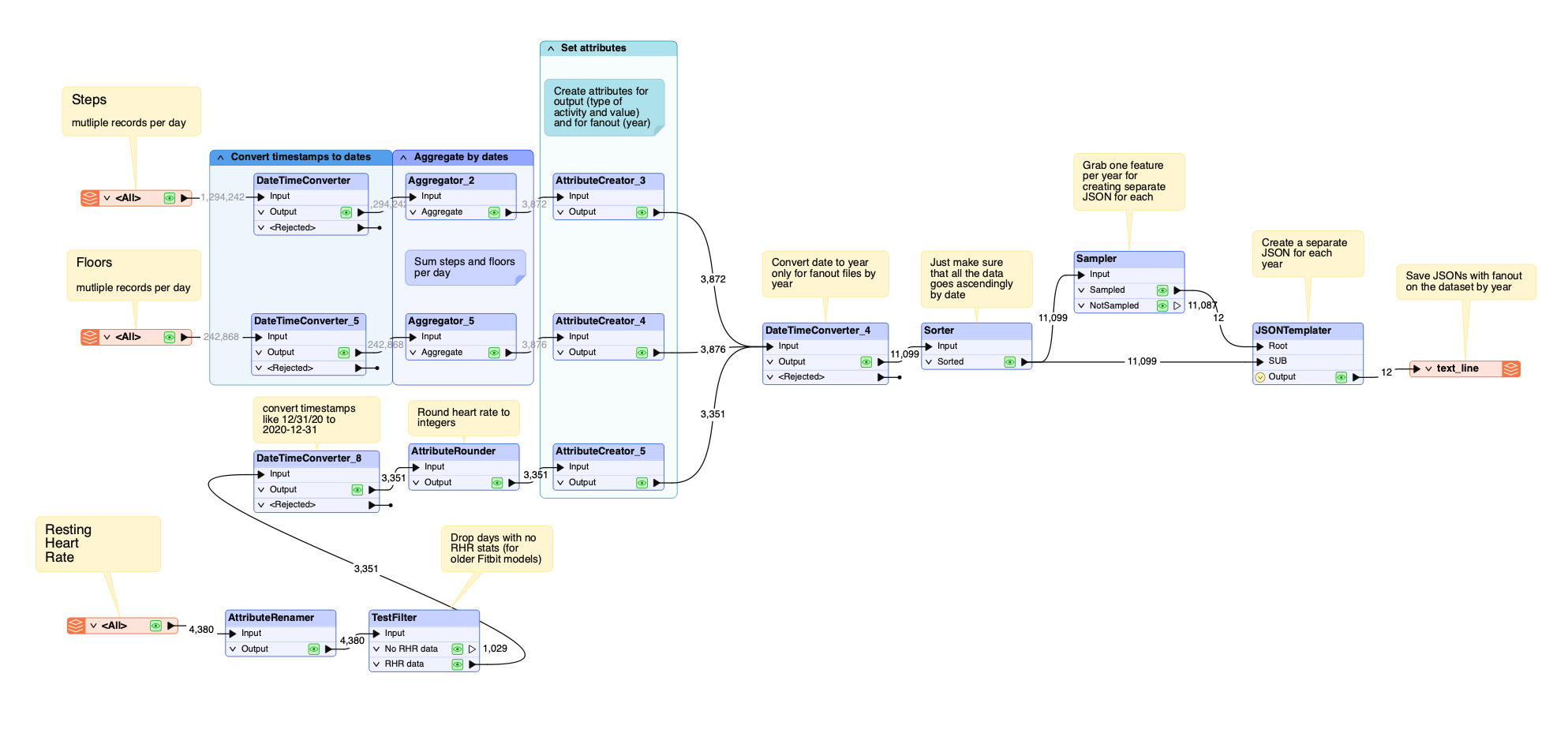
I used FME to process and transform the Fitbit data into a format compatible with Apple Health. The workspace was designed to handle multiple data types, including CSV and JSON files, and focused on the three metrics I cared about most: step counts, floors, and resting heart rate.
Key steps in the workflow included:
- Reading and normalizing data from different file formats
- Converting timestamps into a consistent structure
- Aggregating granular records into daily summaries
- Formatting the output using the JSON Templater
One important decision was to output the data as separate JSON files by year. This was done to accommodate Apple Shortcuts, which can struggle with very large data files. The FME portion of the process took less than an hour. The longest delay was waiting for the Fitbit archive to be generated and downloaded.
To import the transformed data into Apple Health, I used Apple Shortcuts on an iPad. While I was familiar with the concept, I was not experienced with building complex Shortcuts workflows. I used Gemini to generate the automation script that reads the yearly JSON files and loads them into Apple Health.
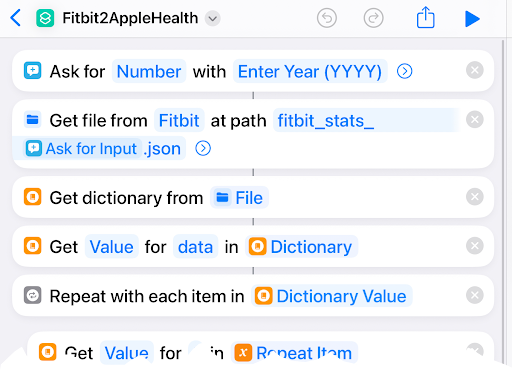
Following this approach, the data was imported successfully. Once complete, Apple Health displayed my step counts, floor data, and a history of my resting heart rate going back to 2015. From a user perspective, the transition was quite seamless.
If you’d like to follow the exact step-by-step process, I’ve created a detailed tutorial outlining the full workflow, including the FME workspace and Apple Shortcuts setup:
Tutorial: How to Migrate Fitbit Data to Apple Health Using FME
https://support.safe.com/hc/en-us/articles/43859714941197-Tutorial-How-to-Migrate-Fitbit-Data-to-Apple-Health-using-FME
Visualizing personal data
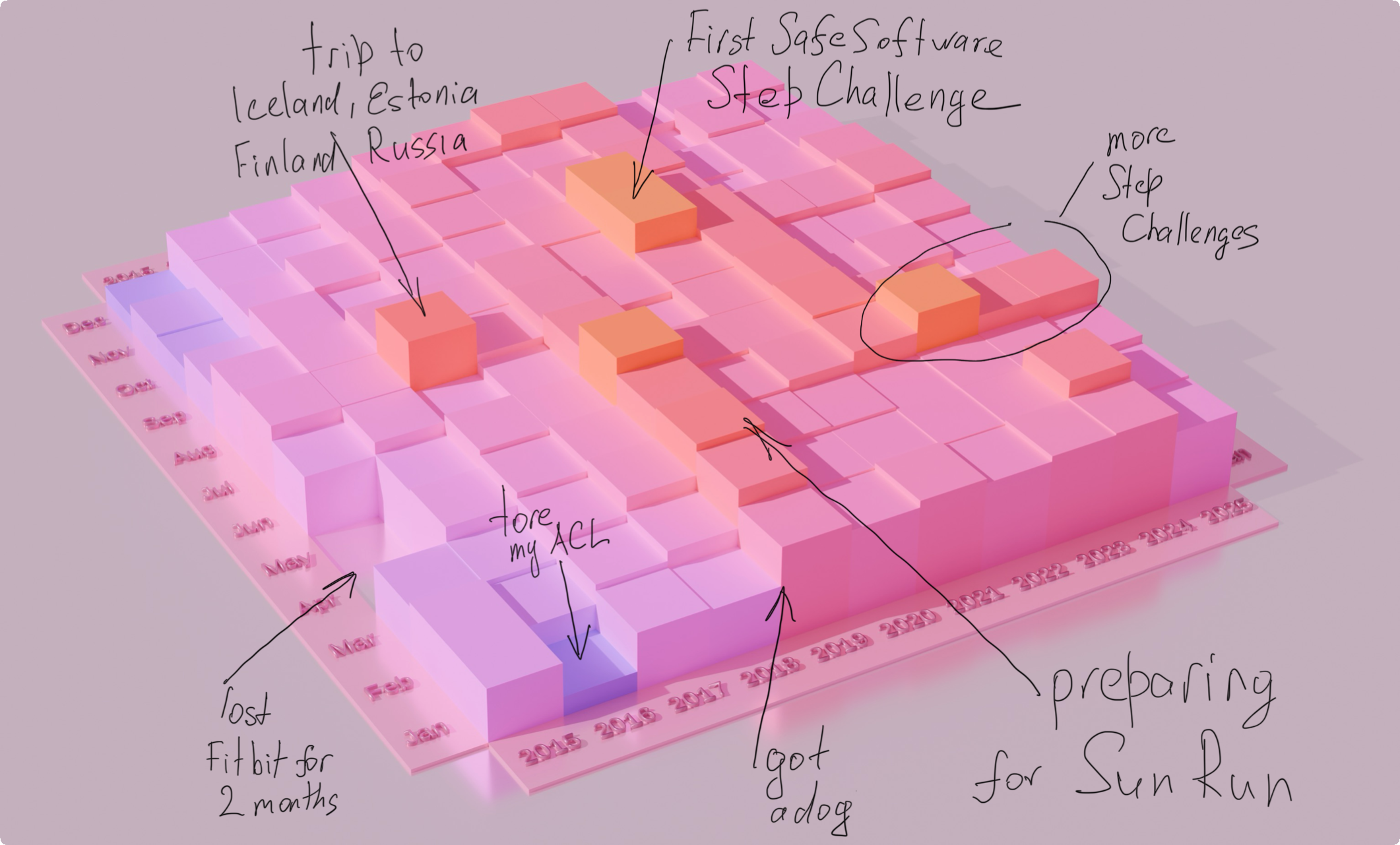
After completing the migration, I used FME to create a visualization of my step data. Patterns were immediately visible. Periods of high activity aligned with travel and step challenges. Sharp declines corresponded with injuries. The visualization made long-term trends easy to interpret and gave additional meaning to data that would otherwise remain abstract.
It represents my life. It is a personal timeline built from years of daily activity.
FME beyond enterprise workflows
The successful integration showed that large personal wearable datasets can be migrated efficiently with the right tooling. This has relevance beyond a single device change. Many people hesitate to adopt new wearable technology because they assume their historical data is locked into one platform.
This project demonstrated that this does not have to be the case. It highlights how self-service data tools can empower individuals to take control of their own data, even when working with long-term histories. While this workflow relied on familiarity with FME, the overall approach is repeatable. For those without development experience, visual tools can provide a practical alternative to writing custom scripts.
I hope this encourages other FME users to think more creatively about how they apply the platform, and to explore personal use cases alongside enterprise workflows.
Feeling inspired? Book a demo.